
What Is Document AI? Complete 2026 Guide
Document AI uses artificial intelligence to automatically classify, extract, and process information from documents — PDFs, scanned images, forms, contracts, invoices, and clinical records. This guide explains how it works, the technology stack, and enterprise applications.
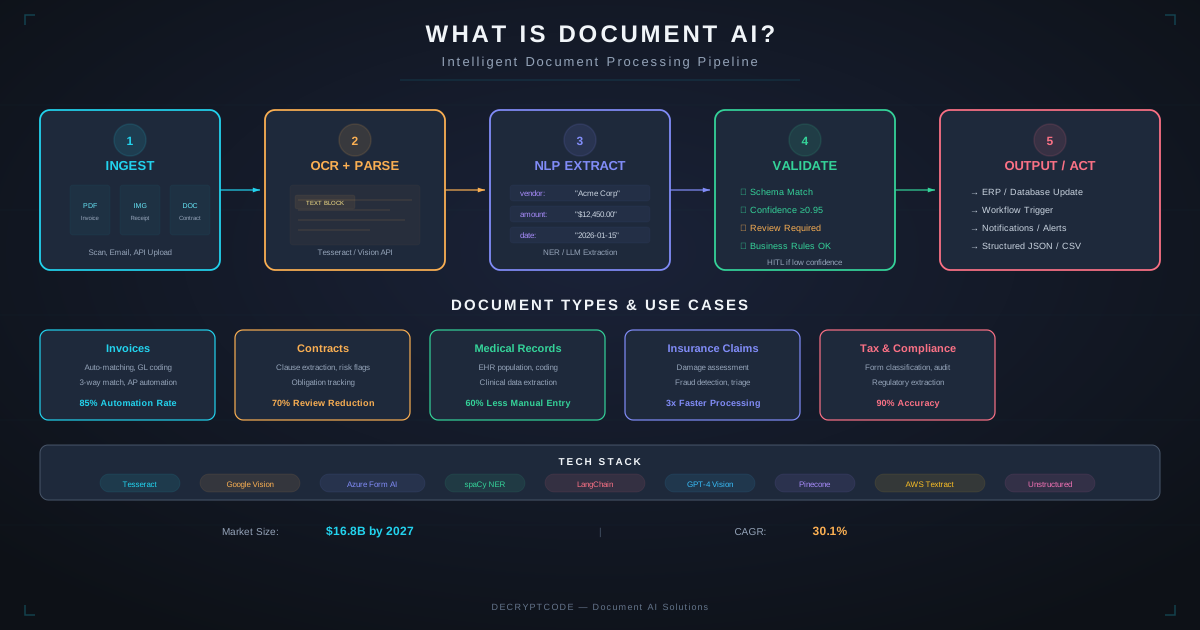
Key Takeaways
- Document AI goes beyond OCR — it classifies, extracts, validates, and routes documents into workflows
- Modern Document AI combines layout models (LayoutLM v3), vision models, and LLMs for 90-98% accuracy
- Key enterprise use cases: invoice processing, contract review, claims handling, patient intake, compliance
- LLMs have transformed Document AI — Claude and GPT-4 Vision handle many extraction tasks zero-shot
- ROI is immediate: 60-90% reduction in manual document processing time
What Is Document AI
Document AI is the application of artificial intelligence to understand and process documents the way humans do — but at machine speed and scale. It goes far beyond reading text. Document AI:
- Classifies: Identifies document type (invoice, contract, form, letter, ID document) from content and layout
- Extracts: Pulls specific fields — dates, amounts, names, addresses, line items, clauses — understanding context
- Validates: Cross-references extracted data against business rules, databases, and other documents
- Transforms: Converts unstructured documents into structured data for downstream systems
- Routes: Directs documents to appropriate workflows, teams, or systems based on content
Example: A healthcare organization receives thousands of patient intake forms daily. Document AI classifies each form type, extracts patient demographics, insurance details, and medical history, validates insurance eligibility, and populates the EHR — reducing a 15-minute manual process to seconds.
Document AI vs. OCR
| Capability | OCR | Document AI |
|---|---|---|
| Text recognition | Yes | Yes (better quality) |
| Layout understanding | No | Yes — headers, tables, sections |
| Document classification | No | Yes — auto-detect type |
| Field extraction | No (text only) | Yes — named fields with context |
| Table extraction | Basic | Advanced — complex tables, merged cells |
| Validation | No | Yes — business rules, cross-reference |
| Multiple languages | Limited | Broad (50+ languages) |
| Handwriting | Poor | Good (85-92% accuracy) |
OCR is one component of Document AI — the text recognition layer. Document AI layers understanding, extraction, and intelligence on top.
Technology Stack
Modern Document AI combines multiple AI technologies:
OCR Layer
Converts document images to text with position information. Tesseract (open source), Google Vision API, Amazon Textract, Azure Form Recognizer. Modern systems use transformer-based OCR (TrOCR) for better accuracy.
Layout Analysis
Understands document structure — headings, paragraphs, tables, figures, captions. Models like LayoutLM v3 and Donut combine text and visual features to understand spatial relationships. Critical for table extraction and form field mapping.
Vision Models
Process document images directly. GPT-4 Vision, Claude (with image input), and specialized document vision models can extract information from documents without separate OCR — understanding the image holistically.
LLMs for Extraction
Large language models have transformed Document AI. Claude and GPT-4 can extract structured data from documents with simple prompts — no training required for many document types. This dramatically reduces development time for new document types.
Classification Models
Document type classification using text + layout features. Fine-tuned models for domain-specific classification (50+ document types in financial services, 30+ in healthcare).
Processing Pipeline
A production document ingestion pipeline:
- Ingestion: Documents arrive via email, upload, API, scanner, or file drop. Format detection and normalization.
- Pre-processing: Image enhancement (deskew, denoise, contrast). PDF rendering. Page splitting for multi-page documents.
- Classification: AI identifies document type. Routes to appropriate extraction model/prompt.
- OCR + Layout: Text extraction with position coordinates. Table detection and structure recognition.
- Field Extraction: Named field extraction using layout model or LLM. Understanding context: "Date" could be invoice date, due date, or ship date.
- Validation: Business rules (is the total correct?), format checks (valid dates, phone numbers), cross-reference (does this customer exist?).
- Human Review: Low-confidence extractions routed to humans for verification. Feedback improves future accuracy.
- Output: Structured JSON/XML delivered to downstream systems via API or database insert.
Enterprise Use Cases
Invoice Processing
Extract vendor, dates, line items, totals, tax, payment terms. Match against POs and contracts. Route for approval. 80-95% straight-through processing (no human touch).
Contract Analysis
Extract key clauses (termination, liability, SLA, pricing), identify obligations, flag non-standard terms, compare against templates. See our contract analysis case study.
Healthcare Intake
Patient registration forms, insurance cards, referral documents. Extract demographics, insurance details, medical history. Populate EHR systems. See our EHR onboarding case study.
Insurance Claims
FNOL documents, damage photos, police reports, medical bills. Classify document types, extract claim details, assess damage from images.
Compliance & KYC
ID verification, proof of address, financial statements. Extract and verify identity documents. Cross-reference against watchlists.
Loan Processing
Income verification (W-2s, pay stubs, tax returns), bank statements, property documents. Extract financial data, calculate DTI, verify income. 60-80% reduction in processing time.
Accuracy & Validation
| Document Type | Field Accuracy | Notes |
|---|---|---|
| Digital forms (clean) | 95-98% | Highest accuracy — structured, typed text |
| Typed documents | 92-96% | Standard layouts, variable formatting |
| Complex tables | 88-95% | Depends on table complexity, merged cells |
| Handwritten forms | 85-92% | Improving rapidly with transformer-based models |
| Mixed doc (typed + handwritten) | 87-93% | Common in healthcare and insurance |
Improving Accuracy
- Domain-specific training: Fine-tune on your actual document types for 5-10% accuracy improvement
- Ensemble methods: Run multiple extraction models, use voting or confidence-based selection
- Validation rules: Business logic catches extraction errors (totals must sum, dates must be valid)
- Human-in-the-loop: Route low-confidence extractions for human verification, use feedback for retraining
Platform Comparison
| Platform | Best For | Key Strength |
|---|---|---|
| AWS Textract | AWS-native, forms & tables | Built-in table/form extraction, lending AI |
| Azure Document Intelligence | Azure-native, pre-built models | Strong pre-built models, custom training |
| Google Document AI | GCP-native, specialized processors | Industry-specific processors (lending, procurement) |
| LLM-based (Claude/GPT-4V) | Rapid prototyping, diverse docs | Zero-shot extraction, no training needed |
| Custom (LayoutLM + LLM) | Maximum accuracy, proprietary docs | Full control, domain-specific optimization |
Getting Started
- Audit: Inventory your document types, volumes, and current processing costs. Identify highest-volume, highest-cost documents.
- POC: Start with one document type. Test LLM-based extraction first (fastest to validate). Measure accuracy against manual baseline.
- Build: Production pipeline with ingestion, processing, validation, and human review. See our pipeline architecture guide.
- Expand: Add document types incrementally. Each new type benefits from shared infrastructure.
Explore our Document AI solutions or contact our team.
Frequently Asked Questions
What is Document AI?
Document AI uses artificial intelligence to classify, extract, validate, and process information from documents — PDFs, images, scanned files, forms. It combines OCR, layout analysis, NLP, and LLMs.
How accurate is Document AI?
90-98% field-level accuracy depending on document type. Clean digital forms: 95-98%. Handwritten: 85-92%. Accuracy improves with domain-specific training and human-in-the-loop validation.
How is Document AI different from OCR?
OCR reads characters from images. Document AI understands structure, classifies document types, extracts named fields with context, validates data, and routes documents into workflows. OCR is one component of Document AI.
Automate Document Processing
From invoices to clinical records — AI-powered document processing that saves time and reduces errors.
Start a Project