
Field Note · Architecture
AI Document Ingestion Pipeline: Architecture Guide
The ingestion pipeline is where RAG systems succeed or fail. This guide covers parsing 50+ document formats, intelligent chunking strategies, metadata extraction, embedding pipelines, and production orchestration patterns.
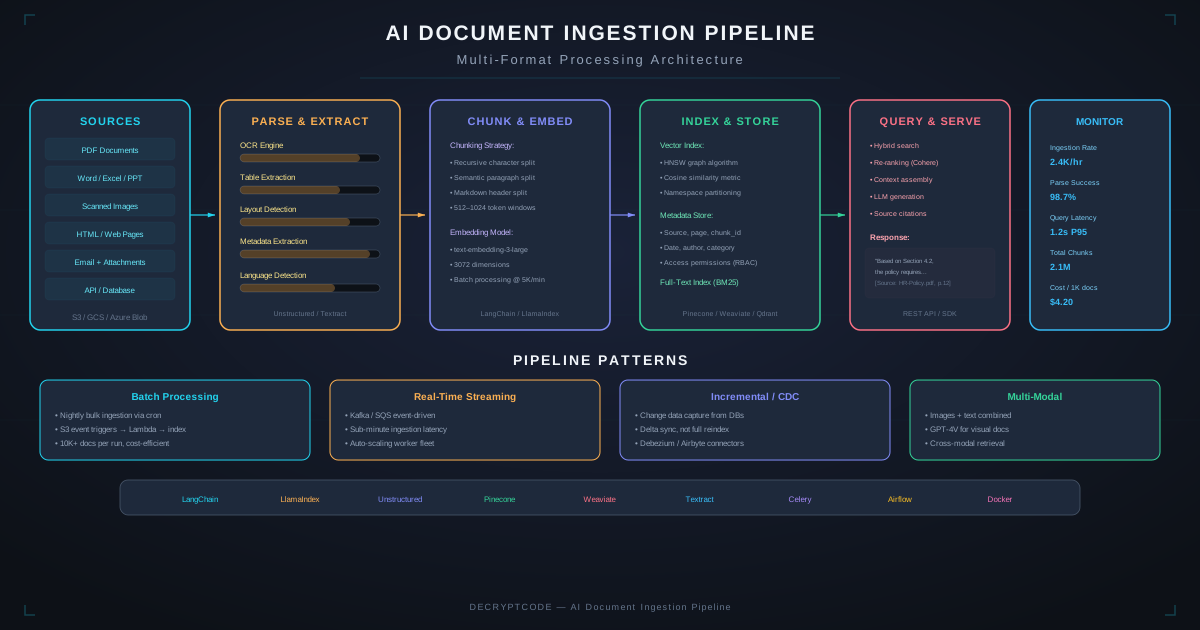
Pipeline Architecture Overview
A production document ingestion pipeline has six stages:
- Source Monitoring: Watch document sources for changes (new files, updates, deletions)
- Parsing: Extract text, tables, images, and structure from raw documents
- Chunking: Split parsed content into retrieval-optimized chunks
- Metadata Enrichment: Tag chunks with source, date, permissions, and classification
- Embedding: Convert text chunks to vector representations
- Indexing: Store vectors and metadata in the vector database
Each stage is independent and connected via message queues. This decoupled architecture enables independent scaling, retry handling, and monitoring per stage. Our Document AI services implement these patterns for enterprise clients.
Source Connectors
Enterprise documents live everywhere. Common sources and connection patterns:
- Cloud storage (S3, GCS, Azure Blob): Event-driven via bucket notifications. S3 Event → SQS → ingestion worker.
- SharePoint / OneDrive: Microsoft Graph API webhooks for real-time changes. Delta queries for incremental sync.
- Confluence / Notion: REST API polling (webhooks limited). Sync every 15-60 minutes using last-modified timestamps.
- Email archives (Exchange, Gmail): IMAP/MAPI integration or dedicated connectors. Filter by sender, subject, folder.
- Databases: Change Data Capture (CDC) via Debezium or database triggers. Stream row changes to ingestion pipeline.
- Web scraping: Scheduled crawls with configurable depth and domain restrictions. Respect robots.txt.
Change Detection
Track document versions using content hashing (SHA-256). Compare hash on each sync cycle — only re-process changed documents. Store hash, last-processed timestamp, and version number in a metadata database. This avoids reprocessing unchanged documents and keeps the index fresh.
Document Parsing
Parsing quality directly impacts retrieval accuracy. Use specialized parsers per format:
PDF Parsing
PDFs are the most complex format. Three types require different approaches:
- Native text PDFs: Extract with PyMuPDF or pdfplumber. Preserve layout, headers, and table structure.
- Scanned PDFs (image-based): OCR with Tesseract or cloud OCR (Amazon Textract, Google Document AI). Layout detection with LayoutLM for structured extraction.
- Mixed PDFs: Detect page type (native vs. scanned) per page. Route to appropriate parser. Common in real-world document sets.
Office Documents
- DOCX: python-docx preserves headings, tables, and styles. Map heading levels to section hierarchy.
- PPTX: python-pptx extracts slide text, speaker notes, and embedded images. Maintain slide order as document structure.
- XLSX: openpyxl reads cells, formulas, and named ranges. Convert tables to structured text or Markdown for LLM consumption.
Structured Data
CSV, JSON, and XML files need schema-aware parsing. Convert tabular data to natural language descriptions or Markdown tables. Include column headers and data types as metadata. For databases, use column descriptions from schema comments.
Handling Failures
Parsers will fail — corrupted files, unsupported variants, permission issues. Route failures to a dead letter queue. Log the failure reason, document ID, and parser version. Alert when failure rate exceeds threshold (>5% is a red flag).
Chunking Strategies
Chunking determines retrieval granularity. The right strategy depends on your document types and query patterns:
Fixed-Size Chunking
Split every N tokens with M token overlap. Simple and universal. Good baseline but loses document structure. Chunk size: 512-1024 tokens. Overlap: 10-15% (50-150 tokens).
Semantic Chunking
Split at logical boundaries — section headers, paragraph breaks, list boundaries. Preserves document structure and topic coherence. Our default recommendation — improves retrieval recall by 15-20% over fixed-size chunking.
Recursive Chunking
Try splitting at the largest semantic boundary first (sections), then paragraphs, then sentences. Only splits at smaller boundaries when chunks exceed max size. Good for documents with inconsistent structure.
Parent-Child Chunking
Store both large parent chunks (2000+ tokens) and small child chunks (200-400 tokens). Retrieve using child chunks (more precise matching), but inject the parent chunk into the LLM context (more complete context). Best of both worlds for retrieval precision and generation quality.
Chunking Best Practices
- Always include the section header in each chunk — it provides critical context
- Never split tables, code blocks, or numbered lists across chunks
- Add the document title and source to each chunk as metadata (not in the chunk text)
- Test chunk sizes empirically against your evaluation suite — there's no universal optimal size
Metadata Extraction
Rich metadata enables filtered retrieval, access control, and source attribution:
- Source metadata: Document title, URL/path, source system, file type, creation date, last modified date
- Structural metadata: Section header hierarchy, page number, chunk index within document
- Permission metadata: Department, classification level, authorized roles/users (synced from source system)
- Content metadata: Detected language, topic classification, named entities, key dates
- Processing metadata: Parser version, chunk strategy, embedding model, processing timestamp
Store metadata alongside vectors in the vector database for filtered retrieval. Also maintain a separate metadata database (PostgreSQL) for document lifecycle management, auditing, and access control queries.
Embedding Pipeline
Model Selection
| Model | Dimensions | Speed | Cost | Quality |
|---|---|---|---|---|
| OpenAI text-embedding-3-large | 3072 | Fast | $0.13/1M tokens | Excellent |
| OpenAI text-embedding-3-small | 1536 | Very fast | $0.02/1M tokens | Good |
| Cohere embed-v3 | 1024 | Fast | $0.10/1M tokens | Excellent |
| BAAI/bge-large-en-v1.5 | 1024 | Self-hosted | GPU cost | Very good |
| Sentence-Transformers | 384-768 | Self-hosted | GPU cost | Good |
Batch Processing
Embed in batches (100-500 chunks per API call). Use async/concurrent processing across multiple batches. For initial bulk ingestion (100K+ documents), parallel workers with rate limiting can process 50,000+ chunks/hour.
Embedding Updates
When documents change, re-embed only changed chunks. Use document-level change detection (content hash) to identify which documents need re-processing. Delete old vectors for that document, insert new ones. Maintain an embedding model version tag — if you upgrade embedding models, you'll need to re-embed everything.
Pipeline Orchestration
Production pipelines need reliable orchestration:
- Message Queue: SQS, RabbitMQ, or Kafka connects pipeline stages. Each stage reads from its input queue, processes, and writes to the next stage's queue. Enables independent scaling and retry handling.
- Worker Scaling: Auto-scale workers based on queue depth. Scale up during bulk ingestion, scale down during steady state. Use spot/preemptible instances for cost efficiency.
- Retry Logic: Transient failures (API rate limits, network timeouts) retry with exponential backoff (3 retries, 1s/5s/30s). Permanent failures (corrupted files, unsupported formats) route to dead letter queue.
- Idempotency: Every operation must be safely repeatable. Use document ID + version as idempotency key. Re-processing a document produces the same result.
- Workflow Orchestration: For complex pipelines, use Airflow, Prefect, or Temporal to manage DAG-based workflows with dependency tracking, scheduling, and monitoring.
Monitoring & Quality
- Ingestion metrics: Documents processed per hour, failure rate, average processing time, queue depth
- Quality metrics: Parsing accuracy (sample review), chunk quality scores, embedding coverage
- Freshness metrics: Time from document change to index update (target: <15 minutes for critical sources)
- Alerting: Failure rate >5%, queue depth >1000 (backlog), freshness lag >1 hour
Ready to build a production document pipeline? Our Document AI team handles the complexity. See also: Advanced RAG patterns for optimizing what comes after ingestion.
Frequently Asked Questions
What document formats should my pipeline support?
At minimum: PDF, DOCX, PPTX, XLSX, HTML, plain text, and email. Enterprise pipelines also handle images (OCR), scanned PDFs, audio transcripts, and structured data (CSV, JSON, XML).
How should I chunk documents for RAG?
Use semantic chunking — split at logical boundaries (sections, paragraphs) rather than fixed sizes. 512-1024 tokens with 10-15% overlap works well. Preserve section headers as metadata. Test strategies against your evaluation suite.
How do I handle document updates?
Content hashing (SHA-256) detects changes. Re-parse, re-chunk, and re-embed only changed sections. Delete old vectors, insert new ones. Track versions in a metadata store for audit compliance.
Build a Production Document Pipeline
From 50+ formats to vector-ready chunks — we engineer document pipelines that make RAG work.
Start a Project