
Super Apps: Architecture, Strategy & Development Guide
Super apps consolidate multiple services into a single platform. This guide covers the architecture behind mini-app ecosystems, modular design patterns, enterprise super app strategies, and what it takes to build one.
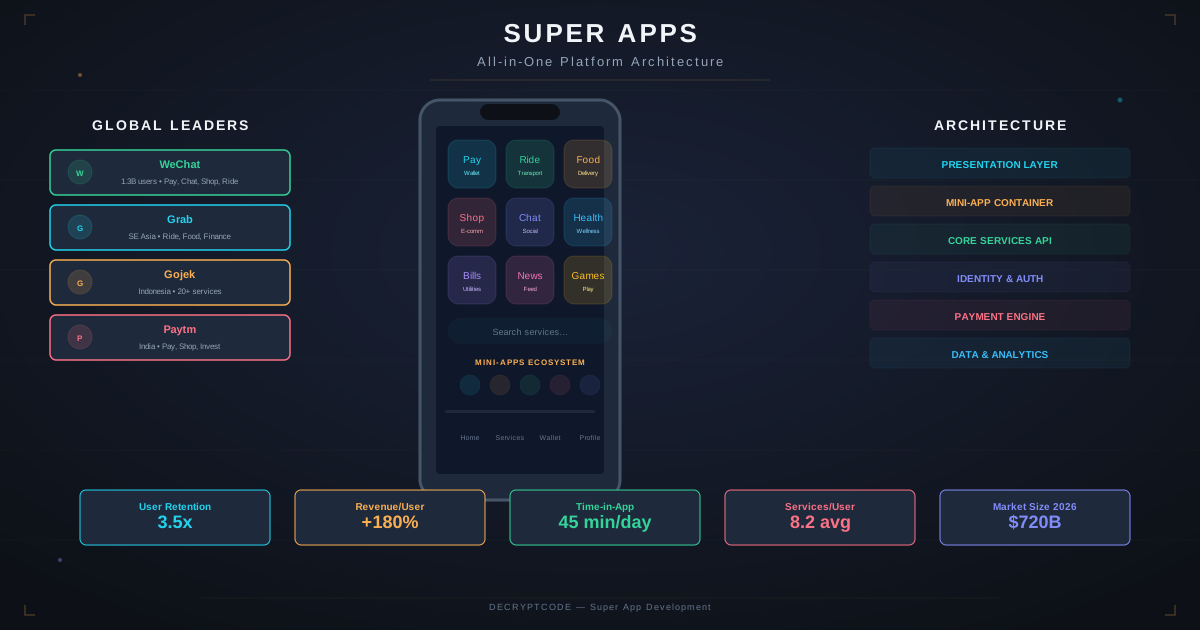
Key Takeaways
- Super apps succeed through a core value proposition (messaging, payments) that attracts users, then layer services
- Mini-app architecture enables independent teams to build and deploy features without app store updates
- Enterprise super apps are the practical use case — consolidating employee tools into one app
- Modular architecture with feature flags, dynamic loading, and shared services is essential
- AI agents are becoming the natural interface for super apps — one assistant across all services
What Are Super Apps
A super app is a mobile platform that hosts multiple services within a single application. Instead of installing separate apps for messaging, payments, ride-hailing, food delivery, and banking, users access them all through one app.
| Super App | Region | Core Service | Extended Services |
|---|---|---|---|
| China | Messaging | Payments, shopping, services, government, mini-programs (4M+) | |
| Grab | Southeast Asia | Ride-hailing | Food delivery, payments, insurance, investments, hotels |
| Gojek | Indonesia | Ride-hailing | Food, payments, logistics, health, entertainment |
| PayPal | Global | Payments | Shopping, crypto, savings, bill pay, rewards |
| Rappi | Latin America | Delivery | Payments, entertainment, travel, financial services |
Why Super Apps Work
- Network effects: Each service increases the value of the whole. Users who pay through the app also order food, which increases driver supply, which improves ride-hailing.
- Data advantage: Cross-service data enables better personalization, risk assessment, and user understanding.
- Lower CAC: Acquiring a user once and cross-selling services is dramatically cheaper than acquiring users for each service separately.
- User convenience: Single identity, single payment method, single app installation.
Platform Architecture
┌─────────────────────────────────────────┐
│              Super App Shell             │
│  ┌─────────┐ ┌─────────┐ ┌─────────┐   │
│  │ Mini-App│ │ Mini-App│ │ Mini-App│   │
│  │ Payments│ │ Shopping│ │ Services│   │
│  └────┬────┘ └────┬────┘ └────┬────┘   │
│       │           │           │         │
│  ┌────▼───────────▼───────────▼────┐    │
│  │      Shared Services Layer      │    │
│  │  Identity │ Payments │ Chat     │    │
│  │  Location │ Analytics│ Push     │    │
│  │  Storage  │ AI Agent │ Offline  │    │
│  └────────────────────────────────┘    │
│  ┌─────────────────────────────────┐    │
│  │      Mini-App Runtime           │    │
│  │  Sandboxing │ Permissions       │    │
│  │  Lifecycle  │ Communication     │    │
│  └─────────────────────────────────┘    │
│  ┌─────────────────────────────────┐    │
│  │      Native Platform Layer      │    │
│  │  iOS APIs │ Android APIs        │    │
│  └─────────────────────────────────┘    │
└─────────────────────────────────────────┘
Core Platform Components
- Shell app: The container that manages navigation, theming, authentication, and mini-app lifecycle. This is the only part that goes through app store review.
- Mini-app runtime: Sandboxed environment for running mini-apps. Handles permissions, inter-app communication, and resource management.
- Shared services: Common capabilities (auth, payments, location, push) available to all mini-apps through a unified API.
- Dynamic delivery: Mini-apps are downloaded on demand, not bundled with the shell. Updates deploy without app store reviews.
Mini-App Framework
Implementation Approaches
| Approach | Technology | Pros | Cons |
|---|---|---|---|
| WebView-based | HTML/JS in WebView | Easy to build, fast updates, web skills | Performance limits, limited native access |
| React Native modules | Dynamic JS bundles | Near-native, hot updates, JS ecosystem | Bundle size, bridge overhead |
| Native modules | Dynamic frameworks | Best performance, full platform access | Slower development, app store for updates |
| Flutter modules | Dynamic Dart bundles | Consistent UI, single engine | Large runtime, Dart skill requirement |
Mini-App Permissions Model
Mini-apps run in sandboxes with explicit permissions:
- Level 0: Display only — no data access, no network, no device APIs
- Level 1: Read user profile (name, email) — with user consent
- Level 2: Access shared services (payments, location) — per-action consent
- Level 3: Access device APIs (camera, contacts) — platform permission dialogs
This mirrors how WeChat Mini Programs handle permissions — users see exactly what each mini-app can access before granting permission.
Enterprise Super Apps
The most practical super app opportunity for most companies is internal — consolidating employee-facing tools into a single app:
Common Enterprise Modules
- HR & People: Time-off requests, benefits, org chart, onboarding
- IT & Support: Ticket submission, password reset, asset management
- Communications: Company news, messaging, video calling
- Expense & Finance: Expense reports, approvals, reimbursement tracking
- Workflow: Task management, approvals, document signing
- Field Operations: Work orders, inspections, asset tracking
Why Enterprise Super Apps Win
Employees at large organizations use 10-20+ different apps. An enterprise super app reduces app fatigue, provides single sign-on, consolidates notifications, and enables cross-module workflows ("Submit expense from travel booking" in one flow).
See our mobile workforce apps guide and enterprise mobile architecture for related patterns.
AI in Super Apps
AI agents are the natural interface for super apps — a single assistant that works across all services:
- "Book a ride to the airport and order coffee for pickup on the way" — the agent coordinates ride-hailing and food ordering services.
- "How much did I spend on food delivery this month?" — cross-service analytics powered by shared data.
- "Submit my expenses from last week's business trip" — enterprise agent accesses travel booking, receipt scanning, and expense approval modules.
The super app provides the agent with tools (services) and context (user data) that a standalone chatbot can't access. See our mobile AI agent integration guide for implementation details.
Technology Choices
Building a super app requires decisions at multiple layers:
- Shell app: Native (recommended for performance and platform integration) or Kotlin Multiplatform (shared logic, native UI).
- Mini-app runtime: WebView for easy third-party integration. React Native modules for performance-sensitive first-party modules.
- Backend: Microservices architecture — each mini-app has its own backend services. API Gateway for unified access. Event-driven for cross-service communication.
- Identity: Single SSO system (OAuth 2.0 + OIDC) with scoped tokens per mini-app.
- Payments: Unified payment abstraction layer supporting multiple methods (cards, wallet, bank transfer).
- Offline: Each module needs offline capability with sync when connected.
Challenges
- App store compliance: Apple restricts apps that function as app stores. Mini-apps must use native iOS payment APIs for digital goods. Design the shell as a platform with integrated features, not as a store distributing third-party apps.
- Performance: Running multiple modules increases memory usage. Aggressive unloading, lazy loading, and memory budgets per module are essential.
- Security: Mini-app sandboxing must prevent cross-module data access without explicit permission. Each module is a potential attack surface.
- Complexity: Platform development, mini-app SDK, developer documentation, testing infrastructure — the overhead is significant. Only justified for large organizations.
- App size: Super apps can grow large. Use dynamic delivery, on-demand module downloads, and aggressive asset optimization.
Frequently Asked Questions
What is a super app?
A mobile platform combining multiple services — messaging, payments, shopping, transport — in one app. Users access mini-apps within the host rather than installing separate apps.
How much does it cost to build a super app?
Core platform: $300K-$800K. Each module: $50K-$200K. Total for a 5-module super app: $550K-$1.8M. Ongoing platform costs are significant.
Should my company build a super app?
Consumer super apps require massive scale. Enterprise super apps — consolidating employee tools — are the practical opportunity for most companies.
Build Your Enterprise Platform
From architecture design to production deployment — we build modular enterprise mobile platforms.
Start Your Platform Project