
React Native vs Flutter vs Kotlin Multiplatform
The three leading cross-platform frameworks compared on every dimension that matters: performance, ecosystem, developer experience, code sharing, cost, and enterprise readiness in 2026.
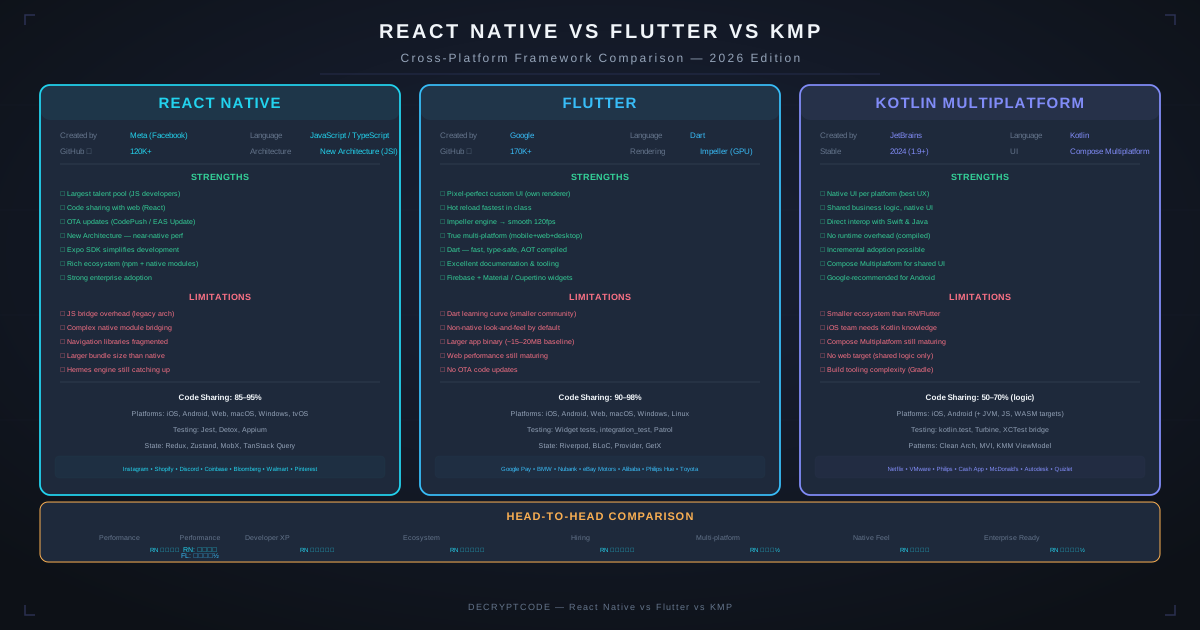
Key Takeaways
- React Native: largest ecosystem, JavaScript/TypeScript, best for teams with web background
- Flutter: best custom UI, highest code sharing (mobile + web + desktop), fastest iteration
- KMP: native UI per platform + shared business logic, best for native-quality enterprise apps
- All three are production-ready for enterprise apps — the choice depends on team skills and priorities
- Performance differences are negligible for 90%+ of mobile apps
Framework Overview
| React Native | Flutter | KMP | |
|---|---|---|---|
| Language | TypeScript / JavaScript | Dart | Kotlin |
| Backing | Meta (Facebook) | JetBrains | |
| First stable | 2015 | 2018 | 2023 (stable) |
| UI approach | Native components via bridge | Custom rendering (Skia/Impeller) | Native UI (SwiftUI + Compose) |
| Code sharing | 85-95% (UI + logic) | 95-99% (UI + logic) | 50-70% (logic only, native UI) |
| Target platforms | iOS, Android, (Web, Windows, macOS via community) | iOS, Android, Web, Windows, macOS, Linux | iOS, Android, Desktop, Web, Server |
| Notable apps | Instagram, Shopify, Discord, Coinbase | Google Pay, BMW, eBay Motors, Nubank | Netflix, McDonald's, Cash App, VMware |
Architecture Differences
React Native — New Architecture
React Native's New Architecture (stable since 0.76) replaces the old bridge with:
- JSI (JavaScript Interface): Direct synchronous communication between JS and native — no serialization overhead
- Fabric: New rendering system with concurrent rendering and synchronous layout measurement
- TurboModules: Lazy-loaded, type-safe native modules with JSI binding
The result: 2-5x faster native module calls, reduced memory usage, and support for concurrent features.
Flutter — Impeller
Flutter draws every pixel itself using the Impeller rendering engine (replaced Skia):
- Pre-compiled shaders: No jank from runtime shader compilation
- Metal (iOS) / Vulkan (Android): Direct GPU access for rendering
- Own widget system: Doesn't use native UI components — renders custom widgets that closely mimic platform look and feel
Advantage: Pixel-perfect consistency across platforms. Trade-off: Widgets don't automatically update when OS design changes.
KMP — Shared Logic, Native UI
KMP's architecture is fundamentally different:
- Shared module: Business logic, networking, data layer, validation written once in Kotlin
- Platform modules: Fully native UI — SwiftUI on iOS, Jetpack Compose on Android
- Expect/actual: Platform-specific implementations for things like file I/O, crypto, device APIs
For a deep dive into KMP, see our Kotlin Multiplatform guide.
Performance Comparison
| Metric | React Native | Flutter | KMP |
|---|---|---|---|
| Cold start | 600-900ms | 500-800ms | 400-600ms (native) |
| List scrolling (60fps) | 95%+ (New Arch) | 98%+ (Impeller) | 100% (native) |
| Animation | Smooth (Reanimated 3) | Excellent (framework-level) | Native (platform animation APIs) |
| Memory overhead | +30-50MB (JS engine) | +20-40MB (Dart VM) | +5-15MB (shared Kotlin) |
| App binary size | +15-25MB | +12-20MB | +3-8MB |
| CPU usage (idle) | Low (no bridge polling) | Very low | Native baseline |
Bottom line: KMP has the smallest overhead since it compiles to native code. Flutter renders beautifully with Impeller. React Native's New Architecture closed the gap significantly. For standard business apps, users can't perceive the differences.
Developer Experience
| Factor | React Native | Flutter | KMP |
|---|---|---|---|
| Hot reload | Fast Refresh (reliable) | Hot Reload (excellent, stateful) | No hot reload (Compose preview, Swift Previews) |
| Debugging | Chrome DevTools, Flipper, Reactotron | DevTools (excellent), Observatory | Xcode + Android Studio (platform native) |
| Type safety | TypeScript (good) | Dart (strong, null-safe) | Kotlin (excellent, null-safe) |
| Testing | Jest, Detox, Maestro | Widget tests, integration tests (built-in) | Platform testing + shared unit tests |
| Learning curve | Easy (if team knows React) | Medium (Dart is new for most) | Medium-high (need Kotlin + both platform UIs) |
| IDE | VS Code (primary), WebStorm | VS Code, Android Studio, IntelliJ | Android Studio + Xcode (both required) |
React Native wins on developer pool size — JavaScript is the most popular language, and React skills are abundant. Flutter wins on built-in tooling and developer consistency. KMP wins on type safety and gives teams native debugging power.
Ecosystem & Libraries
| Category | React Native | Flutter | KMP |
|---|---|---|---|
| Navigation | React Navigation, Expo Router | GoRouter, Auto Route | Platform native + Voyager/Decompose |
| State management | Redux, Zustand, MobX, Jotai | Riverpod, Bloc, Provider | Kotlin Flow + platform (SwiftUI state, Compose state) |
| Networking | Axios, fetch, React Query | Dio, http, Chopper | Ktor (shared), Alamofire/Retrofit (platform) |
| Local DB | MMKV, WatermelonDB, Realm | Hive, Isar, Drift | SQLDelight (shared), Room/Core Data (platform) |
| Maps | react-native-maps | google_maps_flutter | Native MapKit / Google Maps |
| Camera | react-native-camera | camera | Native AVFoundation / CameraX |
| Push notifications | Firebase, OneSignal | firebase_messaging, OneSignal | Native APNs / FCM |
React Native has the widest third-party ecosystem. Flutter's pub.dev has excellent quality control. KMP leverages existing native libraries on each platform — you never lack a library, but you may need platform-specific code to use it.
Code Sharing Strategy
React Native: Share Everything
85-95% shared code including UI. Platform-specific code for native modules and platform-behavior differences. With Expo, even more is abstracted.
Flutter: Share Even More
95-99% shared code. Platform channels needed only for platform-specific APIs (biometrics, NFC, Bluetooth). Even UI is shared — with Platform.isIOS checks for platform-specific behavior.
KMP: Share Logic, Native UI
50-70% shared code (business logic, networking, data, validation). UI is written natively per platform — SwiftUI for iOS, Jetpack Compose for Android. This means more code to write but gives each platform its ideal UX.
What to Share (KMP Strategy)
- ✅ Share: Models, API clients, business logic, validation, database queries, analytics events
- ✅ Share: Common utilities, date/time handling, string processing
- ❌ Platform-specific: UI, navigation, permissions, device APIs, platform integrations
Cost Comparison
For a medium-complexity app (both platforms), assuming equivalent quality:
| Factor | React Native | Flutter | KMP |
|---|---|---|---|
| Initial development | $120K-$250K | $120K-$250K | $140K-$280K |
| Annual maintenance | $24K-$50K | $24K-$50K | $28K-$56K |
| Team size needed | 3-5 devs | 3-5 devs | 4-6 devs (need platform UI skills) |
| Hiring difficulty | Low (many JS devs) | Medium (Dart is niche) | Medium-high (need Kotlin + iOS) |
KMP costs slightly more because you maintain two UIs, but the result is a more native-feeling app. React Native and Flutter are comparable in cost. See our React Native vs native cost analysis and full cost guide for more.
Enterprise Considerations
- Security: All three support platform security features (Keychain, Keystore, biometrics). KMP has a slight edge for HIPAA compliance since security is implemented natively.
- Accessibility: KMP uses native accessibility APIs directly. Flutter and React Native bridge to platform accessibility — good but occasionally requires platform-specific fixes.
- App size: KMP adds 3-8MB, Flutter 12-20MB, React Native 15-25MB. Matters for markets with slow connections or storage-constrained devices.
- Long-term support: Meta, Google, and JetBrains are all committed. React Native has the longest track record (10+ years). Flutter has strong Google backing. KMP has JetBrains + growing enterprise adoption.
- Offline capability: Our fleet management app demonstrates React Native's offline-first capability. KMP's SQLDelight + native storage is equally capable. Flutter's Isar/Hive provide good offline support.
Decision Matrix
Choose React Native when:
- Team knows JavaScript/TypeScript and React
- Large third-party library ecosystem needed
- Want to share code with React web app
- Hiring ease is a priority (largest developer pool)
Choose Flutter when:
- Custom, branded UI design is critical
- Maximum code sharing across mobile + web + desktop
- Fastest development speed and iteration
- Willing to invest in Dart expertise
Choose KMP when:
- Native UX quality is non-negotiable
- Team has Kotlin / Android expertise
- Migrating from existing native app
- Enterprise app requiring deep platform integration
- Building a super app with complex platform features
Need help deciding? Our team has built production apps with all three frameworks. Get a recommendation based on your specific requirements.
Frequently Asked Questions
Which cross-platform framework is best in 2026?
No single best — React Native for JS teams, Flutter for custom UI and max code sharing, KMP for native-quality UI with shared logic. All are production-ready.
Which has the best performance?
KMP (native UI, smallest overhead), then Flutter (Impeller), then React Native (New Architecture). Differences are negligible for 90%+ of apps.
Can I share code with web?
Flutter: same codebase for web. React Native: pair with React (same language, different framework). KMP: share business logic via Kotlin/JS, separate web UI.
Build Cross-Platform Mobile Apps
We build production apps with React Native, Flutter, and Kotlin Multiplatform. Let's find the right fit for your project.
Get Expert Advice