
PCI DSS Compliance for Mobile Payment Apps
Handling payment card data in mobile apps triggers PCI DSS requirements. The smartest strategy is keeping card data out of your app entirely — here's how.
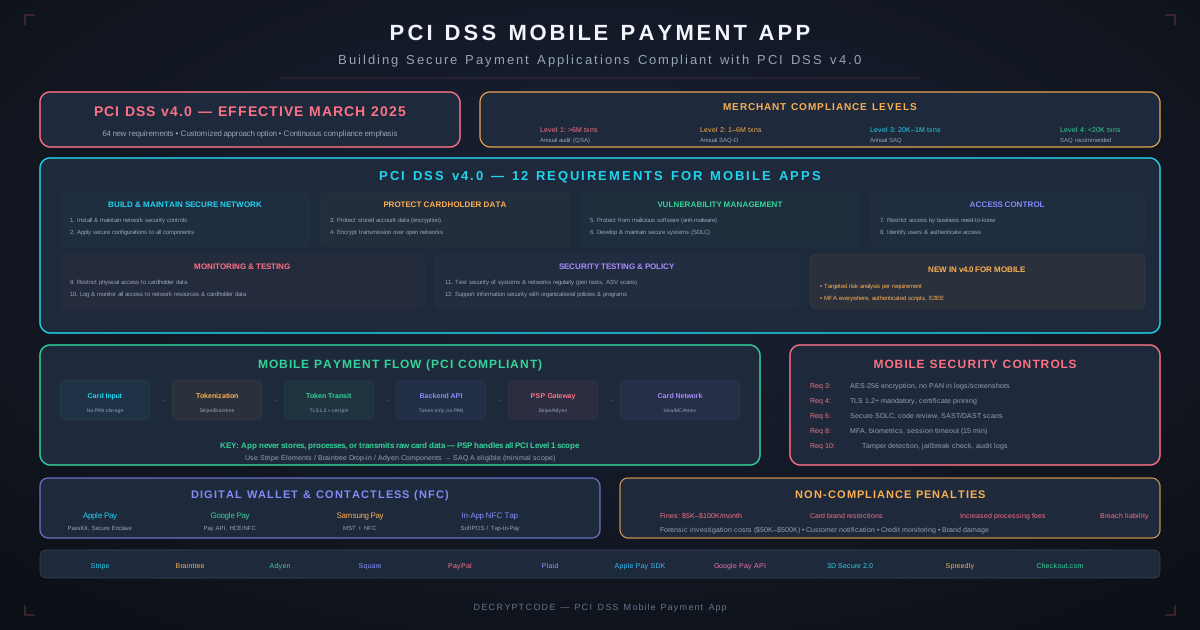
Key Takeaways
- The #1 strategy: never let cardholder data touch your app — use tokenization
- Apple Pay / Google Pay eliminate card data from your scope entirely
- PCI DSS v4.0.1 is fully enforced in 2026 with stricter authentication and encryption requirements
- Scope reduction can drop your SAQ from 300+ controls to 20+ controls
- SoftPOS (phone-as-terminal) introduces new PCI requirements for tap-to-pay
PCI DSS Overview
PCI DSS (Payment Card Industry Data Security Standard) applies to any entity that stores, processes, or transmits cardholder data. For mobile apps, this means:
- In scope: Apps where users enter card numbers, apps that process payments, mPOS/SoftPOS apps
- Potentially in scope: Apps that connect to payment infrastructure, even if they don't see card data directly
- Out of scope: Apps that use only Apple Pay/Google Pay with no card number input
PCI DSS v4.0.1 (Current)
Key changes relevant to mobile apps:
- Customized approach: Alternative to prescriptive controls — prove security intent through custom implementation
- MFA everywhere: Multi-factor authentication required for all access to cardholder data environments
- Enhanced encryption: TLS 1.2 minimum (TLS 1.3 recommended), stronger key management
- Targeted risk analysis: Document risk analysis for each req where flexibility is allowed
- Script management: Inventory and authorize all payment page scripts (web/hybrid apps)
Scope Reduction
The most important PCI strategy for mobile apps: reduce scope aggressively.
| Approach | Card Data Touches App? | PCI Impact | SAQ Level |
|---|---|---|---|
| Direct card input + processing | Yes — full exposure | Full PCI scope | SAQ D (300+ controls) |
| Card input → tokenize client-side | Briefly in memory | Reduced scope | SAQ A-EP (~130 controls) |
| Hosted payment fields (iframe) | No — processor handles | Minimal scope | SAQ A (~20 controls) |
| Apple Pay / Google Pay only | No — device tokens | No card data scope | SAQ A or none |
Scope Reduction Architecture
  FULL SCOPE (avoid)              MINIMAL SCOPE (recommended)
  ┌──────────────┐                ┌──────────────┐
  │  Mobile App  │                │  Mobile App  │
  │  Card Input  │                │  Wallet/SDK  │
  │  ↓           │                │  ↓           │
  │  Your Server │                │  Stripe/     │
  │  ↓           │                │  Braintree   │
  │  Processor   │                │  ↓           │
  └──────────────┘                │  Processor   │
  SAQ-D: 300+                     └──────────────┘
  controls                        SAQ-A: ~20 controls
Tokenization Strategy
Tokenization replaces card numbers with non-reversible tokens. The token has no value if stolen.
Payment Processor SDKs
| Processor | Mobile SDK | How It Works | PCI Impact |
|---|---|---|---|
| Stripe | Stripe iOS/Android SDK | Card element captures data, tokenizes client-side, token sent to your server | SAQ A eligible |
| Braintree | Braintree SDK | Drop-in UI handles card input, returns payment nonce | SAQ A eligible |
| Adyen | Adyen SDK | Encrypted card data sent directly to Adyen servers | SAQ A-EP eligible |
| Square | Square Mobile SDK | In-App Payments SDK handles card entry | SAQ A eligible |
Implementation Rules
- Never log card data: No card numbers in logs, crash reports, analytics, or debug output
- Never cache card data: No card data in local storage, Core Data, SharedPreferences, or any persistent store
- Memory handling: Zero out card data from memory immediately after tokenization
- Network security: All payment API calls over TLS 1.2+ with certificate pinning
- Screenshot prevention: Block screenshots/screen recording on payment screens
Apple Pay & Google Pay
Digital wallets are the ideal payment method for PCI compliance — your app never sees card data.
How Wallet Payments Work
- User authenticates with Face ID / fingerprint
- Device generates a one-time payment token (DPAN — Device Primary Account Number)
- Token + cryptogram sent to your server
- Your server forwards to payment processor
- Processor exchanges token with issuing bank
At no point does your app or server see the actual card number. The DPAN is device-specific and useless if intercepted.
Adoption Rates
Apple Pay is available on 90%+ of active iPhones. Google Pay on 80%+ Android devices. Offering wallet payments as the primary option simplifies PCI compliance while improving conversion rates (wallet checkout is 2-3x faster than manual card entry).
Secure Architecture
Payment Data Flow
  ┌────────────────────────────────────┐
  │          Mobile App                │
  │  ┌─────────────┐                   │
  │  │ Payment UI  │ (Stripe SDK /     │
  │  │             │  Apple Pay)       │
  │  └──────┬──────┘                   │
  │         │ Token (not card data)    │
  │  ┌──────▼──────┐                   │
  │  │ App Logic   │ Sends token to    │
  │  │             │ your backend      │
  │  └──────┬──────┘                   │
  └─────────┼──────────────────────────┘
            │ HTTPS (TLS 1.3)
  ┌─────────▼──────────────────────────┐
  │         Your Backend               │
  │  ┌──────────────┐                  │
  │  │ Payment      │ Creates charge   │
  │  │ Controller   │ with token       │
  │  └──────┬───────┘                  │
  └─────────┼──────────────────────────┘
            │ Server-to-server TLS
  ┌─────────▼──────────────────────────┐
  │     Payment Processor              │
  │  (Stripe / Braintree / Adyen)      │
  │  Handles actual card processing    │
  └────────────────────────────────────┘
Security Controls
- Certificate pinning: Pin payment API certificates to prevent MITM attacks
- Jailbreak/root detection: Warn or block payment operations on compromised devices
- Code obfuscation: Protect payment-related code from reverse engineering
- Secure keyboard: Use secure text input fields that prevent third-party keyboard access during card entry
- Anti-tampering: Detect app modifications that could intercept payment data
Key PCI DSS v4.0.1 Requirements
Even with scope reduction, some requirements still apply:
| Requirement | Mobile App Impact | Implementation |
|---|---|---|
| Req 2: Secure defaults | No hardcoded credentials, disable debug modes | Build configuration management, secrets in keychain/keystore |
| Req 3: Protect stored data | Don't store card data — period | Tokenization, no caching, secure memory handling |
| Req 4: Encrypt transmission | TLS 1.2+ for all payment traffic | Certificate pinning, no fallback to HTTP |
| Req 6: Secure development | Security in SDLC | Code reviews, SAST, dependency scanning, security testing |
| Req 8: Authentication | MFA for admin/developer access | MFA for all backend access, secure session management |
| Req 11: Security testing | Regular vulnerability testing | Quarterly vulnerability scans, annual pen tests |
mPOS & SoftPOS
SoftPOS (Software Point of Sale) turns a phone into a payment terminal using NFC. This is a growing use case with specific PCI requirements.
SoftPOS Requirements
- PCI CPoC (Contactless Payments on COTS): Standard for accepting contactless payments on commercial off-the-shelf devices
- Attestation: Device integrity verification before each transaction
- Secure zone: Payment processing must run in a trusted execution environment (TEE) or secure enclave
- Transaction limits: Per-transaction and cumulative limits without online authorization
- Backend monitoring: Real-time monitoring for anomalous transaction patterns
For fintech payment applications, see our fintech AI solutions.
Validation & SAQs
Self-Assessment Questionnaires
| SAQ Type | Who It's For | Controls | Mobile App Scenario |
|---|---|---|---|
| SAQ A | Outsourced payment processing | ~22 | Apple Pay/Google Pay, hosted payment fields |
| SAQ A-EP | E-commerce + redirects | ~130 | Client-side tokenization with SDK |
| SAQ B | Standalone terminals | ~41 | External card reader (mPOS) |
| SAQ D | All other merchants | ~300+ | Direct card processing (avoid) |
Compliance Timeline
- Quarterly: Vulnerability scans (if in scope), review access logs
- Annually: SAQ completion, penetration test, security awareness training
- As needed: SAQ update when payment flow changes, incident response plan testing
For broader mobile security practices, see our mobile security in the AI era guide.
Frequently Asked Questions
Do mobile apps need PCI DSS compliance?
If your app stores, processes, or transmits card data — yes. Using tokenization (Stripe, Braintree) or wallet payments (Apple Pay/Google Pay) means your app never sees actual card data, significantly reducing or eliminating PCI scope.
What PCI DSS version applies in 2026?
PCI DSS v4.0.1, with all future-dated requirements now mandatory. Key changes include MFA everywhere, enhanced encryption, targeted risk analysis, and script management for payment pages.
How do I reduce PCI scope for a mobile app?
Use payment tokenization so card data goes directly to the processor. Implement Apple Pay/Google Pay. Use hosted payment fields. Never log, store, or cache card data. This can reduce your SAQ from 300+ to ~20 controls.
Build PCI-Compliant Payment Apps
Payment processing, tokenization, and compliance engineering for mobile fintech applications.
Discuss Your Payment App