
Offline-First Enterprise Mobile App Development Guide
Field workers, healthcare providers, logistics teams, and inspectors all work in environments with unreliable connectivity. Offline-first architecture ensures your enterprise mobile app keeps working regardless of network conditions.
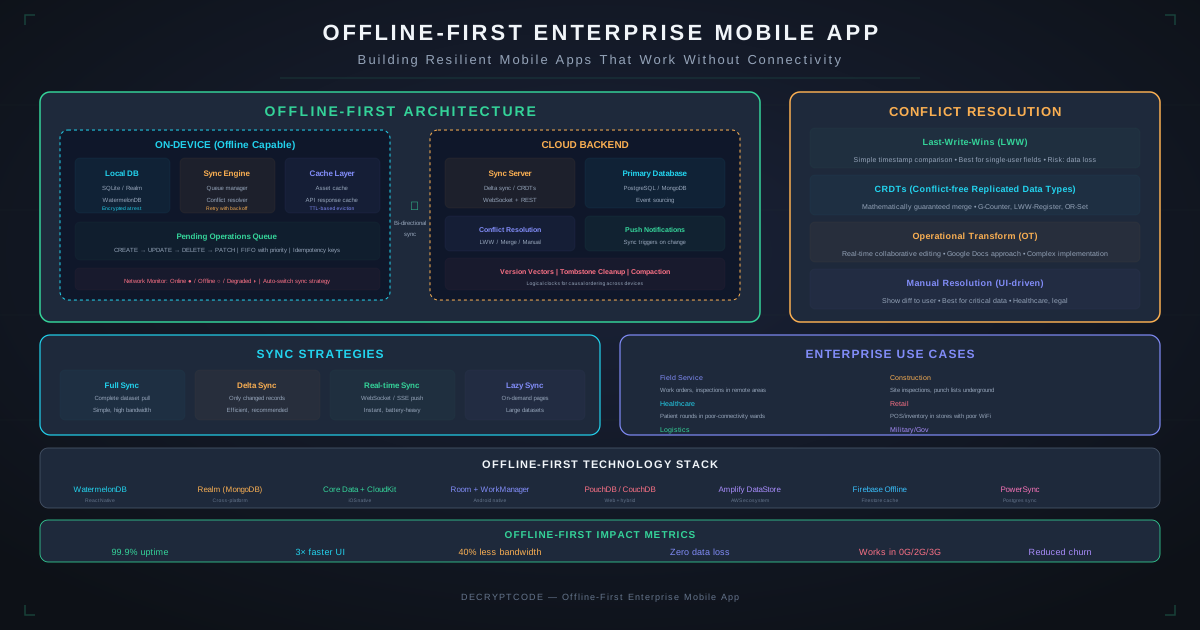
Key Takeaways
- Offline-first means local data is the source of truth — not a cache of server data
- CRDTs provide mathematically guaranteed conflict resolution without coordination
- Sync engines need queue management, retry logic, conflict detection, and bandwidth awareness
- On-device AI enables offline inference for inspections, OCR, and classification
- Enterprise offline-first apps reduce field worker downtime by 60-75% in low-connectivity environments
Why Offline-First for Enterprise
Enterprise mobile apps serve users who don't always have reliable connectivity — field technicians in warehouses, healthcare workers in rural clinics, utility inspectors underground, logistics drivers between cell towers. If your app breaks without internet, it fails your users when they need it most.
| Industry | Offline Scenario | Impact Without Offline |
|---|---|---|
| Healthcare | Rural clinics, hospital basements | Cannot access patient records during treatment |
| Logistics | Warehouses, delivery routes | Cannot scan inventory, complete deliveries |
| Utilities | Underground infrastructure | Cannot complete inspections, file reports |
| Construction | Remote job sites | Cannot access blueprints, submit timesheets |
| Insurance | Disaster zones, rural areas | Cannot process claims, capture damage photos |
Our fleet management case study demonstrates these principles in production — the offline-first app reduced missed deliveries by 78% and continued operating with 72-hour offline windows.
Architecture Patterns
Local-First vs. Cache-First vs. Offline-Capable
| Pattern | Data Authority | Offline Writes | Sync | Best For |
|---|---|---|---|---|
| Offline-capable | Server | Queued | When online | Apps with occasional offline |
| Cache-first | Server | Limited | Background refresh | Read-heavy apps |
| Local-first | Local | Full CRUD | Bi-directional merge | Enterprise field apps |
| CRDT-based | Distributed | Full CRUD | Automatic merge | Collaborative editing |
For enterprise field applications, local-first is the recommended pattern. The local database is the source of truth. The server is a sync target, not the authority.
┌──────────────────────────────────────────┐
│              Mobile App                   │
│  ┌────────────┐    ┌─────────────────┐   │
│  │   UI Layer │◄──►│  Local Database  │   │
│  └────────────┘    │   (SQLite)       │   │
│                    └───────┬─────────┘   │
│                            │              │
│  ┌─────────────────────────▼──────────┐  │
│  │          Sync Engine               │  │
│  │  Change Tracker │ Queue Manager    │  │
│  │  Conflict Resolver │ Retry Logic   │  │
│  └─────────────────────────┬──────────┘  │
│                            │              │
└────────────────────────────┼──────────────┘
                             │ (when online)
┌────────────────────────────▼──────────────┐
│              Backend APIs                  │
│  Sync Gateway │ Conflict Resolution       │
│  Event Store  │ Push Notifications        │
└────────────────────────────────────────────┘
Local Data Layer
Database Options
| Database | Platform | Sync Built-in | Best For |
|---|---|---|---|
| SQLite | iOS, Android | No (DIY) | Complex queries, relational data, full control |
| SQLDelight | KMP | No (DIY) | Cross-platform with type-safe SQL |
| Realm (Atlas) | iOS, Android, RN | Yes | Document data with automatic sync |
| WatermelonDB | React Native | No (DIY) | Large datasets in React Native |
| Couchbase Lite | iOS, Android | Yes | Enterprise with existing Couchbase infrastructure |
Local Storage Strategy
- Schema versioning: Include migration logic for every schema change. Users may be offline during updates and need to migrate from any previous version.
- Data partitioning: Only sync data the user needs. A field technician doesn't need all 50,000 work orders — only their assigned ones.
- Encryption at rest: Use SQLCipher or platform encryption (iOS Data Protection, Android EncryptedSharedPreferences). See our HIPAA mobile development guide for compliance requirements.
- Storage budgets: Monitor local database size. Set alerts at 500MB, cleanup at 1GB. Archive completed records to free space.
Sync Engine
Core Components
- Change tracker: Records every local create, update, delete with timestamps and vector clocks. Uses write-ahead log pattern.
- Queue manager: Maintains ordered queue of pending changes. Handles priority (critical data first), batching, and deduplication.
- Network monitor: Detects connectivity changes. Distinguishes between no network, metered (cellular), and unmetered (Wi-Fi) to adjust sync behavior.
- Retry logic: Exponential backoff with jitter. Separate queues for idempotent (safe to retry) and non-idempotent operations.
- Bandwidth awareness: Compress payloads, diff-sync for large records, defer media uploads to Wi-Fi.
Sync Strategies
| Strategy | Direction | Trigger | Use Case |
|---|---|---|---|
| Push sync | Client → Server | On change + connectivity | User-generated data (forms, inspections) |
| Pull sync | Server → Client | Periodic + on-open | Reference data (catalogs, schedules) |
| Bi-directional | Both | On change + periodic | Collaborative data (shared work orders) |
| Event sourcing | Both (events) | On change | Audit-critical data (compliance records) |
Conflict Resolution
Conflicts occur when two users modify the same record offline, or when a user modifies a record that was updated on the server. This is the hardest problem in offline-first development.
Resolution Strategies
| Strategy | How It Works | Data Loss Risk | Best For |
|---|---|---|---|
| Last-Write-Wins | Latest timestamp wins | High — silent overwrites | Single-user fields, non-critical data |
| Field-level merge | Merge non-conflicting fields | Low — only per-field conflicts | Records with independent fields |
| CRDTs | Math-based auto-merge | None — guaranteed convergence | Counters, sets, collaborative text |
| Operational Transform | Transform concurrent ops | None — preserves intent | Real-time collaborative editing |
| Manual resolution | Show both versions to user | None — user decides | Business-critical data |
CRDTs in Practice
Conflict-free Replicated Data Types (CRDTs) are data structures that can be updated independently and merged automatically without conflicts:
- G-Counter: Grow-only counter — each node has its own counter, sum gives total. Use for: item counts, progress tracking.
- LWW-Register: Last-Writer-Wins register with vector clock. Use for: single-value fields (status, assignee).
- OR-Set (Observed-Remove Set): Add and remove from sets without conflicts. Use for: tags, checklist items.
- LWW-Map: Map where each key is an LWW-Register. Use for: form fields, inspection data.
Libraries like Automerge and Yjs implement CRDTs for JavaScript. For native, custom implementations on top of vector clocks are common.
On-Device AI for Offline
AI features that work offline are transformative for field workers. See our edge AI guide for framework details.
- Photo classification: Automatically tag inspection photos (damage type, severity) using Core ML or TensorFlow Lite models.
- OCR/document scanning: Extract text from forms, serial numbers, meter readings without server roundtrip.
- Voice-to-text: Dictate inspection notes hands-free using on-device speech recognition.
- Anomaly detection: Flag unusual sensor readings, measurements, or data entries locally.
- Smart suggestions: Auto-fill forms based on historical patterns and context (location, asset type, time).
Testing Offline Scenarios
- Network conditioner: Use iOS Network Link Conditioner and Android emulator network settings to simulate 2G, 3G, high latency, and packet loss.
- Airplane mode cycling: Rapidly toggle airplane mode during data entry to test change queue resilience.
- Multi-device conflicts: Two devices modify the same record offline, then both come online. Verify conflict resolution works correctly.
- Large offline windows: Leave device offline for 24-72 hours with active usage. Verify sync completes correctly when reconnected.
- Schema migration offline: Update the app while offline. Verify database migration works and pending sync queue is preserved.
- Storage pressure: Fill device storage to near capacity. Verify graceful handling and clear error messaging.
Case Study: Fleet Management
Our fleet management platform serves 500+ vehicles across delivery routes with frequent connectivity dead zones:
- Architecture: React Native with WatermelonDB, offline-first with background sync.
- Offline capability: Full route execution, delivery confirmation, photo capture, signature collection — all offline.
- Sync strategy: Priority queue — delivery confirmations sync first (revenue impact), photos sync on Wi-Fi.
- Conflict resolution: LWW for driver notes, manual resolution for delivery status disputes.
- Result: 78% fewer missed deliveries, reliable operation with up to 72-hour offline windows.
Frequently Asked Questions
What does offline-first mean?
Offline-first means the app is designed to work without network connectivity as the default. Local data is the source of truth. Sync happens when connectivity is available. This is different from "offline-capable" where the app primarily works online but caches data for offline use.
How do you handle conflicts in offline-first apps?
Strategies include Last-Write-Wins, CRDTs (mathematically guaranteed convergence), operational transforms, and manual resolution. Most enterprise apps combine approaches: CRDTs for counters, LWW for single-user fields, and manual resolution for critical data.
Which database is best for offline-first mobile apps?
SQLite is the most reliable cross-platform choice. SQLDelight for KMP projects. Realm or Couchbase Lite if you want built-in sync. WatermelonDB for large datasets in React Native.
Build Offline-First Enterprise Apps
We build mobile apps that work everywhere — from city offices to remote field sites, with or without connectivity.
Discuss Your Project