
Native vs Cross-Platform Mobile Development in 2026
The native vs. cross-platform debate has evolved dramatically. This guide compares both approaches on performance, cost, developer experience, time-to-market, and long-term maintainability — with a clear decision framework.
Key Takeaways
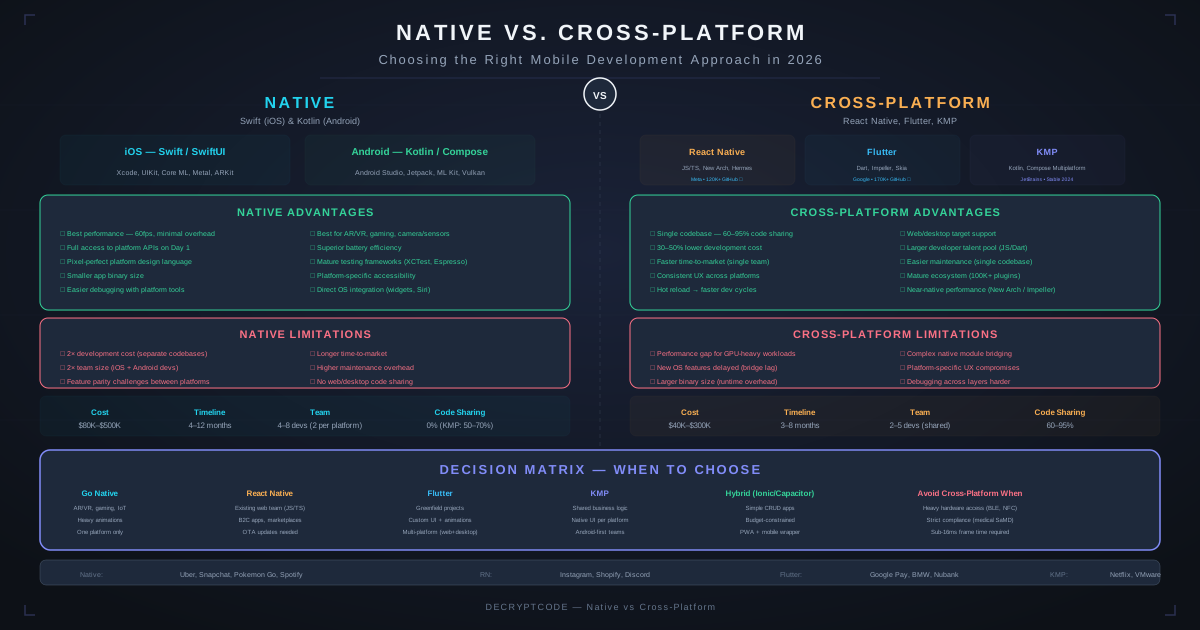
- Cross-platform frameworks in 2026 achieve 95%+ of native performance for most use cases
- Cross-platform saves 30-40% upfront cost and reduces ongoing maintenance by maintaining one codebase
- Native is still better for GPU-intensive apps, complex AR, games, and deep OS integration
- Kotlin Multiplatform offers a middle ground: shared business logic with native UI on each platform
- Choose based on your specific requirements, not framework popularity
The 2026 Landscape
The native vs. cross-platform gap has narrowed significantly. React Native's New Architecture (JSI, Fabric, TurboModules) eliminated the old bridge bottleneck. Flutter 4 compiles to native ARM code with Impeller rendering. Kotlin Multiplatform reached stable for production use.
Native development has also evolved. SwiftUI and Jetpack Compose now offer declarative, reactive UI paradigms that are more productive than their predecessors (UIKit and XML layouts). Apple's on-device AI capabilities through Core ML and the Apple Intelligence framework give native iOS apps exclusive access to powerful features.
The question is no longer "can cross-platform match native?" but rather "does my specific app need native capabilities that cross-platform can't deliver?"
Native Advantages
Platform-Specific UX
Native development delivers the exact look and feel users expect on each platform. iOS users expect specific navigation patterns, gestures, and visual behaviors that differ from Android. Native apps get these "for free" — cross-platform apps must implement platform-specific behavior manually.
Full Hardware Access
Native gives immediate access to new platform APIs and hardware capabilities:
- iOS: Core ML, ARKit, Metal (GPU), HealthKit, NFC, Ultra Wideband, Dynamic Island, Apple Intelligence
- Android: ML Kit, ARCore, Vulkan (GPU), Health Connect, NFC, UWB, adaptive layouts
Cross-platform frameworks lag 3-12 months behind new OS releases for API support.
Peak Performance
For computationally intensive tasks — real-time image processing, 3D rendering, complex animations at 120fps, on-device model inference — native code has no abstraction layer overhead. This matters for ~10-15% of apps.
Cross-Platform Advantages
Single Codebase
One codebase for iOS and Android means:
- 30-40% lower initial development cost vs. two native apps
- Faster feature development — implement once, ship everywhere
- Consistent business logic — no "it works on iOS but not Android" bugs
- Smaller team required — fewer specialized developers needed
Faster Time-to-Market
Cross-platform apps ship 30-50% faster. One team, one codebase, one QA cycle. For startups and enterprises launching new products, this time advantage translates to competitive advantage and earlier revenue.
Easier Maintenance
Long-term maintenance costs drop significantly with a single codebase. Bug fixes, feature updates, and security patches are implemented once. Annual maintenance costs are typically 40-50% lower.
Code Sharing Beyond Mobile
Flutter extends to web and desktop. React Native pairs with React for web. Kotlin Multiplatform shares business logic with backend (Ktor) and web (Kotlin/JS). This further amplifies the code reuse benefit.
Performance Comparison
| Metric | Native | React Native | Flutter | KMP |
|---|---|---|---|---|
| Cold start time | Baseline | +50-100ms | +30-80ms | ~Native |
| Animation (60fps) | Consistent | 95%+ (JSI) | 98%+ (Impeller) | Native |
| Memory usage | Baseline | +15-25% | +10-20% | ~Native |
| App size (min) | 5-10 MB | +8-12 MB | +6-10 MB | +2-4 MB |
| GPU-intensive (3D, AR) | Full access | Limited | Limited | Full access |
| On-device ML | Full access | Bridge needed | Bridge needed | Platform-specific |
Key insight: KMP achieves near-native performance because the shared layer is compiled Kotlin code, and UI is fully native (SwiftUI/Compose). React Native and Flutter add a thin abstraction layer, but with modern architectures, the delta is imperceptible for most apps.
Cost Comparison
For a medium-complexity app ($80K-$200K single platform):
| Approach | Year 1 (Build + Launch) | Annual Maintenance | 3-Year Total |
|---|---|---|---|
| Two native apps | $280K-$400K | $56K-$80K | $392K-$560K |
| React Native | $130K-$250K | $26K-$50K | $182K-$350K |
| Flutter | $130K-$250K | $26K-$50K | $182K-$350K |
| KMP | $150K-$270K | $30K-$54K | $210K-$378K |
For detailed cost analysis, see our mobile app development cost guide and React Native vs native cost comparison.
AI/ML Capabilities
AI features are increasingly central to mobile apps. How do the approaches compare?
- Native: Full access to Core ML (iOS) and ML Kit / LiteRT (Android). Best for on-device inference, especially with Apple's Neural Engine and Android's NNAPI. See Core ML vs TensorFlow Lite.
- React Native: Cloud AI integration is straightforward (REST APIs). On-device ML requires native modules — workable but adds complexity.
- Flutter: Similar to React Native — cloud AI via HTTP, on-device via platform channels. Plugin ecosystem growing.
- KMP: Best of both worlds for AI — shared cloud API integration code, fully native on-device ML through platform-specific implementations.
Learn more about integrating AI agents into mobile apps and edge AI on-device intelligence.
Decision Framework
Choose native when:
- Single platform only (iOS or Android, not both)
- GPU-intensive: 3D rendering, complex AR, games
- Deep OS integration: widgets, Live Activities, Wear OS, watchOS
- Maximum performance critical (sub-10ms response requirements)
- Heavy on-device ML with platform-specific frameworks
Choose cross-platform when:
- Targeting both iOS and Android
- Budget-conscious — need to maximize feature output per dollar
- Time-to-market pressure
- Standard UI patterns (lists, forms, navigation, maps)
- Existing web team (React → React Native, Dart/Flutter)
Choose KMP specifically when:
- You want native UI but shared business logic
- Team has Kotlin/Android expertise
- Enterprise apps where platform-specific UX matters
- Migration path from existing native Android app
Real Examples
Our team built a fleet management app with React Native — offline-first, real-time GPS, 500+ vehicles. Cross-platform saved 35% in development cost while delivering native-quality performance with background location tracking.
For a telehealth platform, we used Kotlin Multiplatform to share HIPAA-compliant business logic across iOS and Android while delivering platform-native video calling and UI experiences.
Conversely, our insurance claims app leveraged native iOS capabilities (camera + Core ML) for real-time damage assessment — a use case where native hardware access was essential.
Frequently Asked Questions
Is cross-platform as good as native in 2026?
For 85-90% of apps, yes. Modern frameworks deliver near-native performance. The remaining 10-15% (GPU-intensive, complex AR, games) still benefit from native development.
Which cross-platform framework should I choose?
React Native for JavaScript teams. Flutter for custom UI and single codebase across mobile/web. Kotlin Multiplatform for shared logic with native UI per platform.
Can I switch from cross-platform to native later?
Yes, but costly — 50-70% rewrite. KMP is easiest to transition from since the shared layer is Kotlin and iOS UI is already SwiftUI.
Need Help Choosing?
Our engineering team will evaluate your requirements and recommend the best platform approach.
Get Expert Advice