
Mobile App Maintenance: Strategy, Process & Best Practices
Launching a mobile app is the beginning, not the end. This guide covers the complete maintenance lifecycle — from monthly update cadences to OS migration strategies to long-term app health.
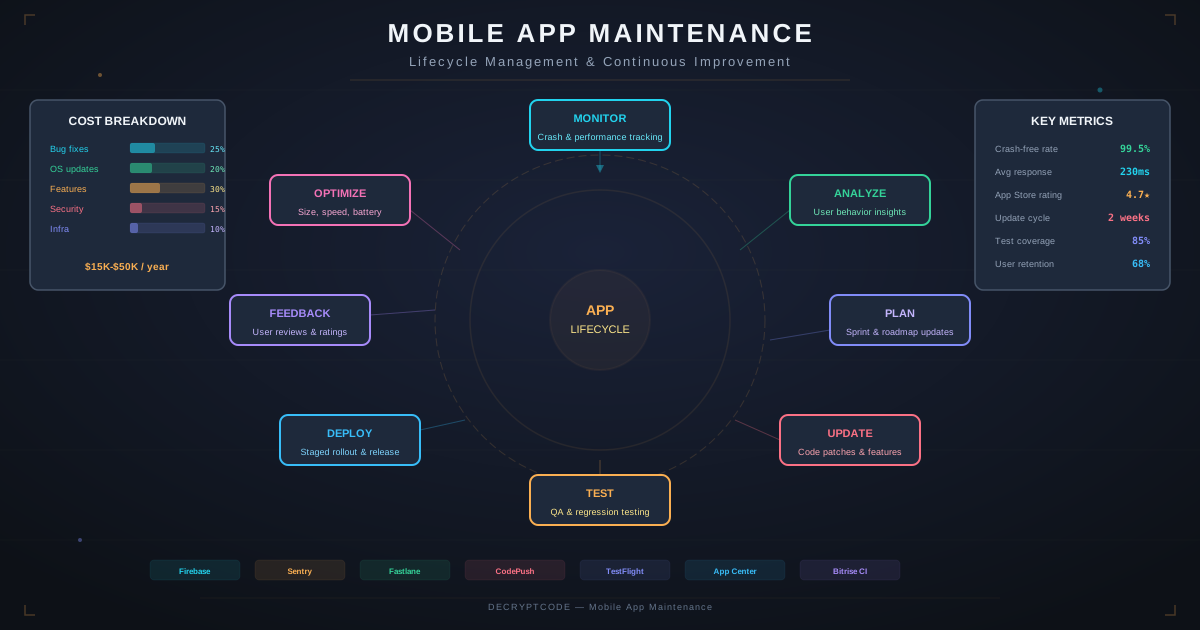
Key Takeaways
- Maintenance includes 4 types: corrective, adaptive, perfective, and preventive
- OS update cycles (iOS/Android) are the single biggest recurring maintenance activity
- Automated testing (80%+ coverage) and CI/CD reduce maintenance costs by 40-60%
- Proactive monitoring catches 70% of issues before users report them
- Plan for a major modernization or rebuild every 3-5 years
Types of Maintenance
| Type | Purpose | % of Effort | Examples |
|---|---|---|---|
| Corrective | Fix bugs and crashes | 20-25% | Crash fixes, data corruption, UI glitches |
| Adaptive | Keep compatible with environment changes | 25-30% | OS updates, SDK changes, API migrations, new devices |
| Perfective | Improve performance and UX | 25-30% | Speed optimization, UX refinements, accessibility |
| Preventive | Reduce future maintenance cost | 15-20% | Refactoring, tech debt reduction, test coverage |
Most teams spend too much on corrective and adaptive maintenance because they underinvest in preventive. Spending 15-20% on preventive work (refactoring, testing, documentation) reduces corrective costs over time.
OS Update Strategy
Annual OS Update Timeline
| Phase | iOS Timeline | Android Timeline | Action Required |
|---|---|---|---|
| Beta announcement | June (WWDC) | February (preview) | Review what's new, identify breaking changes |
| Developer beta | June-September | March-August | Test app on beta, file radar/bugs |
| Public release | September | August-October | Day-one compatibility release |
| Adoption window | 2-4 weeks | 3-6 months (fragmented) | Adopt new APIs, update UI for new guidelines |
| Target SDK update | April deadline | November deadline | Update target SDK for app store compliance |
OS Update Checklist
- Install beta on test devices on day one of developer beta
- Run full test suite — identify crashes and visual issues
- Review deprecated API usage — plan migration timeline
- Test with new permission changes (location, notifications, tracking)
- Update UI for new system components (navigation bars, sheets)
- Validate push notifications, widgets, app extensions
- Ship compatibility update before or on public release day
Dependency Management
A typical mobile app has 30-80 dependencies. Each is a potential maintenance burden.
Dependency Tiers
- Tier 1 — Critical (update immediately): Platform SDKs (iOS SDK, Android SDK), authentication, payment processors, crash reporting
- Tier 2 — Important (update monthly): Networking, database, analytics, push notifications, image loading
- Tier 3 — Low priority (update quarterly): UI libraries, animation frameworks, utility libraries
Automated Dependency Updates
- Dependabot / Renovate: Auto-create PRs for dependency updates. Configure per-tier update schedules.
- Lock files: Always commit Podfile.lock, package-lock.json, or gradle.lockfile. Reproducible builds prevent "works on my machine."
- Security scanning: Integrate Snyk, OWASP Dependency Check, or GitHub Advanced Security to flag vulnerable dependencies.
Monitoring & Observability
Essential Monitoring Stack
| Category | Tool Examples | What It Catches |
|---|---|---|
| Crash reporting | Firebase Crashlytics, Sentry | Crashes, ANRs, unhandled exceptions |
| Performance (APM) | Datadog Mobile, New Relic | Slow launches, network latency, UI jank |
| User analytics | Amplitude, Mixpanel | Feature usage, drop-off points, retention |
| Error tracking | Sentry, Bugsnag | Non-fatal errors, API failures, edge cases |
| Network monitoring | Charles Proxy, Proxyman | API failures, slow endpoints, payload issues |
| App store reviews | AppFollow, Appbot | User complaints, feature requests, competitive intel |
Alert Thresholds
- Crash-free rate: Alert if below 99.5% (99.9% target)
- App launch time: Alert if p95 exceeds 3s (cold start) or 1s (warm start)
- API error rate: Alert if above 1% for any endpoint
- ANR rate (Android): Alert if above 0.5%
- App size: Alert if binary exceeds budget (100MB iOS, 150MB Android recommended)
Testing Strategy
Test Pyramid for Mobile
- Unit tests (60%): Business logic, data transformations, view models. Fast, run on every commit.
- Integration tests (25%): API communication, database operations, navigation flows. Run on PR merge.
- UI/E2E tests (15%): Critical user journeys. Run nightly and before releases. Use Maestro, Detox, or XCUITest.
Testing Maintenance Activities
- Regression suite: Run full suite after any dependency update or OS migration
- Device matrix testing: Test on 10-15 representative device/OS combinations quarterly
- Performance regression: Benchmark startup time, memory, battery on each release
- Accessibility audit: Quarterly review with VoiceOver/TalkBack and accessibility scanner
- Security testing: Annual penetration test, automated SAST/DAST in CI
CI/CD Pipeline
A mature mobile CI/CD pipeline automates the most time-consuming maintenance tasks:
  ┌──────────┐    ┌──────────┐    ┌──────────┐
  │  Commit   │───►│  Build   │───►│  Test    │
  └──────────┘    └──────────┘    └──────────┘
                                       │
  ┌──────────┐    ┌──────────┐    ┌────▼─────┐
  │ Release   │◄──│  Review  │◄──│  Analyze  │
  └──────────┘    └──────────┘    └──────────┘
       │
  ┌────▼─────┐    ┌──────────┐
  │ TestFlight│───►│ App Store│
  │ / Internal│    │ / Play   │
└──────────┘ └──────────┘- Build: Compile, lint, check formatting — every commit (Fastlane, GitHub Actions, Bitrise)
- Test: Unit + integration tests — every PR
- Analyze: Code coverage, static analysis, dependency scan — every PR
- Review: Manual code review for logic changes, auto-merge for dependency updates with passing tests
- Release: Automated versioning, changelog generation, TestFlight/internal track upload
App Lifecycle Planning
Year-by-Year Strategy
- Year 1 (Stabilize): Fix post-launch bugs, optimize performance, establish monitoring. High maintenance activity.
- Year 2 (Optimize): Routine maintenance, feature refinements, build test coverage. Pay down tech debt from launch rush.
- Year 3 (Evaluate): Assess technology stack relevance. Plan for modernization if needed. Consider adopting new platform features.
- Year 4-5 (Modernize or Rebuild): Major framework updates (e.g., UIKit → SwiftUI, RN Old → New Architecture). If the stack is significantly behind, a strategic rebuild may cost less than ongoing maintenance.
When to Rebuild vs. Maintain
| Signal | Maintain | Rebuild |
|---|---|---|
| Framework status | Actively supported | Deprecated or end-of-life |
| Tech debt level | Manageable, isolated | Pervasive, blocking features |
| Developer hiring | Easy to find talent | Difficult to hire for the stack |
| Feature velocity | Features ship on schedule | Simple changes take weeks |
| Crash-free rate | Above 99.5% | Below 99% and declining |
For cost planning, see our mobile app maintenance cost breakdown.
Frequently Asked Questions
What does mobile app maintenance include?
OS compatibility updates, bug fixes, security patches, SDK updates, server maintenance, performance optimization, app store compliance, minor feature improvements, and monitoring. It's ongoing work that keeps the app functional and competitive.
How often should a mobile app be updated?
Monthly for bug fixes, within 48 hours for critical security patches, within 2-4 weeks of major OS releases. Major features quarterly. Apps not updated in 6+ months lose user trust and may face app store flags.
What happens if you don't maintain a mobile app?
Crashes increase after OS updates, security vulnerabilities go unpatched, integrations break, app store policies cause removal risk, ratings decline. Within 12-18 months, the app becomes unusable for many users.
Reliable App Maintenance
Fixed monthly plans with SLA guarantees — OS updates, security patches, and performance optimization included.
View Maintenance Plans