
Mobile App EHR Integration: FHIR, HL7 & Implementation Guide
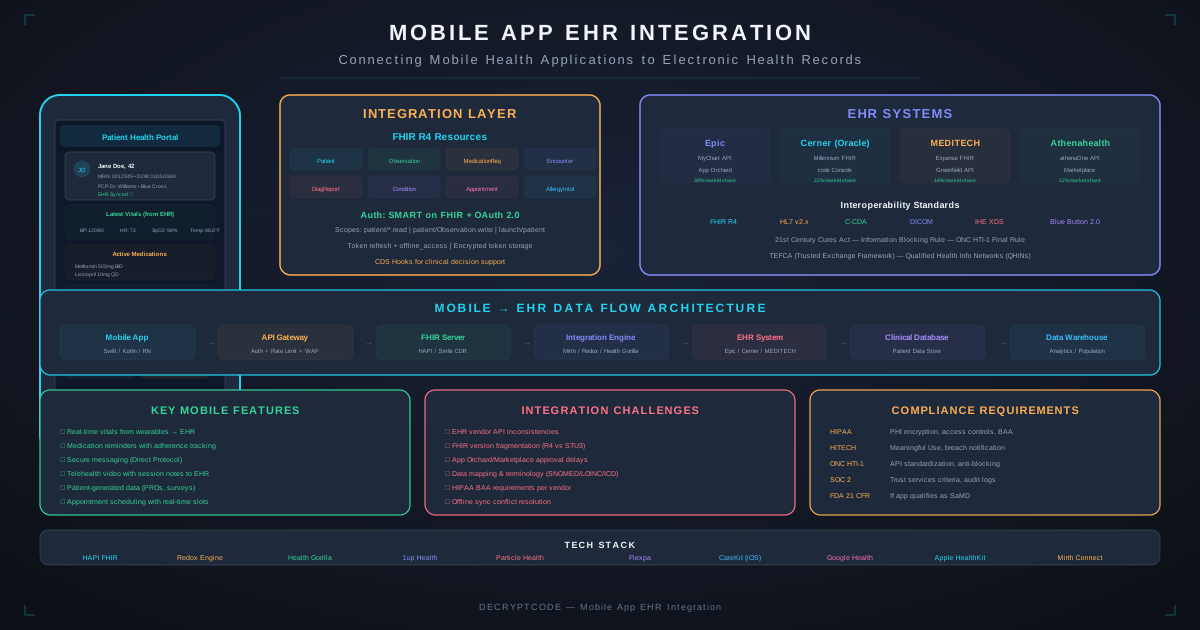
Integrating mobile apps with electronic health record systems is essential for healthcare workflows. FHIR R4 and SMART on FHIR have made it more accessible — but the vendor approval process and compliance requirements still demand careful planning.
Key Takeaways
- FHIR R4 is the standard for mobile EHR integration — RESTful, JSON-based, and mandated by the 21st Century Cures Act
- SMART on FHIR provides standardized OAuth 2.0 authorization for healthcare apps
- Vendor review processes (Epic App Orchard, Oracle Health Marketplace) often take longer than development
- Offline access to clinical data requires careful HIPAA-compliant local storage design
- Start with read-only integration, prove value, then expand to write operations
EHR Integration Landscape
The 21st Century Cures Act requires EHR vendors to provide standardized APIs for data access, transforming how mobile apps connect to clinical systems.
| EHR Vendor | Market Share (US) | API Platform | FHIR Version |
|---|---|---|---|
| Epic | ~38% | App Orchard / Open.Epic | FHIR R4 |
| Oracle Health (Cerner) | ~25% | Code Console / Marketplace | FHIR R4 |
| Meditech | ~16% | Greenfield / FHIR APIs | FHIR R4 |
| Allscripts/Veradigm | ~5% | Developer Portal | FHIR R4 |
| athenahealth | ~5% | More Disruption Please | FHIR R4 |
For AI-powered healthcare applications, see our healthcare AI development services and AI EHR integration guide.
FHIR R4 for Mobile
FHIR (Fast Healthcare Interoperability Resources) uses RESTful API conventions that mobile developers already know:
Common FHIR Resources
| Resource | Description | Mobile Use Case |
|---|---|---|
| Patient | Demographics, identifiers | Patient profile, search |
| Observation | Vitals, lab results, measurements | Health data display, charting |
| MedicationRequest | Prescriptions, medication orders | Medication list, refill requests |
| Condition | Diagnoses, problems | Problem list, health summary |
| AllergyIntolerance | Allergies, adverse reactions | Allergy alerts, safety checks |
| Appointment | Scheduled encounters | Scheduling, reminders |
| DocumentReference | Clinical documents, notes | Document viewer, PDF display |
| DiagnosticReport | Lab reports, imaging | Results viewer |
FHIR API Patterns
- Read:
GET /Patient/{id}— retrieve a single resource - Search:
GET /Observation?patient={id}&code=8867-4— search with parameters - Create:
POST /Observation— create new resource - Update:
PUT /Patient/{id}— update existing resource - Batch:
POST /with Bundle — multiple operations in one request
FHIR responses are JSON (or XML), making them straightforward to parse in Swift, Kotlin, or JavaScript.
SMART on FHIR
SMART on FHIR is the standardized OAuth 2.0 authorization framework for healthcare apps. It defines how apps authenticate, what data they can access, and how tokens are managed.
Launch Types for Mobile Apps
- Standalone launch: App opens independently, user authenticates, selects patient. Most common for patient-facing and clinical workflow apps.
- EHR launch: App is launched from within the EHR (e.g., Epic's embedded browser). Receives launch context (current patient, encounter) via token.
Scopes
SMART scopes define what data the app can access:
patient/Patient.read— read patient demographicspatient/Observation.read— read observations (vitals, labs)patient/MedicationRequest.read— read medicationslaunch/patient— receive patient context from EHR launchopenid fhirUser— get user identity
Request only the minimum scopes needed — the HIPAA minimum necessary principle applies.
Vendor-Specific Integration
Epic Integration
- Registration: Register app on Epic App Orchard (now called Epic App Market). Requires organization verification.
- Sandbox testing: Use Epic's sandbox FHIR server with synthetic data. Free for development.
- Review process: 4-12 weeks. Epic reviews security, HIPAA compliance, and clinical safety.
- Production access: Each health system must individually approve your app. Epic central approval enables, but doesn't guarantee, access.
Oracle Health (Cerner) Integration
- Registration: Register on Cerner Code Console. More developer-friendly than Epic historically.
- Sandbox: Open sandbox with synthetic data, self-service provisioning.
- Review: 3-8 weeks. Security review and clinical safety assessment.
- Production: Each health system activates through their Cerner admin console.
Timeline Planning
| Phase | Duration | Activities |
|---|---|---|
| Registration & sandbox setup | 1-2 weeks | Create developer accounts, configure sandbox |
| FHIR integration development | 4-8 weeks | Auth flow, resource parsing, error handling |
| Security & compliance | 2-4 weeks | Encryption, audit logging, HIPAA controls |
| Vendor review | 4-12 weeks | Submit for review, respond to feedback, revisions |
| Health system go-live | 2-6 weeks | Per-site configuration, testing, training |
Mobile Architecture for EHR Integration
  ┌──────────────────────────────────┐
  │          Mobile App              │
  │  ┌──────────┐  ┌─────────────┐  │
  │  │ Clinical  │  │ Local Cache │  │
  │  │ UI Views  │  │ (Encrypted) │  │
  │  └─────┬────┘  └──────┬──────┘  │
  │        │               │         │
  │  ┌─────▼───────────────▼──────┐  │
  │  │      FHIR Client Layer     │  │
  │  │  Resource Models │ Parser  │  │
  │  │  Auth Manager    │ Cache   │  │
  │  └──────────────┬─────────────┘  │
  └─────────────────┼────────────────┘
                    │ HTTPS + SMART Auth
  ┌─────────────────▼────────────────┐
  │        Your Backend (Optional)   │
  │  Token Proxy │ Aggregation       │
  │  AI Processing │ Audit Logs      │
  └─────────────────┬────────────────┘
                    │
  ┌─────────────────▼────────────────┐
  │        EHR FHIR Server           │
  │  Epic / Cerner / Meditech        │
  └──────────────────────────────────┘
Key Architectural Decisions
- Direct vs. proxy: Mobile app can call FHIR APIs directly (simpler) or through your backend proxy (more control, aggregation, AI processing).
- Local caching: Cache FHIR resources locally for performance. Encrypt all cached PHI. Implement cache invalidation based on resource version IDs.
- Offline access: For clinical apps used in low-connectivity areas, cache critical patient data locally with HIPAA-compliant encryption. See our offline-first guide.
- Error handling: EHR APIs can be slow (5-15 second response times) and have rate limits. Implement retry logic, timeout handling, and graceful degradation.
Data Models
FHIR Resource Mapping
Map FHIR resources to native app models. Key considerations:
- Coding systems: Medical data uses SNOMED CT, LOINC, ICD-10, RxNorm codes. Your app needs to display human-readable text while preserving coded values.
- Extensions: EHR vendors add custom FHIR extensions for vendor-specific data. Parse gracefully — don't fail on unknown extensions.
- Versions: Each FHIR resource has a version ID. Use for cache invalidation and optimistic concurrency on updates.
- References: FHIR resources reference each other (e.g., Observation references Patient). Implement lazy loading or batch retrieval for referenced resources.
Compliance Requirements
- HIPAA: All PHI must be encrypted at rest and in transit. Audit logging for all data access. Minimum necessary access. See our HIPAA mobile development guide.
- 21st Century Cures Act: Prohibits information blocking. Apps must allow patients to access their data. APIs must be standards-based (FHIR).
- ONC Health IT Certification: If your app needs certification, it must meet ONC criteria including FHIR US Core Profile compliance.
- State regulations: Some states have additional requirements (e.g., California CMIA, New York SHIELD Act).
For our production EHR integration work, see the AI EHR onboarding case study where we achieved 82% faster data processing.
Frequently Asked Questions
What is FHIR and why does it matter for mobile apps?
FHIR is a healthcare data exchange standard using RESTful JSON APIs. It's mandated by the Cures Act and supported by all major EHRs. Mobile developers can use familiar HTTP/JSON patterns to access clinical data.
How long does EHR integration take?
3-6 months total: 4-8 weeks development, 4-12 weeks vendor review, 2-6 weeks per health system go-live. The vendor review process is typically the longest phase.
What data can mobile apps access from EHRs?
Via FHIR R4: patient demographics, medications, allergies, conditions, lab results, vitals, immunizations, procedures, clinical notes, care plans, and appointments. Access requires SMART on FHIR authorization and HIPAA compliance.
Build EHR-Integrated Mobile Apps
From FHIR integration to Epic App Orchard approval — we build healthcare mobile apps that connect to your clinical systems.
Explore Healthcare Solutions