
Mobile AI Agent Integration: Building Smart Apps
AI agents are transforming mobile apps from passive tools to proactive assistants. This guide covers architecture patterns for integrating AI agents — from on-device inference to cloud-powered multi-step reasoning — with practical UX patterns and production considerations.
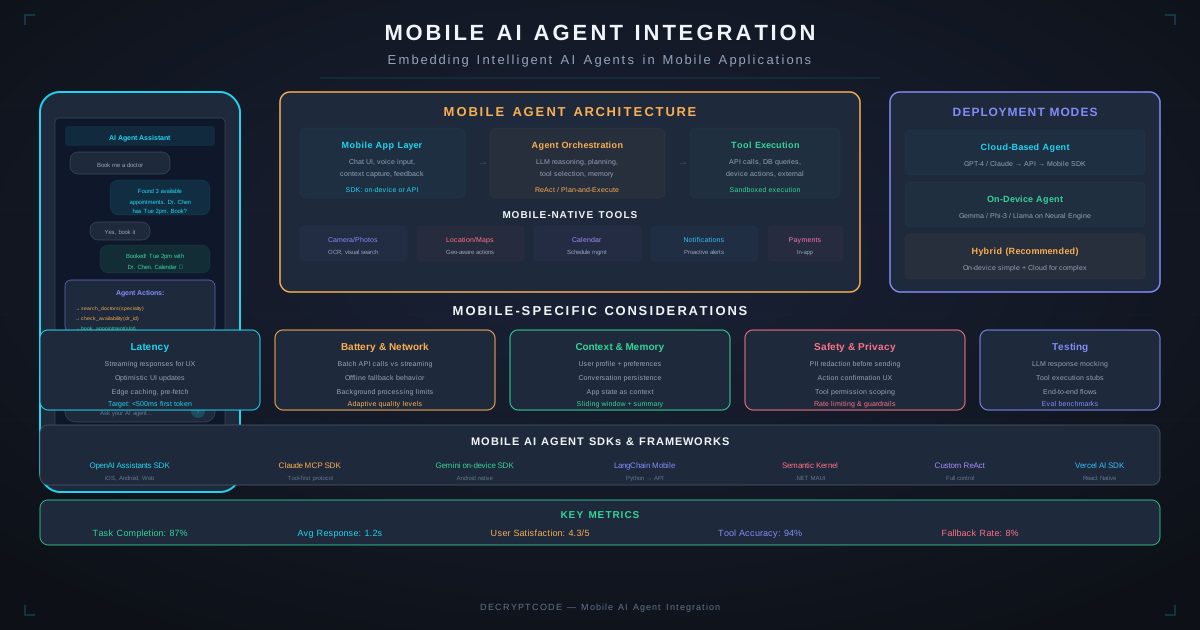
Key Takeaways
- Mobile AI agents combine LLM reasoning with app-native actions (navigation, data access, system APIs)
- Hybrid architecture works best: on-device for quick tasks + cloud for complex multi-step reasoning
- Tool use (function calling) lets agents interact with app features, APIs, and device capabilities
- UX matters as much as AI quality — show agent progress, enable interruption, confirm destructive actions
- Guardrails are essential: scope permissions, validate agent outputs, implement human-in-the-loop for sensitive actions
What Are Mobile AI Agents
Mobile AI agents go beyond simple chatbots. They are autonomous systems that can reason about user intent, plan multi-step actions, use app features as tools, and execute workflows — all within a mobile app context.
Examples of mobile AI agent capabilities:
- Healthcare: "Schedule my next appointment based on my treatment plan and preferred times" — the agent checks the treatment plan, finds available slots matching the patient's calendar, and books the appointment.
- Finance: "Why did my spending increase this month?" — the agent analyzes transaction categories, compares to previous months, identifies outliers, and presents insights with visualizations.
- Field service: "Diagnose the issue with unit #4723" — the agent pulls maintenance history, analyzes sensor data, cross-references known issues, and suggests repair procedures.
- E-commerce: "Find me running shoes similar to what I bought last year but in the $80-$120 range" — the agent retrieves purchase history, searches inventory, filters by price, and presents options.
For foundational agent patterns, see our AI agents guide and LangGraph multi-agent guide.
Architecture Patterns
Pattern 1: Cloud-First Agent
User Input → Mobile App → API Gateway → Agent Server
                                        ├─ LLM (reasoning)
                                        ├─ Tools (APIs, DB, search)
                                        ├─ Memory (conversation state)
                                        └─ Response → Streaming → Mobile App
Best for: Complex reasoning, multi-step workflows, data-intensive tasks. Requires network connectivity.
Pattern 2: On-Device Agent
User Input → Local LLM (Phi/Gemma/Apple FM)
           → Tool Router (device APIs, local DB)
           → Action Execution (on-device)
           → Response → UI Update
Best for: Privacy-sensitive, offline-capable, simple tasks. Limited by on-device model capability.
Pattern 3: Hybrid Agent (Recommended)
User Input → Intent Classifier (on-device, fast)
           ├─ Simple task → On-Device Agent → Response
           └─ Complex task → Cloud Agent (streaming) → Response
                           ├─ Uses mobile tools via callback
                           └─ Falls back to on-device if offline
The hybrid pattern routes simple tasks to on-device models (instant response, zero API cost) and complex tasks to cloud models (better reasoning, more tools). An on-device intent classifier decides the routing in <50ms.
On-Device Agents
On-device agents run small language models locally for reasoning and tool use:
| Model | Platform | Parameters | Capabilities |
|---|---|---|---|
| Apple Foundation Models | iOS 19+ | ~3B (on-device) | Summarization, composition, entity extraction, app intents |
| Gemini Nano | Android 14+ | ~1.8-3.25B | Summarization, smart reply, entity extraction |
| Phi-4 Mini (quantized) | iOS / Android | 3.8B | Reasoning, code, multi-step instructions |
| Llama 3.2 (quantized) | iOS / Android | 1B / 3B | General assistant, tool use, conversation |
On-device models work well for:
- Text summarization and rewriting
- Simple Q&A over local data
- Form auto-fill and smart suggestions
- Entity extraction (names, dates, amounts from text)
- Classification and intent detection
See our edge AI guide and Core ML vs TFLite comparison for implementation details.
Cloud Agent Integration
Streaming Architecture
Always use streaming for cloud agent responses. Users expect immediate feedback:
// Swift - Server-Sent Events for agent streaming
func streamAgentResponse(prompt: String) async throws {
    let request = URLRequest(url: agentEndpoint)
    let (stream, _) = try await URLSession.shared.bytes(for: request)

    for try await line in stream.lines {
        if line.hasPrefix("data: ") {
            let event = parseSSE(line)
            switch event.type {
            case .thinking: updateThinkingUI(event.content)
            case .toolCall: showToolExecution(event.tool)
            case .token: appendToResponse(event.content)
            case .done: finalizeResponse()
            }
        }
    }
}
Conversation Memory
Mobile agents need persistent memory across sessions:
- Short-term: Current conversation context. Store in memory, clear on session end.
- Medium-term: Recent interactions and preferences. Store encrypted on-device, sync to server.
- Long-term: User profile, learned preferences, interaction history. Server-side with on-device cache.
For enterprise memory patterns, see our AI agents autonomous systems guide.
Tool Use & Actions
The power of mobile agents comes from tool use — the agent can invoke app features, device APIs, and external services as "tools" during reasoning:
App-Native Tools
- Navigation: Open specific screens, perform searches, apply filters
- Data access: Read local databases, query API endpoints, access user preferences
- Content creation: Generate documents, create calendar events, compose messages
- Device APIs: Camera, location, contacts, health data (with permissions)
Tool Definition Example
// Define tools the agent can use
let tools = [
    AgentTool(
        name: "search_products",
        description: "Search product catalog by query, category, and price range",
        parameters: [
            .string("query", required: true),
            .string("category", required: false),
            .number("minPrice"), .number("maxPrice")
        ],
        handler: { params in
            return try await productAPI.search(params)
        }
    ),
    AgentTool(
        name: "get_order_history",
        description: "Retrieve user's past orders with optional date filter",
        parameters: [.string("since_date")],
        handler: { params in
            return try await orderService.getHistory(params)
        }
    ),
    AgentTool(
        name: "navigate_to_screen",
        description: "Navigate user to a specific app screen",
        parameters: [.string("screen_id", required: true)],
        handler: { params in
            await router.navigate(to: params["screen_id"])
            return "Navigated to \(params["screen_id"])"
        }
    )
]
Multi-Step Execution
Complex agent tasks require multiple tool calls in sequence. The agent reasons about results from each step before deciding the next action. Show each step to the user as it executes — this builds trust and allows interruption.
UX Design Patterns
Agent UX is fundamentally different from traditional chatbot UX. Key patterns:
1. Progress Transparency
Show what the agent is doing at each step: "Checking your order history…" → "Found 3 recent orders" → "Comparing prices…" → "Here's what I found." Users tolerate latency when they see progress.
2. Confirmation for Actions
Distinguish between read-only and write actions. Read-only (search, analyze) can execute automatically. Write actions (book, purchase, delete, send) must require explicit user confirmation before execution.
3. Inline Results
Present agent results using native app UI components — product cards, charts, maps — not just text. The agent should output structured data that the app renders natively.
4. Interruption & Correction
Let users stop the agent mid-execution and redirect. "Actually, search in Electronics instead." The agent should handle mid-stream corrections gracefully.
5. Graceful Degradation
When the agent can't complete a task, provide actionable fallback: "I couldn't find that automatically. Here's the search screen with your filters pre-filled."
6. Proactive Suggestions
Agents shouldn't only respond to prompts. Use contextual triggers: arriving at a location, opening the app at a certain time, viewing a specific screen — to offer proactive, relevant suggestions.
Security & Guardrails
- Scope permissions: Define exactly which tools each agent can access. A customer-facing agent shouldn't have admin tools.
- Input validation: Sanitize all user inputs before passing to the LLM. Guard against prompt injection attacks.
- Output validation: Validate agent tool calls before execution. Check parameter types, ranges, and authorization.
- Rate limiting: Limit agent actions per session (e.g., max 20 tool calls per conversation) to prevent runaway loops.
- Human-in-the-loop: Require user confirmation for sensitive actions: financial transactions, data deletion, sharing personal information, health-related decisions.
- Audit trail: Log every agent action, tool call, and decision. Essential for debugging and compliance (especially HIPAA and financial regulations).
Cost Optimization
| Strategy | Savings | Trade-off |
|---|---|---|
| Model routing (simple→small, complex→large) | 50-70% | Latency for routing decision (~50ms) |
| On-device for common tasks | 100% (no API cost) | Limited model capability |
| Response caching | 30-50% | Stale responses for dynamic data |
| Prompt caching (Anthropic) | Up to 90% | System prompt must be stable |
| Batch API for non-urgent tasks | 50% | Higher latency (minutes vs seconds) |
| Shorter context (summarize history) | 20-40% | May lose conversation nuance |
For detailed cost analysis, see our AI agent development cost guide and ROI calculator.
Frequently Asked Questions
Can AI agents run entirely on-device?
Simple agents with small models (<3B params) can run on-device. Complex multi-step reasoning typically needs cloud models. Hybrid architecture — on-device for quick tasks, cloud for complex ones — works best.
How do I handle latency for AI agents in mobile apps?
Stream responses, show step-by-step progress, cache common responses, and pre-warm connections. Target <500ms for first token, <3 seconds for simple completions.
What are the costs of running AI agents in a mobile app?
$0.002-$0.06 per agent call. For 10K DAU with 5 calls/day: $300-$9,000/month. Optimize with model routing, on-device for simple tasks, and caching.
Build AI-Powered Mobile Apps
From agent architecture to production deployment — our team builds intelligent mobile experiences.
Discuss Your AI App