
Model Context Protocol (MCP): The Open Standard Reshaping Enterprise AI Tool Use
MCP solves a fragmentation problem that's been blocking enterprise AI adoption: every tool integration required bespoke code, model-specific schemas, and brittle prompt engineering. MCP standardizes that interface — build once, connect to any model.
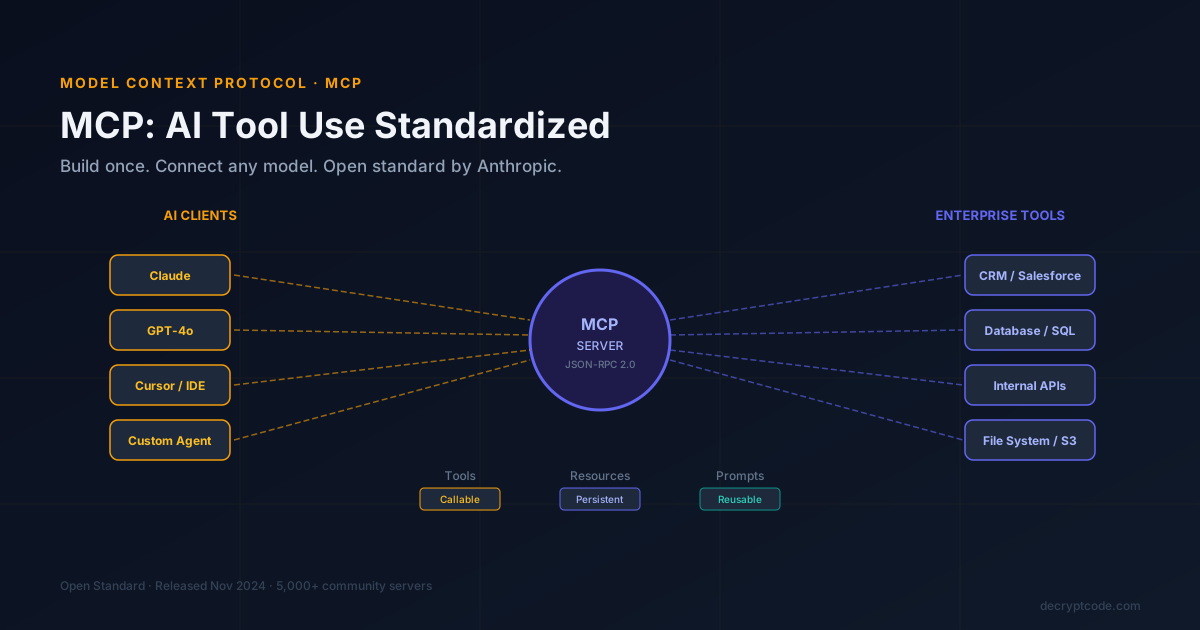
Table of Contents
What Is MCP?
Model Context Protocol (MCP) is an open standard released by Anthropic in November 2024. It defines a universal interface for AI models to interact with external tools, APIs, and data sources. Think of it as USB-C for AI integrations: a single, standardized connector that works regardless of which AI model or host application you're using.
Before MCP, connecting an AI agent to your internal systems meant writing custom glue code for every model you wanted to use — different schemas for OpenAI function calling, different patterns for Claude tool use, different SDK abstractions for each framework. MCP replaces that fragmentation with a single protocol that any compliant client can speak.
Protocol Architecture
MCP uses a client-server architecture over JSON-RPC 2.0. The three core primitives are:
- Tools — Callable functions the AI can invoke. Example:
search_crm_contacts(query: string),create_calendar_event(…). Similar to function calling, but model-agnostic. - Resources — Persistent data the AI can read. Example: the full contents of a document, a database row, a file. Resources have URIs and can be subscribed to for change notifications.
- Prompts — Reusable, parameterized prompt templates. Teams can share standardized prompts for common tasks and keep them versioned in the MCP server.
Transport Mechanisms
MCP supports two transports: stdio (subprocess, for local tools like a file system server) and HTTP with SSE (Server-Sent Events, for remote servers). The HTTP transport enables centralized enterprise MCP servers that multiple AI clients can connect to simultaneously.
MCP vs. Function Calling
| Factor | Function Calling (OpenAI) | Model Context Protocol |
|---|---|---|
| Scope | Model-specific API feature | Open, model-agnostic standard |
| Schema definition | Inline in each API request | Defined once in MCP server |
| Reuse across models | No — must re-implement per model | Yes — one server, any client |
| Resources (data) | No native concept | First-class primitive |
| Prompt templates | No | Yes |
| Discovery | None — static schemas | Dynamic capability listing |
| Streaming | Supported | Supported via SSE |
Building Your First MCP Server
The official SDKs support Python and TypeScript. A minimal Python MCP server exposing a CRM search tool looks like this:
from mcp.server import Server
from mcp.server.models import InitializationOptions
import mcp.types as types

app = Server("crm-mcp-server")

@app.list_tools()
async def list_tools() -> list[types.Tool]:
    return [
        types.Tool(
            name="search_contacts",
            description="Search CRM contacts by name or email",
            inputSchema={
                "type": "object",
                "properties": {
                    "query": {"type": "string", "description": "Search term"},
                    "limit": {"type": "integer", "default": 10}
                },
                "required": ["query"]
            }
        )
    ]

@app.call_tool()
async def call_tool(name: str, arguments: dict) -> list[types.TextContent]:
    if name == "search_contacts":
        results = await crm_client.search(arguments["query"])
        return [types.TextContent(type="text", text=format_results(results))]
Run the server with mcp run server.py and connect any MCP-compatible client to it immediately.
Enterprise Integration Patterns
Centralized Enterprise MCP Gateway
Rather than deploying one MCP server per data source, build a gateway that routes tool calls to the appropriate internal service. The gateway handles authentication (OAuth 2.0 / API keys), rate limiting, and audit logging centrally. Individual data connectors register with the gateway at startup.
Read-Only vs. Read-Write Servers
Separate your MCP servers by trust level. A read-only server for your knowledge base can be shared broadly. A read-write server that can create CRM records or send emails needs tighter access control — connect it only to agents that explicitly need write access.
Context-Aware Tool Filtering
Dynamically filter which tools are exposed to the LLM based on the current user's role and the active task. An AI agent operating in "customer support" mode gets different tools than the same agent in "sales" mode — even if they share the same underlying MCP server.
Security Hardening
- Input validation — Validate all tool arguments against JSON Schema before calling backend systems. Never pass raw LLM output to SQL queries or shell commands.
- Tool injection defense — If your MCP server reads external content (web pages, emails, documents), the content could contain adversarial instructions. Sanitize and clearly separate data from instructions.
- Principle of least privilege — Each MCP server should have only the permissions it needs. A document search server doesn't need database write access.
- Audit logging — Log every tool call: which agent called it, with what arguments, what was returned, and the latency. This is essential for debugging and compliance.
- Rate limiting — AI agents can call tools in tight loops. Rate-limit at the gateway layer to prevent accidental DoS of internal systems.
2026 MCP Ecosystem
The MCP ecosystem grew rapidly. Key server implementations available today:
- Official Anthropic servers — Filesystem, Git, PostgreSQL, Brave Search, Slack, Google Drive
- Community servers — 5,000+ on GitHub covering AWS, GitHub, Linear, Notion, Jira, Salesforce, HubSpot
- Enterprise vendors — Atlassian, ServiceNow, SAP, and Workday have released or announced official MCP servers
For enterprise deployments, we recommend the official MCP servers as starting points and building custom wrappers for proprietary internal systems rather than building from scratch.
Frequently Asked Questions
Model Context Protocol is an open standard created by Anthropic (released November 2024) that defines how AI models communicate with external tools and data sources. An MCP server exposes capabilities (tools, resources, prompts) via a standardized JSON-RPC 2.0 interface; an MCP client (like Claude Desktop or a custom AI agent) connects and uses those capabilities dynamically.
OpenAI function calling is model-specific and requires you to define tool schemas inline in each API request. MCP is a standalone protocol: you build an MCP server once and any MCP-compatible client — Claude, Cursor, your own agent — can connect to it without changes. MCP also supports resources (persistent data) and prompts (reusable templates), not just tool calls.
Yes. While Anthropic created MCP, it is an open standard. As of 2026, MCP is supported by Claude (native), OpenAI (GPT models via compatibility layer), Google Gemini (via third-party adapters), and many agentic frameworks including LangChain, LangGraph, and AutoGen.
The main risks are: (1) tool injection — a malicious data source returns instructions that trick the LLM into calling unintended tools; (2) over-permissioned MCP servers that expose write operations when only read is needed; (3) unvalidated inputs passed from the LLM to backend systems. Mitigate with strict input validation, read-only defaults, tool whitelisting per agent, and audit logging of all tool calls.