
LangChain vs Custom Pipeline: When to Build Your Own AI Agent Framework
LangChain accelerates prototyping but introduces abstraction complexity that becomes a liability in production. Here's how to decide between framework convenience and custom control for enterprise AI agents.
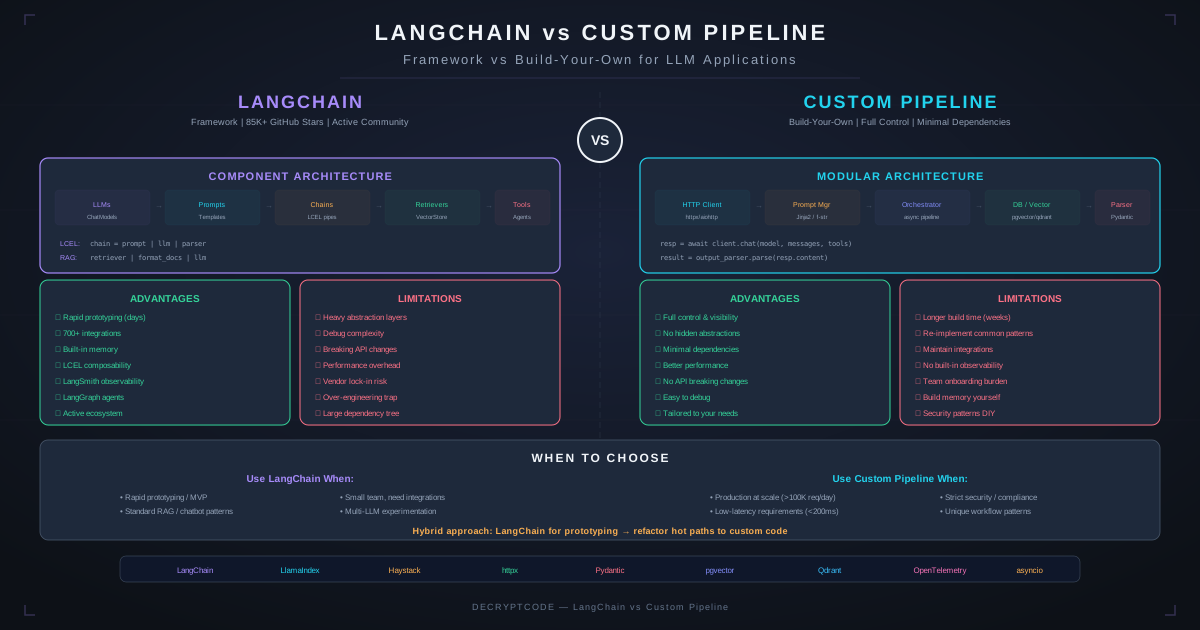
Key Takeaways
- LangChain is ideal for prototyping and simple chains; custom pipelines are better for production multi-agent systems
- LangChain's abstraction layers add 200-400ms latency and obscure debugging in production
- LangGraph (same maintainers) is significantly better for agent orchestration than vanilla LangChain
- Custom pipelines cost 2-4 weeks more upfront but save 4-8 weeks over the project lifecycle
- Most production AI systems we build use LangGraph for orchestration + direct API calls for LLM interaction
Quick Answer
For enterprise production AI agents, we recommend LangGraph for orchestration with direct LLM API calls — not vanilla LangChain. LangChain's chain abstraction adds unnecessary complexity for production systems, while LangGraph's state machine approach gives you both structure and control. For simple, single-step LLM tasks, direct API calls with a thin wrapper are the better choice.
Where LangChain Excels
Rapid Prototyping
LangChain's primary value is speed-to-first-demo. You can have a working RAG chatbot in 50 lines of code. For hackathons, demos, and proof-of-concepts, this speed is genuinely valuable. We use LangChain internally for rapid prototyping before deciding on production architecture.
Ecosystem Integrations
LangChain has pre-built integrations with 80+ vector stores, 50+ LLM providers, and 100+ document loaders. If you need a quick integration with an obscure data source, LangChain probably has a community connector.
Community & Documentation
The largest AI framework community on GitHub. Abundant tutorials, examples, and Stack Overflow answers. Developers new to AI can get productive quickly with LangChain's learning resources.
Standardized Interfaces
LangChain's Runnable interface provides a consistent API across LLM providers. Switching from OpenAI to Anthropic requires changing one line of code. This portability has real value for teams that want provider flexibility.
Where LangChain Falls Short
Abstraction Overhead
LangChain wraps every LLM call in multiple layers: BaseLLM → ChatModel → Runnable → Chain → Agent. Each layer adds latency, memory overhead, and debugging complexity. In production, we've measured 200-400ms of pure framework overhead per LLM call.
This might be negligible for a chatbot answering one question at a time. For a multi-agent system making 20+ LLM calls per workflow, it adds 4-8 seconds of unnecessary latency.
Debugging Nightmare
When a LangChain agent fails, the stack trace traverses 15+ framework files before reaching your code. Identifying whether the failure is in your prompt, your tool, LangChain's parsing, or the LLM's response requires deep framework knowledge.
We spent 3 days debugging a production issue that turned out to be LangChain's output parser silently truncating JSON responses. With direct API calls, this would have been a 15-minute fix.
Version Instability
LangChain has shipped breaking changes in minor versions. Production systems pinned to langchain==0.1.x can't easily upgrade without regression testing the entire framework layer. We've seen teams stuck on 6-month-old versions because upgrading would break production.
Over-Abstraction of Simple Tasks
Making a single LLM API call with LangChain requires importing 3-5 modules and understanding the Runnable protocol. The same call with the OpenAI SDK is 4 lines of code. For simple tasks, LangChain adds complexity without value.
The Case for Custom Pipelines
Full Control
Custom pipelines give you direct access to every parameter: temperature, token limits, retry logic, timeout handling, and streaming behavior. No framework opinions between your code and the LLM.
Debuggability
When something fails, the stack trace shows your code. Logging is straightforward. You can add breakpoints anywhere. Production debugging time drops by 60-80% compared to framework-heavy architectures.
Performance
Direct API calls eliminate framework overhead. Custom connection pooling, request batching, and caching can be optimized for your specific access patterns. We've achieved 3-5× throughput improvements by moving from LangChain to custom pipelines.
When Custom Pipelines Make Sense
- Multi-agent systems with complex orchestration logic
- High-throughput systems (1000+ LLM calls/minute)
- Systems requiring sub-second latency
- Teams with strong Python engineering capabilities
- Long-lived production systems (12+ months expected lifecycle)
When Custom Pipelines Are Overkill
- Single-step LLM tasks (use direct API calls with a thin wrapper)
- Prototypes and demos (use LangChain)
- Teams without production Python experience
- Projects with uncertain requirements (framework flexibility helps during exploration)
LangGraph: The Middle Ground
LangGraph, built by the LangChain team, is a fundamentally different architecture. Instead of chains, it uses state machines with directed graphs. This is the approach we use for most production AI agent systems.
Why LangGraph Works for Production
- Explicit State: Agent state is a typed dictionary, not hidden in chain internals. You can inspect, modify, and persist state at any point.
- Graph-Based Flow: Agent logic is a directed graph with conditional edges. Complex workflows are visible and debuggable as a diagram.
- Human-in-the-Loop: Built-in support for pausing execution, waiting for human input, and resuming. Essential for enterprise agents with approval gates.
- Checkpointing: Automatic state persistence enables retry from any node, not just the beginning. Critical for long-running multi-agent workflows.
LangGraph vs. Vanilla LangChain
LangGraph is what LangChain agents should have been. It replaces the opaque AgentExecutor with explicit graph definitions. We've migrated 4 production systems from LangChain agents to LangGraph with performance improvements of 40-60% and debugging time reduction of 70%.
Side-by-Side Comparison
| Factor | LangChain | LangGraph | Custom Pipeline |
|---|---|---|---|
| Prototype Speed | Fastest | Fast | Slowest |
| Production Debugging | Poor | Good | Best |
| Performance | Lowest | Good | Best |
| Flexibility | Limited by abstractions | High | Unlimited |
| Learning Curve | Medium | Medium-High | High (initially) |
| Community Support | Largest | Growing | None (your team) |
| Multi-Agent Support | Basic | Excellent | Custom (full control) |
| Vendor Lock-in | Medium | Medium | None |
| Maintenance Burden | Framework updates | Framework updates | Self-maintained |
Decision Framework
Use LangChain when: Building a demo in less than a week, exploring integrations, or your team is new to AI engineering.
Use LangGraph when: Building production AI agents with stateful workflows, human-in-the-loop, and multi-agent coordination. This is our default recommendation for most enterprise projects.
Use Custom Pipeline when: Maximum performance is critical, your team has strong Python engineering, or you need capabilities outside any framework's scope.
Use Direct API Calls when: Simple single-step LLM tasks. Don't add framework complexity for a function that calls an API and returns a response.
Migrating Off LangChain
If you've outgrown LangChain, migration typically takes 2-4 weeks per agent:
- Week 1: Replace LLM wrappers with direct API calls (OpenAI SDK, Anthropic SDK)
- Week 2: Replace chain logic with LangGraph graphs or custom Python functions
- Week 3: Replace document loaders/text splitters with direct implementations
- Week 4: Replace vector store wrappers with direct client libraries
The payoff is immediate: faster debugging, better performance, and elimination of framework version anxiety.
Frequently Asked Questions
Should I use LangChain for my AI agent?
For prototypes, yes. For production multi-agent systems, use LangGraph or custom pipelines. LangChain's abstractions add complexity that becomes a liability at scale.
What are the alternatives to LangChain?
LangGraph (agent orchestration), LlamaIndex (RAG-focused), Haystack (document pipelines), CrewAI (multi-agent), AutoGen (Microsoft), or custom Python with direct API calls.
How long does it take to build a custom AI pipeline?
2-4 weeks longer than LangChain initially, but saves 4-8 weeks over the project lifecycle in debugging and customization. Total cost is often lower.
Building AI Agents for Production?
We've built multi-agent systems with LangGraph and custom pipelines for CRM, compliance, and healthcare. Let's discuss the right architecture for your project.
Discuss Your Architecture