
Kotlin Multiplatform for Enterprise Mobile Apps
Kotlin Multiplatform (KMP) lets you share business logic between iOS and Android while keeping native UI. This guide covers architecture, shared code strategies, the expect/actual mechanism, Compose Multiplatform, and how enterprises are adopting KMP.
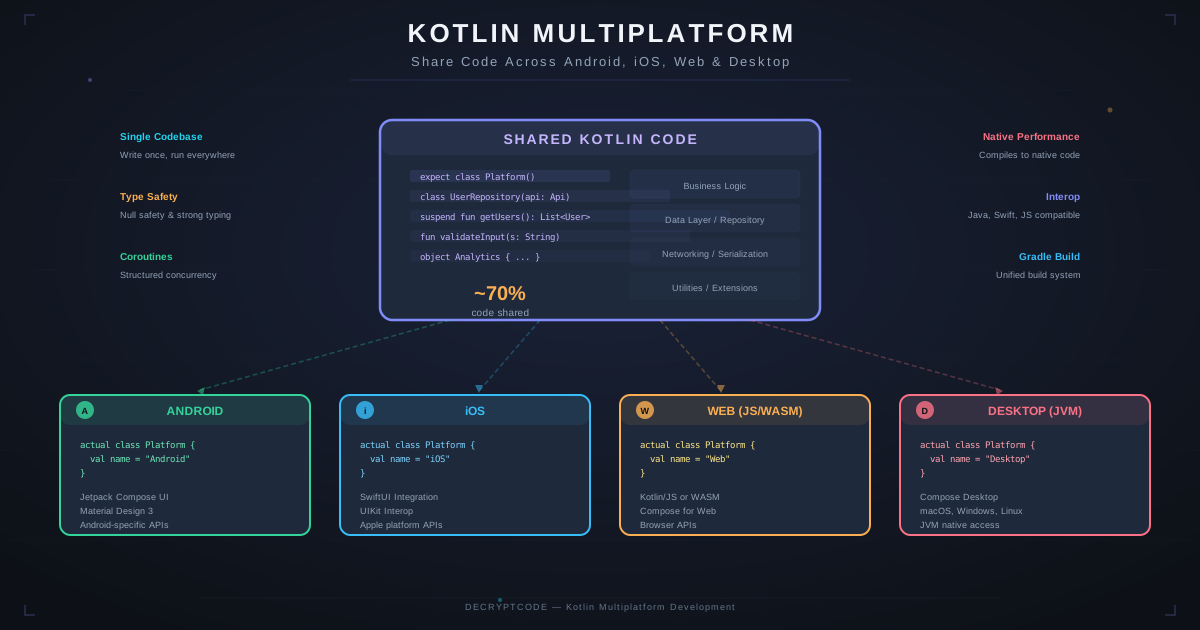
Key Takeaways
- KMP shares business logic (50-70%) while iOS stays SwiftUI and Android stays Jetpack Compose
- Shared code compiles to native binaries — no runtime performance penalty
- Expect/actual pattern handles platform differences elegantly
- KMP libraries (Ktor, SQLDelight, Koin) cover networking, data, and DI without platform-specific code
- Ideal for enterprises migrating from native apps — adopt incrementally, module by module
What Is Kotlin Multiplatform
Kotlin Multiplatform is a technology from JetBrains that enables writing shared code in Kotlin that compiles to platform-native binaries. Unlike React Native or Flutter, KMP doesn't mandate a shared UI framework — you write native UI (SwiftUI on iOS, Jetpack Compose on Android) and share the layers underneath.
The shared layer typically includes:
- Data models and DTOs
- API clients (networking)
- Business logic and validation
- Database queries and caching
- Analytics event tracking
- Feature flags and configuration
On iOS, the shared Kotlin code compiles to a native framework (via Kotlin/Native) that Swift code imports like any other dependency. On Android, it's standard Kotlin — zero overhead.
KMP Architecture
┌──────────────────────────────────────────┐
│          iOS App (Swift/SwiftUI)          │
│   ┌─────────────────────────────────┐    │
│   │  SwiftUI Views + Navigation     │    │
│   │  Platform-specific features     │    │
│   └──────────┬──────────────────────┘    │
│              │  uses                      │
│   ┌──────────▼──────────────────────┐    │
│   │  Shared KMP Module (.framework) │    │
│   │  ├─ Models                      │    │
│   │  ├─ API Client (Ktor)           │    │
│   │  ├─ Repository Layer            │    │
│   │  ├─ Use Cases / Business Logic  │    │
│   │  ├─ Local DB (SQLDelight)       │    │
│   │  └─ DI (Koin)                   │    │
│   └─────────────────────────────────┘    │
└──────────────────────────────────────────┘

┌──────────────────────────────────────────┐
│      Android App (Kotlin/Compose)        │
│   ┌─────────────────────────────────┐    │
│   │  Compose UI + Navigation        │    │
│   │  Platform-specific features     │    │
│   └──────────┬──────────────────────┘    │
│              │  uses (directly)           │
│   ┌──────────▼──────────────────────┐    │
│   │  Shared KMP Module (Kotlin)     │    │
│   │  (same code as iOS shared)      │    │
│   └─────────────────────────────────┘    │
└──────────────────────────────────────────┘
The key architectural principle: UI and platform-specific code live in platform modules. Everything else goes in the shared module.
Expect / Actual Pattern
KMP's expect/actual mechanism handles platform differences. Declare an expected interface in common code, provide actual implementations per platform:
// Common (shared) code
expect class SecureStorage {
    fun saveToken(key: String, value: String)
    fun getToken(key: String): String?
    fun deleteToken(key: String)
}

// iOS implementation (actual)
actual class SecureStorage {
    actual fun saveToken(key: String, value: String) {
        // Uses iOS Keychain
        KeychainWrapper.standard.set(value, forKey: key)
    }
    actual fun getToken(key: String): String? {
        return KeychainWrapper.standard.string(forKey: key)
    }
    actual fun deleteToken(key: String) {
        KeychainWrapper.standard.removeObject(forKey: key)
    }
}

// Android implementation (actual)
actual class SecureStorage(private val context: Context) {
    private val prefs = EncryptedSharedPreferences.create(/*...*/)
    actual fun saveToken(key: String, value: String) {
        prefs.edit().putString(key, value).apply()
    }
    actual fun getToken(key: String): String? {
        return prefs.getString(key, null)
    }
    actual fun deleteToken(key: String) {
        prefs.edit().remove(key).apply()
    }
}
Common use cases for expect/actual: secure storage, file I/O, date/time formatting, device info, biometric auth, logging, analytics SDK calls.
KMP Library Ecosystem
| Category | Library | Description |
|---|---|---|
| Networking | Ktor | HTTP client with serialization, auth, logging. Works on all platforms. |
| Serialization | kotlinx.serialization | JSON/CBOR/Protobuf serialization. Compiler plugin, no reflection. |
| Database | SQLDelight | Type-safe SQL queries. Generates Kotlin from SQL files. iOS/Android/Desktop. |
| Coroutines | kotlinx.coroutines | Async/await, Flow. Works across all KMP targets. |
| DI | Koin | Lightweight dependency injection. KMP support is first-class. |
| Date/Time | kotlinx-datetime | Cross-platform date/time handling. |
| Settings/Prefs | multiplatform-settings | Key-value storage abstraction. |
| Navigation | Decompose / Voyager | Shared navigation graph with platform renderers. |
| Image Loading | Coil 3 | Image loading for Compose Multiplatform. |
Compose Multiplatform
Compose Multiplatform extends Jetpack Compose to iOS, desktop, and web. Instead of writing native UI per platform, you write Compose once:
- Android: Standard Jetpack Compose — fully mature, Google-backed
- iOS: Beta status in 2026 — renders via Skiko (Skia), good performance, growing adoption
- Desktop: Stable — JVM-based, Swing/AWT integration
- Web: Alpha — Kotlin/Wasm or Kotlin/JS targets
When to use Compose Multiplatform: When you prefer maximum code sharing over platform-native UI fidelity. Good for internal tools, dashboards, and apps where custom branding matters more than following platform design guidelines.
When to keep native UI: Consumer-facing enterprise apps where iOS users expect iOS patterns and Android users expect Material Design. Healthcare, finance, and regulated industries where platform conventions build user trust.
For framework comparison including Compose Multiplatform, see our React Native vs Flutter vs KMP guide.
Migration Strategy
KMP's biggest advantage is incremental adoption. You don't rewrite — you migrate module by module:
- Phase 1 — Data models (Week 1-2): Move shared DTOs and domain models to KMP. Both apps import the shared module.
- Phase 2 — Networking (Week 3-4): Replace platform HTTP clients with Ktor in the shared module. Existing ViewModels/Presenters call shared API client.
- Phase 3 — Business logic (Week 5-8): Move validation, calculations, and business rules to shared. This is where the biggest ROI hits.
- Phase 4 — Data layer (Week 9-12): Introduce SQLDelight for shared local storage. Migrate caching and offline logic.
- Phase 5 — ViewModels (Optional, Week 13+): Share ViewModel logic using shared Kotlin Flows. Keep platform UI consuming these flows.
Our telehealth case study demonstrates this incremental migration approach in a HIPAA-compliant healthcare context.
Enterprise Adoption
Why enterprises are choosing KMP:
- Risk reduction: Native UI means platform updates never break the UI layer. Shared logic is pure Kotlin with extensive testing.
- Team structure: iOS and Android developers keep their expertise. Shared module is maintained by either team or a platform team.
- Performance: Compiles to native binaries — no VM, no interpreter, no bridge. Smallest performance overhead of any cross-platform approach.
- Incremental adoption: No big-bang rewrite. Add KMP to existing apps module by module. See the native vs cross-platform guide for transition strategies.
- Server sharing: If your backend is Kotlin (Ktor, Spring Boot), you can share models and validation between server and mobile apps.
Explore our cross-platform development and Android development services.
Frequently Asked Questions
Is KMP production-ready?
Yes. Stable since late 2023, used by Netflix, McDonald's, Cash App, VMware, and many enterprises. Shared logic is mature; Compose Multiplatform iOS is beta.
How much code can I share?
50-70% with native UI (SwiftUI + Compose). 80-95% with Compose Multiplatform for shared UI. Shared code includes models, networking, business logic, and database.
Do iOS developers need to learn Kotlin?
Not necessarily — shared code compiles to an Objective-C framework. iOS devs write SwiftUI normally. But learning Kotlin (easy from Swift) lets them contribute to the shared layer.
Build with Kotlin Multiplatform
Our team builds KMP apps with shared business logic and native-quality UI on both platforms.
Start Your KMP Project