
HIPAA Mobile App Development: Compliance Guide
Building mobile health apps requires getting HIPAA compliance right from the start. This guide covers every technical requirement: data encryption, secure storage, authentication, audit logging, third-party BAAs, and a complete compliance checklist.
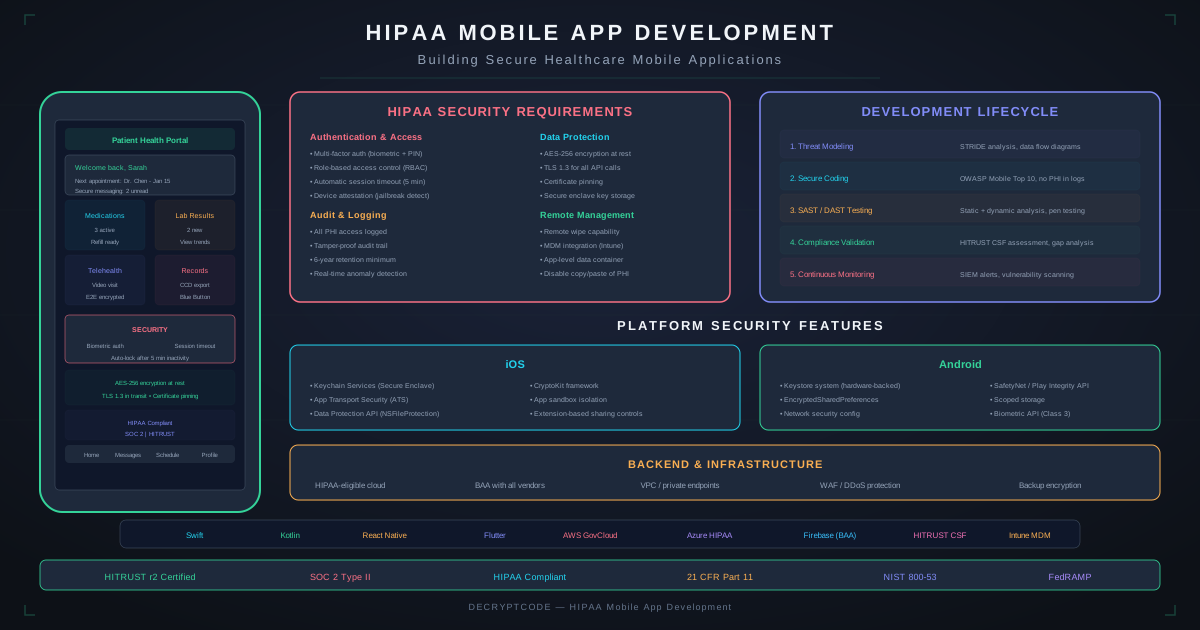
Key Takeaways
- HIPAA applies when your app creates, receives, stores, or transmits Protected Health Information (PHI)
- Encrypt everything: AES-256 at rest, TLS 1.3 in transit, encrypt local databases and caches
- Use Keychain (iOS) and EncryptedSharedPreferences / Keystore (Android) for secrets — never shared preferences
- Every third-party service touching PHI needs a Business Associate Agreement (BAA)
- Build compliance in from architecture onward — retrofitting costs 2-3x more
When HIPAA Applies to Your Mobile App
HIPAA applies to mobile apps when:
- Your app is used by a covered entity (healthcare provider, health plan, clearinghouse) or their business associate
- Your app creates, receives, maintains, or transmits Protected Health Information (PHI)
- PHI includes any individually identifiable health information: names, dates, diagnoses, medications, images, biometrics tied to health conditions
HIPAA does not apply to consumer wellness apps (fitness trackers, meditation apps) unless they share data with covered entities. However, even non-HIPAA apps should follow these practices for user trust.
For broader HIPAA + AI considerations, see our HIPAA-compliant AI deployment guide.
Data Encryption
At Rest
| Data Type | iOS Implementation | Android Implementation |
|---|---|---|
| Local database | SQLCipher or encrypted Core Data store (NSFileProtectionComplete) | SQLCipher or Room with SQLCipher, EncryptedFile |
| Credentials / tokens | Keychain (kSecAttrAccessibleWhenUnlocked) | Android Keystore + EncryptedSharedPreferences |
| Cached files | Data Protection API (Complete Protection class) | EncryptedFile (Jetpack Security) |
| Images / documents | Encrypted container (NSFileProtectionComplete) | EncryptedFile or custom AES-256 encryption |
| Logs | Encrypted log files, no PHI in system logs | Encrypted log files, redact PHI from Logcat |
Critical: iOS Data Protection is enabled by default for apps, but only protects data when the device is locked. Use NSFileProtectionComplete for maximum protection — files are inaccessible when device is locked, even to the OS.
Android: Android full-disk encryption (FDE) or file-based encryption (FBE) protects at the OS level, but you must additionally encrypt sensitive data within your app in case of root access or backup extraction.
In Transit
- TLS 1.3 minimum for all API communication
- Certificate pinning to prevent MITM attacks (recommended, not required by HIPAA)
- Disable fallback to HTTP — enforce HTTPS only via App Transport Security (iOS) and Network Security Config (Android)
- No PHI in URL parameters — use request body (POST/PUT)
Secure Storage Patterns
iOS
// Keychain - secure credential storage
let query: [String: Any] = [
    kSecClass: kSecClassGenericPassword,
    kSecAttrAccount: "authToken",
    kSecValueData: tokenData,
    kSecAttrAccessible: kSecAttrAccessibleWhenUnlockedThisDeviceOnly
]
SecItemAdd(query as CFDictionary, nil)

// Data Protection for files
try data.write(to: fileURL, options: .completeFileProtection)
Never store PHI in: UserDefaults, plist files, unencrypted SQLite, iCloud (without BAA), clipboard, or system logs.
Android
// EncryptedSharedPreferences
val masterKey = MasterKey.Builder(context)
    .setKeyScheme(MasterKey.KeyScheme.AES256_GCM)
    .build()

val prefs = EncryptedSharedPreferences.create(
    context, "secure_prefs", masterKey,
    PrefKeyEncryptionScheme.AES256_SIV,
    PrefValueEncryptionScheme.AES256_GCM
)

// EncryptedFile for document storage
val encryptedFile = EncryptedFile.Builder(
    context, file, masterKey,
    EncryptedFile.FileEncryptionScheme.AES256_GCM_HKDF_4KB
).build()
Never store PHI in: SharedPreferences (unencrypted), external storage, unencrypted Room/SQLite, clipboard, or Logcat output.
Authentication & Access Control
- Multi-factor authentication (MFA): Required for accessing PHI. Combine password + biometric (Face ID / Touch ID / Android BiometricPrompt) or password + OTP.
- Session timeouts: Auto-logout after 5-15 minutes of inactivity. Shorter for more sensitive data.
- Biometric gating: Require biometric re-authentication for sensitive operations (viewing PHI, exporting data).
- Role-based access control (RBAC): Different data access levels for doctors, nurses, admins, patients. Enforce on both client and server.
- Unique user identification: Every user has a unique identifier. No shared accounts. All actions traceable to an individual.
- Password policy: Minimum 12 characters, complexity requirements. Account lockout after 5 failed attempts.
// iOS Biometric Authentication
let context = LAContext()
context.evaluatePolicy(
    .deviceOwnerAuthenticationWithBiometrics,
    localizedReason: "Authenticate to view patient records"
) { success, error in
    if success { /* grant access */ }
}
Audit Logging
HIPAA requires tracking who accessed what PHI, when, and what action they took. Your mobile app must log:
- Access events: User login/logout, PHI viewed, PHI exported, PHI shared
- Modification events: PHI created, updated, deleted
- Security events: Failed login attempts, permission changes, session timeout triggers
- Device events: App install/uninstall, remote wipe triggered, jailbreak/root detected
Audit Log Structure
{
  "timestamp": "2026-06-04T14:30:22Z",
  "userId": "dr-jane-smith-uuid",
  "action": "VIEW_PATIENT_RECORD",
  "resourceType": "PatientRecord",
  "resourceId": "patient-12345",
  "ipAddress": "192.168.1.100",
  "deviceId": "iphone-uuid-abc",
  "appVersion": "3.2.1",
  "result": "SUCCESS"
}
Implementation: Buffer audit logs locally (encrypted), batch-sync to server every 30-60 seconds. If offline, queue locally and sync on reconnect. Server-side logs must be immutable (append-only) and retained for 6+ years.
Network Security
- Certificate pinning: Pin your API's TLS certificate or public key. Prevents MITM attacks even on compromised networks.
- API security: OAuth 2.0 + PKCE for mobile authentication. Short-lived access tokens (15 min), refresh tokens stored in Keychain/Keystore.
- VPN consideration: For enterprise deployments, consider requiring VPN for PHI access on untrusted networks.
- Background data: Clear sensitive data from memory when app backgrounds. Prevent screenshot capture of PHI screens (iOS: overlay blank view in applicationWillResignActive; Android: FLAG_SECURE).
// iOS - Prevent screenshots of PHI screens
func applicationWillResignActive(_ application: UIApplication) {
    let blurView = UIVisualEffectView(effect: UIBlurEffect(style: .regular))
    blurView.tag = 999
    window?.addSubview(blurView)
}

// Android - Prevent screenshots
window.setFlags(
    WindowManager.LayoutParams.FLAG_SECURE,
    WindowManager.LayoutParams.FLAG_SECURE
)
Third-Party Services & BAAs
Every cloud service or SDK that touches PHI requires a Business Associate Agreement (BAA):
| Service Category | BAA Available | Notes |
|---|---|---|
| AWS | Yes (activate per account) | Must configure HIPAA-eligible services only |
| Google Cloud | Yes (request via console) | Must enable HIPAA compliance mode |
| Azure | Yes (via Online Services Terms) | Covers most Azure services |
| Firebase | Yes (limited services) | Firestore, Cloud Functions — yes. Analytics — no |
| Apple iCloud | Yes | CloudKit for healthcare data |
| Twilio | Yes | For HIPAA-compliant messaging/voice |
| Analytics (Mixpanel, etc.) | Varies | Do NOT send PHI to non-BAA analytics. Anonymize first. |
| Crash reporting | Varies | Strip PHI from crash reports. Sentry offers BAA; Crashlytics does not. |
Critical rule: If a service doesn't offer a BAA, do not send PHI to it. This includes analytics, crash reporting, logging, and monitoring services. Either use a BAA-covered alternative or ensure PHI is stripped/anonymized before sending.
AI Features & HIPAA
AI features in healthcare apps introduce specific HIPAA considerations:
- On-device ML is privacy-advantaged: PHI processed locally never leaves the device. Core ML and TFLite inference is HIPAA-friendly by design.
- Cloud LLM APIs require BAAs: If sending PHI to OpenAI, Anthropic, or other LLM providers, you need a BAA. Azure OpenAI and AWS Bedrock offer HIPAA-eligible configurations.
- De-identify before cloud processing: When possible, strip PHI before sending to cloud AI. Process the AI result, then re-associate with PHI client-side.
- AI-generated content about patients: Treat AI outputs (summaries, recommendations) that contain or reference PHI as PHI themselves.
See our detailed HIPAA-compliant AI deployment guide and EHR integration guide for comprehensive coverage.
HIPAA Mobile App Compliance Checklist
- ☐ PHI encrypted at rest (AES-256) on device
- ☐ All network communication over TLS 1.3
- ☐ Credentials stored in Keychain (iOS) / Keystore (Android)
- ☐ Multi-factor authentication implemented
- ☐ Session timeout (5-15 min inactivity)
- ☐ Role-based access control on client and server
- ☐ Comprehensive audit logging (who, what, when)
- ☐ Remote wipe capability
- ☐ Screenshot prevention for PHI screens
- ☐ Jailbreak/root detection
- ☐ BAAs signed with all third-party services
- ☐ No PHI in system logs, analytics, or crash reports
- ☐ Minimum necessary access enforced
- ☐ Breach notification process documented
- ☐ Risk assessment completed and documented
- ☐ Employee training program in place
Need help building a HIPAA-compliant mobile app? See our healthcare AI development services.
Frequently Asked Questions
What makes a mobile app HIPAA compliant?
Encryption at rest and in transit, MFA, RBAC, audit logging, remote wipe, BAAs with all third-party services, session timeouts, and documented policies for breach notification.
Do I need a BAA with Apple or Google?
Only if storing PHI in their cloud services (iCloud, Google Cloud). App store distribution alone doesn't require a BAA.
How much does HIPAA compliance add to development cost?
$30K-$60K in initial development, $15K-$30K annually for compliance maintenance. Retrofitting is 2-3x more expensive than building in from the start.
Build HIPAA-Compliant Mobile Apps
Our team has built compliant healthcare apps serving 500K+ patients. Let's build yours.
Start Your Healthcare Project