
Enterprise Mobile App Architecture: Patterns & Best Practices
Enterprise mobile apps must scale across teams, features, and years of maintenance. This guide covers the architecture patterns that make that possible — from clean architecture to modular design to AI integration layers.
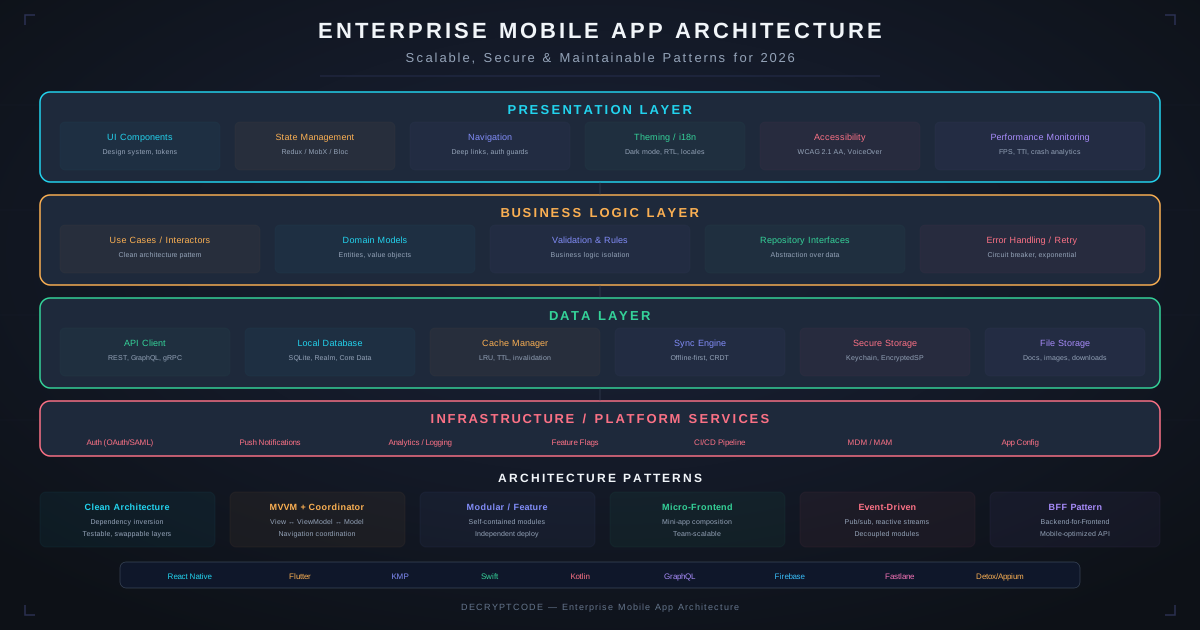
Key Takeaways
- Clean architecture with strict layer separation enables testability and long-term maintainability
- Modular architecture is essential for multi-team development — each team owns their feature module
- Unidirectional data flow (MVI/Redux pattern) scales better than bidirectional binding for complex apps
- The networking layer needs auth management, retry logic, caching, and offline queuing built in
- AI features need their own architectural layer with model management, fallbacks, and observability
Architecture Principles
Enterprise mobile apps differ from consumer apps in critical ways: multiple development teams, 3-5+ year maintenance horizons, compliance requirements, and complex backend integrations. Architecture must account for these realities.
Core Principles
- Separation of concerns: UI knows nothing about data persistence. Business logic knows nothing about the network. Each layer has a single responsibility.
- Dependency inversion: High-level modules don't depend on low-level modules. Both depend on abstractions (protocols/interfaces).
- Testability: Every layer is independently testable. Business logic is tested without UI. UI is tested without the network.
- Modularity: Features are independent modules that can be developed, tested, and deployed by separate teams.
- Convention over configuration: Consistent patterns across modules. A developer joining any module should recognize the structure immediately.
Clean Architecture
  ┌─────────────────────────────────────────┐
  │           Presentation Layer             │
  │  Views │ ViewModels │ UI State │ Nav     │
  ├─────────────────────────────────────────┤
  │             Domain Layer                 │
  │  Use Cases │ Entities │ Repository       │
  │  Interfaces │ Business Rules             │
  ├─────────────────────────────────────────┤
  │              Data Layer                  │
  │  Repository Impl │ API Services          │
  │  Local DB │ Mappers │ DTOs               │
  └─────────────────────────────────────────┘

  Dependencies flow INWARD:
  Presentation → Domain ← Data
Domain Layer (Center)
- Entities: Core business objects. No framework imports, no UI dependencies, no persistence annotations.
- Use cases (Interactors): Single business operation.
GetPatientUseCase,SubmitInspectionUseCase. One class, one responsibility. - Repository interfaces: Abstractions that define data access.
PatientRepository.getById(id)— the domain doesn't know if data comes from API or cache.
Data Layer (Outer)
- Repository implementations: Implement domain interfaces. Coordinate between remote API and local cache.
- Data sources: Remote (API client) and local (database). Each has its own models (DTOs, entities).
- Mappers: Convert between data layer models and domain entities. Isolate API/DB schema changes from business logic.
Presentation Layer (Outer)
- ViewModels: Hold UI state, call use cases, map results to UI state. No direct UI references.
- Views: Display state from ViewModel. Send user actions to ViewModel. No business logic.
- Navigation: Coordinator or Router pattern. ViewModels don't know about screens — they request navigation actions.
Modular Design
For teams of 5+ developers, a monolithic app structure creates merge conflicts, long build times, and unclear ownership. Modularize.
Module Types
| Module Type | Purpose | Dependencies | Examples |
|---|---|---|---|
| App | Entry point, dependency graph, navigation root | All feature modules | Main app target |
| Feature | Self-contained feature | Core, shared UI | Payments, Profile, Chat, Inspections |
| Core | Shared business logic, interfaces | None (leaf dependency) | Auth, Networking, Models, Analytics |
| Shared UI | Design system components | None | Buttons, cards, form fields, theming |
| Test Support | Shared test utilities, mocks | Core | Mock services, test fixtures, builders |
Module Boundaries
- No direct feature-to-feature dependencies: Features communicate through the Core module's interfaces or through a router/coordinator.
- Interface-first design: Feature modules expose protocols/interfaces. Other modules depend on the interface, not the implementation.
- Independent build & test: Each feature module should build and test independently. This enables parallel CI and faster developer feedback.
Tooling
- iOS: Tuist or XcodeGen for project generation. SPM for dependency management. Each module is a Swift Package.
- Android: Gradle multi-module project. Convention plugins for consistent module configuration. Hilt for cross-module DI.
- KMP: Gradle modules with shared Kotlin logic modules and platform-specific UI modules. See our KMP guide.
- React Native: Monorepo with Yarn Workspaces or pnpm. Feature packages with clean dependencies.
State Management
Unidirectional Data Flow (Recommended)
  User Action → Intent → Reducer → New State → View Update
       ↑                                           │
       └───────────────────────────────────────────┘
The MVI (Model-View-Intent) pattern provides predictable state management:
- Single source of truth: One state object per screen. No scattered mutable variables.
- Immutable state: State is a data class/struct. Changes create new instances.
- Pure reducers: State transitions are deterministic functions. Easy to test, easy to debug.
- Side effects: Network calls, database operations are explicit side effects triggered by intents, not embedded in view logic.
Platform-Specific Patterns
| Platform | Recommended Pattern | State Holder | State Flow |
|---|---|---|---|
| iOS (SwiftUI) | TCA / MVI | ObservableObject / @Observable | Combine / AsyncSequence |
| iOS (UIKit) | MVVM + Coordinator | ViewModel | Combine publishers |
| Android (Compose) | MVI | ViewModel | StateFlow / SharedFlow |
| React Native | Redux / Zustand | Store | Selectors / Subscriptions |
| KMP | MVI (shared) | Shared ViewModel | Kotlin Flow |
Networking Layer
The network layer in enterprise apps needs more than basic HTTP calls:
Required Components
- Authentication manager: Token storage, automatic refresh, retry on 401, multi-account support
- Request interceptor chain: Add auth headers, logging, analytics, retry logic in composable interceptors
- Response handling: Standardized error parsing, network error vs. server error distinction, user-friendly error messages
- Caching layer: HTTP cache + application-level cache. Configurable per endpoint (cache-first, network-first, stale-while-revalidate)
- Offline queue: Queue mutations when offline. Replay when connected. See our offline-first guide
- Certificate pinning: Pin API certificates. Essential for financial and healthcare apps. See mobile security guide
Dependency Injection
DI is essential for testability and modularity:
| Platform | DI Framework | Type | Notes |
|---|---|---|---|
| Android | Hilt (Dagger) | Compile-time | Standard for Android. Module-aware. Google-supported. |
| iOS | Factory / Swinject | Runtime | Swift lacks compile-time DI. Factory is lightweight. |
| KMP | Koin | Runtime | Multiplatform-compatible. Simple DSL. |
| React Native | Context / Inversify | Runtime | React Context for simple cases. Inversify for complex. |
DI Best Practices
- Inject interfaces, not implementations
- Use constructor injection, avoid service locator pattern
- Separate DI module per feature module
- Use scoping: application scope for singletons, screen scope for ViewModels
AI Integration Layer
Enterprise apps increasingly include AI features. They need their own architectural layer:
  ┌──────────────────────────────────────┐
  │           AI Service Layer            │
  │  ┌────────────┐  ┌───────────────┐   │
  │  │ On-Device   │  │ Cloud AI      │   │
  │  │ Core ML     │  │ OpenAI/Claude │   │
  │  │ TFLite      │  │ Custom APIs   │   │
  │  └──────┬─────┘  └──────┬────────┘   │
  │         │               │             │
  │  ┌──────▼───────────────▼──────────┐  │
  │  │     AI Orchestrator             │  │
  │  │  Model Selection │ Fallbacks    │  │
  │  │  Caching │ Rate Limiting        │  │
  │  │  Observability │ Cost Tracking  │  │
  │  └────────────────────────────────┘  │
└──────────────────────────────────────┘- Model abstraction: Use cases call AI services through interfaces. Swap between on-device and cloud models without changing business logic.
- Fallback chains: Try on-device model first (fast, free, offline). Fall back to cloud API. Fall back to deterministic logic.
- Cost tracking: Monitor API token usage per feature, per user, per session. Set budgets and alerts.
- Observability: Log AI inputs, outputs, latency, and accuracy metrics. Essential for model performance monitoring.
See our mobile AI agent integration guide for detailed implementation patterns.
Testing Architecture
Test Strategy
| Layer | Test Type | What To Test | Target Coverage |
|---|---|---|---|
| Domain (Use Cases) | Unit tests | Business rules, edge cases, error handling | 90%+ |
| Data (Repositories) | Integration tests | API parsing, DB queries, cache logic | 80%+ |
| Presentation (ViewModels) | Unit tests | State transitions, user action handling | 80%+ |
| UI (Views/Screens) | Snapshot / UI tests | Visual regression, accessibility | Critical flows |
| End-to-End | Integration tests | Critical user journeys (login, payment) | Top 5-10 flows |
Testing Patterns
- Repository pattern pays off: Swap real repositories for mock/fake implementations in tests. Test ViewModels without network calls.
- Fake over mock: Prefer fakes (in-memory implementations) over mocking frameworks. They're more maintainable and catch more bugs.
- Test fixtures module: Shared test data, builders, and fakes in a dedicated module. Don't duplicate test setup across features.
- CI integration: Unit tests on every PR. Integration tests on merge to main. E2E tests nightly. See our maintenance guide for CI/CD patterns.
Frequently Asked Questions
What is clean architecture for mobile apps?
Concentric layers: Domain (pure business logic), Data (repositories, storage), and Presentation (ViewModels, UI). Dependencies point inward. Code is testable, maintainable, and framework-independent.
How do you structure a mobile app for multiple teams?
Modular architecture: independent feature modules (payments, profile, messaging) that teams own. Modules communicate through interfaces in a Core module. Enables parallel development and independent testing.
Should enterprise mobile apps use microservices?
On the backend — yes. On the mobile app — no. Use modular monolith: a single deployable binary with well-separated internal modules. True mobile microservices add enormous complexity for minimal benefit.
Architecture That Scales
We design mobile architectures that support multi-team development, long-term maintenance, and enterprise-grade reliability.
Get Architecture Guidance