
Core ML vs TensorFlow Lite: On-Device ML Framework Guide
Choosing the right on-device ML framework shapes your mobile AI strategy. This guide compares Core ML and TensorFlow Lite across performance, model support, conversion pipelines, hardware acceleration, and real-world use cases.
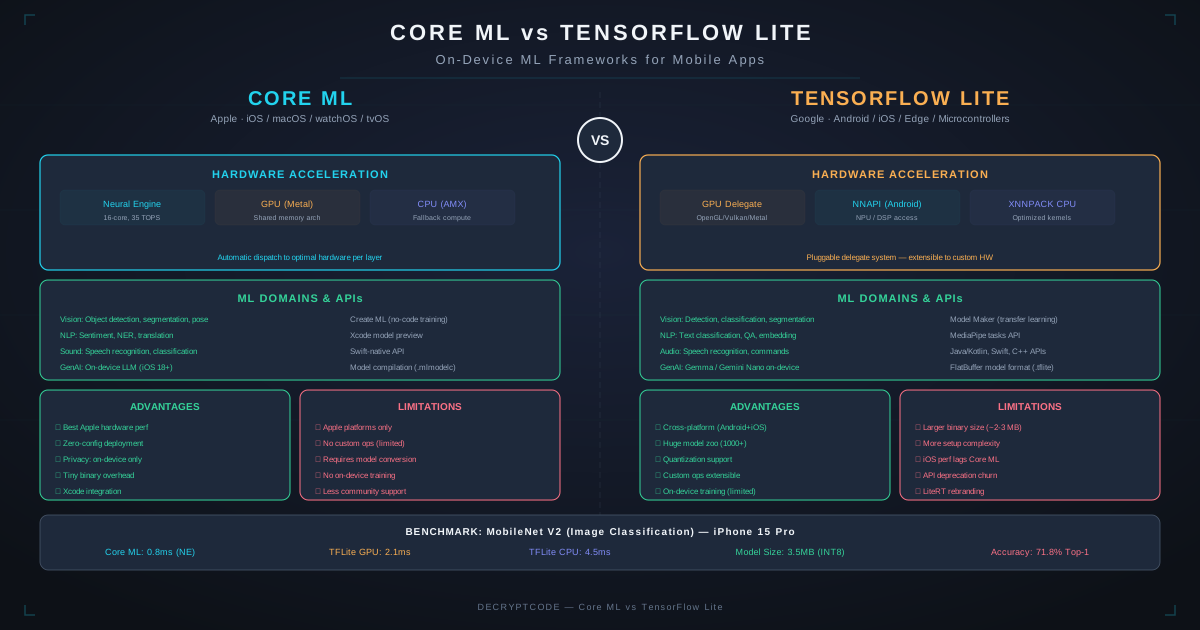
Key Takeaways
- Core ML is fastest on Apple devices (Neural Engine optimization); TFLite is the standard for Android
- Both support major model architectures — CNNs, transformers, LLMs — via conversion from PyTorch/TensorFlow
- Train once in PyTorch, convert to both formats via ONNX for cross-platform deployment
- ONNX Runtime and MediaPipe offer cross-platform alternatives with different trade-offs
- On-device ML is best for real-time (<30ms), privacy-sensitive, and offline scenarios
Framework Overview
Core ML (Apple)
Core ML is Apple's on-device ML framework, integrated deeply into iOS, iPadOS, macOS, watchOS, and tvOS. It leverages Apple's Neural Engine (up to 35 TOPS on M4), Metal GPU, and CPU to run models with minimal latency and power consumption. Core ML supports vision, NLP, sound, and tabular models through companion frameworks (Vision, NaturalLanguage, SoundAnalysis).
In 2026, Core ML powers Apple Intelligence features and runs on-device foundation models (Apple Foundation Models). The framework supports stateful models, multifunction models, and model compression (palettization, pruning, quantization).
TensorFlow Lite (Google)
TensorFlow Lite (TFLite) is Google's on-device ML framework for Android, iOS, embedded Linux, and microcontrollers. It uses delegates to access hardware acceleration: NNAPI (Android neural processors), GPU delegate (OpenGL/Vulkan), Hexagon DSP delegate (Qualcomm), and CoreML delegate (iOS — yes, TFLite can use Core ML as a backend).
Google has been consolidating its mobile ML offerings. LiteRT (the evolution of TFLite) and MediaPipe provide higher-level task APIs. ML Kit offers pre-built models for common tasks (text recognition, face detection, barcode scanning).
Head-to-Head Comparison
| Feature | Core ML | TensorFlow Lite |
|---|---|---|
| Platforms | Apple only (iOS, macOS, watch, tv) | Android, iOS, Linux, MCUs |
| Model format | .mlmodel / .mlpackage | .tflite |
| Model size limit | No hard limit (streams from disk) | No hard limit (memory-mapped) |
| Hardware acceleration | Neural Engine, Metal GPU, CPU (automatic) | NNAPI, GPU, Hexagon DSP, CPU (delegate-based) |
| Quantization | INT8, FP16, palettization (2/4/6/8-bit) | INT8, FP16, dynamic range, full integer |
| On-device training | Updatable models (limited) | Transfer learning toolkit (limited) |
| Async inference | Yes (prediction API) | Yes (interpreter API) |
| Streaming inference | Stateful models support | Stateful delegates |
| Pre-built models | Vision, NaturalLanguage frameworks | ML Kit, MediaPipe tasks |
| Conversion tool | coremltools (from PyTorch, TF, ONNX) | TFLite Converter (from TF, JAX) |
Hardware Acceleration
Apple Neural Engine
Apple's Neural Engine (ANE) is a dedicated ML accelerator in Apple Silicon chips. Performance by generation:
| Chip | TOPS | Devices |
|---|---|---|
| A16 Bionic | 17 | iPhone 14 Pro, iPhone 15 |
| A17 Pro | 35 | iPhone 15 Pro |
| A18 / A18 Pro | 35-38 | iPhone 16 series |
| M4 | 38 | iPad Pro, MacBook Pro |
Core ML automatically routes operations to ANE, GPU, or CPU based on model architecture and available resources. Developers don't need to specify — the runtime optimizes automatically.
Android Neural Processing
Android's NNAPI provides a hardware abstraction layer, but performance varies dramatically by device:
- Google Tensor G4: 45 TOPS (Pixel 9 Pro) — excellent ML performance
- Qualcomm Snapdragon 8 Gen 4: 73 TOPS (Hexagon NPU) — top Android performance
- Samsung Exynos 2500: ~35 TOPS — Samsung Galaxy flagships
- MediaTek Dimensity 9400: ~46 TOPS — upper mid-range devices
The challenge: Android fragmentation means you can't guarantee NPU availability. TFLite's delegate system handles this with fallback chains: NPU → GPU → CPU.
Model Support & Architecture
Both frameworks support modern model architectures through conversion from training frameworks:
- Computer vision: ResNet, EfficientNet, MobileNet, YOLOv8/v9, DETR — both frameworks handle these well
- NLP / Transformers: BERT, DistilBERT, MobileBERT — supported on both via conversion
- On-device LLMs: Core ML runs Apple Foundation Models + converted models (Phi, Llama via MLX/coremltools). TFLite runs Gemma, Phi via MediaPipe LLM inference API.
- Audio: Whisper (speech), sound classification — both support via conversion
- Generative: Stable Diffusion runs on Core ML (Apple's optimized implementation). TFLite supports smaller generative models.
See our edge AI guide for detailed coverage of on-device LLMs and optimization strategies.
Model Conversion Pipeline
Recommended Workflow
# Train in PyTorch (most common in 2026)
model = train_model()

# Export to ONNX (intermediate format)
torch.onnx.export(model, dummy_input, "model.onnx")

# Convert to Core ML
import coremltools as ct
mlmodel = ct.converters.convert(
    "model.onnx",
    compute_precision=ct.precision.FLOAT16,
    minimum_deployment_target=ct.target.iOS17
)
mlmodel.save("Model.mlpackage")

# Convert to TFLite
import tensorflow as tf
converter = tf.lite.TFLiteConverter.from_saved_model(saved_model_dir)
converter.optimizations = [tf.lite.Optimize.DEFAULT]
tflite_model = converter.convert()
Conversion Challenges
| Challenge | Core ML | TFLite |
|---|---|---|
| Custom ops | Flexible ops, custom layers via Swift | Custom ops via C++ delegates |
| Dynamic shapes | Enumerated shapes or range shapes | Dynamic tensors supported |
| Accuracy loss | FP16 default (minimal), INT8 needs calibration | Dynamic range quant (some loss), full INT8 needs calibration |
| Unsupported ops | Falls back to CPU for unsupported ops | Falls back to CPU reference kernel |
Best practice: Always validate converted model accuracy against the original. Run a test suite of 100+ inputs and compare outputs. Acceptable accuracy delta: <1% for classification, <2% for regression/detection.
Other On-Device Frameworks
| Framework | Strengths | Best For |
|---|---|---|
| ONNX Runtime Mobile | Cross-platform, good PyTorch support, NNAPI/CoreML delegates | Cross-platform apps needing one conversion pipeline |
| MediaPipe | Pre-built task APIs (face, hands, pose, objects), easy integration | Common ML tasks without custom models |
| PyTorch Mobile / ExecuTorch | Direct PyTorch model deployment, no conversion needed | PyTorch-native teams wanting minimal conversion |
| ML Kit (Google) | Drop-in APIs, no ML expertise needed | Standard tasks (OCR, barcode, face) without custom models |
For detailed framework comparisons, see our edge AI on-device intelligence guide.
Use Case Recommendations
- iOS-only app with ML features: Core ML. No question. Best performance, deepest integration, automatic Neural Engine optimization.
- Android-only app: TensorFlow Lite with NNAPI/GPU delegates. Or MediaPipe for pre-built task APIs.
- Cross-platform (React Native / Flutter): ONNX Runtime for shared model format. Or platform-specific: Core ML bridge for iOS, TFLite for Android.
- Cross-platform (KMP): Use expect/actual pattern — Core ML implementation for iOS, TFLite for Android. Share pre/post-processing logic in Kotlin.
- AR + ML: Core ML + ARKit (iOS), TFLite + ARCore (Android). Native frameworks for lowest latency. See AR and mobile apps guide.
- Healthcare / HIPAA: On-device ML is privacy-advantaged — no data leaves device. Both frameworks work; Core ML preferred for iOS healthcare apps. See HIPAA mobile app development.
Decision Guide
Use Core ML when:
- Building for Apple platforms exclusively
- Maximum on-device performance is required
- Using Apple-specific features (Vision, NaturalLanguage, SoundAnalysis)
- Running on-device LLMs or generative models on Apple Silicon
Use TensorFlow Lite when:
- Building for Android (primary or exclusive)
- Need the same model on multiple platforms (Android, iOS, embedded, web)
- Already using TensorFlow/Keras for training
- Want ML Kit's pre-built solutions for common tasks
Use both when:
- Building a cross-platform app needing ML on both iOS and Android
- Train once → convert to both formats → platform-specific deployment
- This is the most common enterprise approach
Need help implementing on-device ML? Explore our iOS and Android development services.
Frequently Asked Questions
Which is faster: Core ML or TensorFlow Lite?
Core ML on Apple devices — 2-5x faster due to Neural Engine optimization. TFLite on high-end Android with dedicated NPUs (Qualcomm, Tensor) approaches Core ML performance.
Can I use the same model on both iOS and Android?
Not directly — different formats. But train once in PyTorch, export to ONNX, then convert to Core ML (.mlpackage) and TFLite (.tflite). Same source model, platform-specific deployment.
Should I use on-device ML or cloud APIs?
On-device for real-time (<30ms), privacy-sensitive, and offline scenarios. Cloud for complex models (large LLMs), tasks needing frequent updates, and when on-device capability is insufficient.
Build AI-Powered Mobile Apps
Our team integrates on-device ML into production iOS and Android applications.
Start Your ML Project