
Claude Enterprise Integration Guide
Anthropic's Claude excels at enterprise tasks: long document analysis, structured data extraction, code generation, and safety-critical applications. This guide covers integration architecture, prompt engineering patterns, tool use, and production best practices.
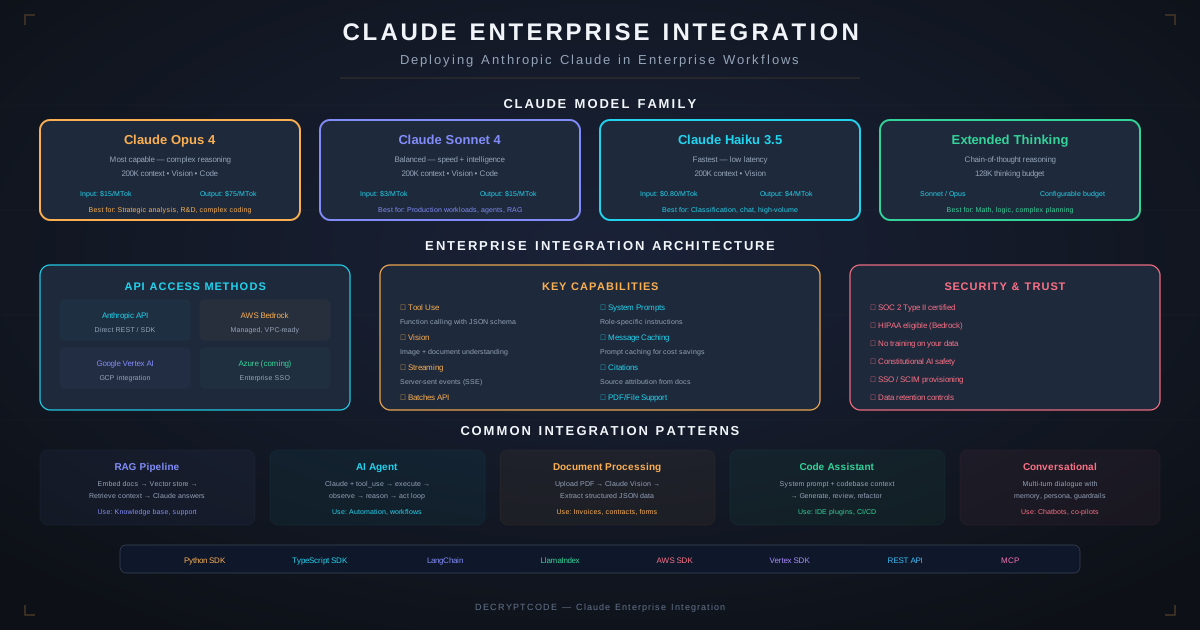
Key Takeaways
- Claude Sonnet for production workloads, Opus for complex reasoning, Haiku for high-volume classification
- 200K token context window enables processing entire documents, codebases, and conversation histories
- Tool use (function calling) is essential for building agents that interact with enterprise systems
- Prompt caching reduces costs 90% for repeated system prompts and large context documents
- Available via Anthropic API directly or through Amazon Bedrock and Google Vertex AI
Model Selection
Choose the right Claude model for your use case. See our full Claude vs OpenAI comparison for detailed benchmarks.
| Model | Best For | Context | Speed | Cost (per 1M tokens) |
|---|---|---|---|---|
| Claude Opus | Complex reasoning, analysis, research | 200K | Slower | $15 input / $75 output |
| Claude Sonnet | Production workloads, coding, extraction | 200K | Medium | $3 input / $15 output |
| Claude Haiku | Classification, routing, simple Q&A | 200K | Fast | $0.25 input / $1.25 output |
Multi-model pattern: Use Haiku to classify and route requests. Sonnet handles 80% of production tasks. Opus handles the complex 20%. This optimizes cost while maintaining quality for complex cases.
API Integration
Access Methods
- Anthropic API Direct: anthropic.com API. Best for development and standard production. Python and TypeScript SDKs.
- Amazon Bedrock: AWS-managed access. Best for AWS-native environments. Uses IAM for auth, integrated billing, VPC endpoints.
- Google Vertex AI: GCP-managed access. Best for GCP environments. Uses Google Cloud auth.
SDK Integration
The Anthropic Python SDK provides the cleanest integration. Key patterns:
- Use
client.messages.create()for synchronous calls - Use
client.messages.stream()for streaming responses - Use
client.beta.messages.batches.create()for batch processing (50% discount) - Always specify
max_tokensto control response length and cost - Use
systemparameter for system prompts (not in messages array)
Prompt Engineering for Claude
Claude-specific prompt engineering patterns that improve output quality:
XML Tags for Structure
Claude excels with XML-tagged prompts. Use tags to clearly delineate:
<context>— background information and documents<instructions>— what you want Claude to do<examples>— few-shot examples of desired output<output_format>— exact format specification (JSON schema, markdown structure)
Chain of Thought
For complex reasoning, ask Claude to think step-by-step. Use <thinking> tags in the system prompt to separate reasoning from final output. This improves accuracy on multi-step problems by 15-30%.
System Prompt Best Practices
- Define Claude's role, expertise, and constraints upfront
- Include output format specifications in the system prompt
- Add guardrails: what Claude should NOT do (refuse, escalate, etc.)
- Use prompt caching for system prompts — they rarely change between requests
Tool Use & Function Calling
Claude's tool use enables it to interact with external systems — databases, APIs, calculators, search engines. Essential for building AI agents.
How It Works
- Define tools with name, description, and JSON Schema input parameters
- Send user message + tool definitions to Claude
- Claude decides whether to call a tool, which tool, and generates structured arguments
- Your code executes the tool call and returns results
- Claude uses the results to formulate its response
Enterprise Tool Examples
- CRM lookup: Search Salesforce for account/contact information
- Database query: Execute read-only SQL against data warehouse
- Document search: Query RAG vector database for relevant documents
- Calendar: Check availability, schedule meetings
- Ticket creation: Create Jira/ServiceNow tickets from conversations
- API calls: Interact with internal microservices
Multi-Tool Orchestration
Claude can chain multiple tool calls in a single turn — search for information, look up details, and take action. Combine with LangGraph for complex multi-step workflows with state management.
Streaming & Batch
Streaming
Use SSE streaming for user-facing applications. Benefits:
- First token appears in 200-500ms instead of waiting for full response
- Progressive rendering improves perceived performance
- Can abort early if user navigates away (save tokens/cost)
Message Batches
For non-real-time workloads, use the Batch API:
- 50% cost discount vs. synchronous API
- Submit up to 10,000 requests per batch
- Results available within 24 hours (typically much faster)
- Perfect for document processing, data enrichment, report generation
RAG Integration
Claude's 200K context window is ideal for enterprise RAG:
Context Window Strategy
- Small context (0-20K tokens): Direct injection. Put all retrieved documents in the prompt. Simplest approach.
- Medium context (20-100K tokens): Prompt caching. Cache frequently-used reference documents. Retrieve dynamic content per query.
- Large context (100-200K tokens): Full document analysis. Upload entire documents for summarization, Q&A, or extraction.
Prompt Caching for RAG
Claude's prompt caching is transformative for RAG:
- Cache your knowledge base context (static reference documents) — pay full price once, 90% discount on subsequent requests
- Cache the system prompt with RAG instructions
- Only the user query and newly-retrieved dynamic chunks are non-cached
- Result: dramatic cost reduction for high-volume RAG applications
Production Architecture
- API Gateway: Rate limiting, authentication, request/response logging, cost tracking per client/use case
- Prompt Registry: Version-controlled prompt templates. A/B test prompt variations. Track which prompts produce best results.
- Response Cache: Semantic cache for repeated queries. Hash prompt + key params for cache key. Configurable TTL.
- Fallback: Claude → OpenAI GPT-4o → smaller model → rule-based fallback. See production deployment patterns.
- Monitoring: Track latency (p50/p95/p99), token usage, error rates, output quality scores, cost per request
- Security: Prompt injection defenses, output filtering, PII detection, audit logging
Cost Optimization
- Model routing: Haiku for simple tasks (80% cheaper than Sonnet), Sonnet for standard, Opus only when needed
- Prompt caching: 90% discount on cached tokens — massive savings for RAG and repeated system prompts
- Batch API: 50% discount for non-real-time processing
- Token optimization: Minimize prompt tokens — concise system prompts, efficient few-shot examples, structured output to reduce verbose responses
- Response caching: Cache identical or semantically-similar queries to avoid duplicate API calls
- Max tokens limit: Set appropriate
max_tokens— don't let Claude generate 4K tokens when you need 200
Ready to integrate Claude? Explore our generative AI development services.
Frequently Asked Questions
Which Claude model should I use?
Sonnet for most production workloads. Opus for complex reasoning. Haiku for high-volume classification. Many enterprises use all three with intelligent routing.
Does Claude support tool use?
Yes. Define tool schemas, Claude decides when to call them and generates structured arguments. Essential for building AI agents that interact with databases, APIs, and enterprise systems.
How do I handle rate limits?
Request queuing with exponential backoff. Batch non-urgent requests. Cache responses. Use Amazon Bedrock for separate limits. Monitor usage dashboards.
Integrate Claude into Your Enterprise
Production-grade Claude integration — from prompt engineering to multi-model architecture.
Start a Project