
App Store Privacy Compliance: Labels, ATT & SDK Audits
Apple and Google have dramatically tightened privacy requirements. Missing or inaccurate privacy declarations can get your app rejected. Here's what you need to know and do.
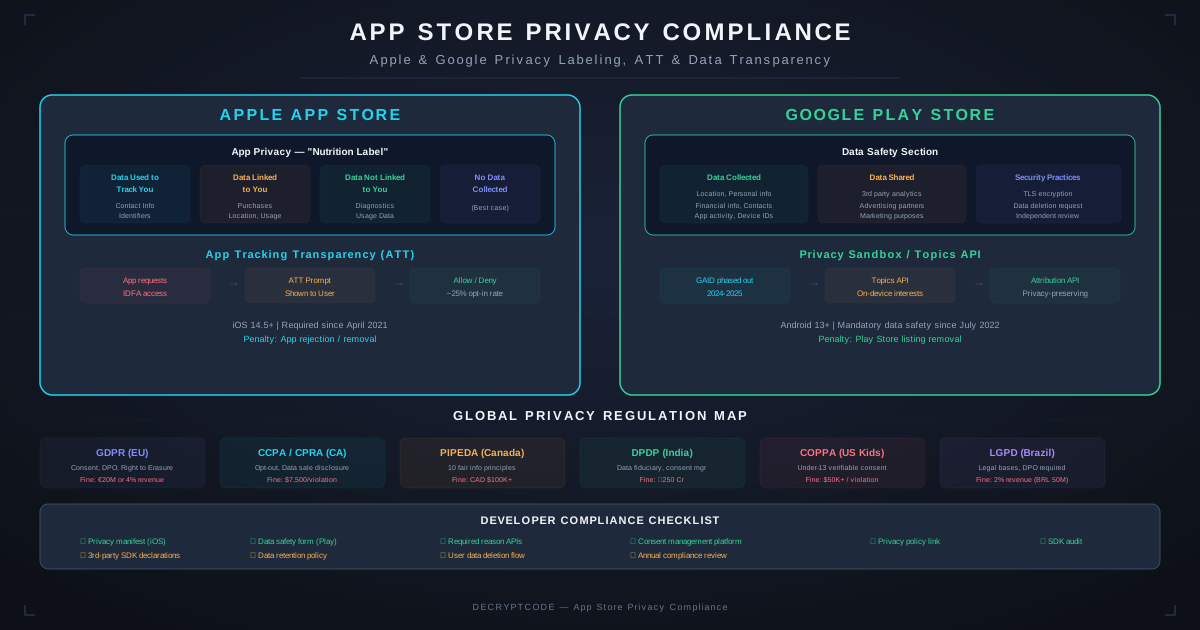
Key Takeaways
- Apple privacy labels must account for ALL data collected — your code and every SDK
- Privacy manifests are now required for all third-party SDKs on iOS
- ~75% of users opt out of tracking via ATT — your analytics strategy must adapt
- Google Data Safety sections require similar data collection disclosures
- AI features that process user data need explicit privacy disclosures and consent
Privacy Landscape 2026
Both Apple and Google have progressively tightened privacy requirements:
| Requirement | Apple (iOS) | Google (Android) |
|---|---|---|
| Data collection disclosure | Privacy labels (mandatory) | Data Safety section (mandatory) |
| Tracking permission | ATT prompt (mandatory) | Topics API (opt-out based) |
| SDK transparency | Privacy manifests required | SDK runtime (planned) |
| Required reason APIs | Must declare why certain APIs are used | Permission rationale required |
| Data deletion | Must offer account/data deletion | Must offer account/data deletion |
| Children's privacy | Strict COPPA compliance | Teacher Approved program |
Non-compliance risks: app rejection, removal from store, legal action, privacy complaints. For broader compliance coverage, see our GDPR AI compliance guide.
Apple Privacy Labels
Apple's privacy "nutrition labels" show users what data your app collects and how it's used. You must declare data from your own code and all integrated SDKs.
Data Categories
| Category | Examples | Common Sources |
|---|---|---|
| Contact Info | Name, email, phone, address | Registration, profile, contacts access |
| Health & Fitness | Health data, fitness data | HealthKit, CoreMotion |
| Financial Info | Payment info, credit score | Payment SDKs, fintech APIs |
| Location | Precise, coarse location | CoreLocation, IP-based, SDKs |
| Identifiers | User ID, device ID, IDFA | Authentication, analytics SDKs |
| Usage Data | Product interaction, advertising data | Analytics, ad SDKs, crash reporters |
| Diagnostics | Crash data, performance data | Crashlytics, Sentry, APM tools |
Usage Purposes
For each data type, declare the purpose:
- Tracking: Linking user data with third-party data for advertising
- Analytics: Understanding app usage patterns
- Product personalization: Customizing the experience
- App functionality: Required for features to work
- Third-party advertising: Displaying ads
- Developer advertising: Marketing your own products
App Tracking Transparency (ATT)
ATT requires an explicit opt-in before tracking users across apps and websites. The IDFA is zeroed out unless the user grants permission.
When ATT Is Required
- Accessing IDFA for advertising attribution
- Sharing user data with data brokers
- Using advertising SDKs that perform cross-app tracking
- Matching user data with third-party data for measurement
When ATT Is NOT Required
- First-party analytics (understanding your own app usage)
- Fraud detection and security
- Essential app functionality
- Server-side attribution without device identifiers
ATT Best Practices
- Pre-prompt education: Show a custom screen explaining the value of tracking BEFORE the system prompt. Apps that explain "why" see 30-40% opt-in vs. 15-20% without.
- Timing: Don't show on first launch. Wait until the user has experienced value (after onboarding, after first significant action).
- Graceful degradation: Design analytics and attribution to work without IDFA. Use SKAdNetwork for ad attribution, server-side analytics for measurement.
Google Data Safety Section
Google Play's Data Safety section requires similar disclosures to Apple's privacy labels but with different categories and format.
Key Differences from Apple
- Data sharing vs. collection: Google distinguishes between data "collected" (sent off device) and "shared" (transferred to third parties)
- Security practices: Declare whether data is encrypted in transit, if users can request deletion, and whether the app follows Google's families policy
- Independent review: Apps can opt for independent security review (MASA — Mobile App Security Assessment)
- No system prompt: Android uses Topics API and Privacy Sandbox instead of ATT-style prompts
SDK Privacy Audits
Third-party SDKs are the biggest privacy compliance risk. A single SDK can collect data you didn't know about, making your privacy labels inaccurate.
Audit Process
- Inventory all SDKs: List every dependency including transitive dependencies. Use CocoaPods/SPM dependency graph for iOS, Gradle dependency tree for Android.
- Review privacy manifests: Apple requires privacy manifests for SDKs. Check each SDK's PrivacyInfo.xcprivacy file.
- Network traffic analysis: Run the app through Charles Proxy or mitmproxy. Document every domain contacted, data sent, and frequency.
- Permission audit: Check which SDKs request device permissions and which APIs they call. Use Exodus Privacy for Android analysis.
- Documentation review: Read each SDK's privacy policy, data processing agreement, and documentation for data collection details.
- Test without permissions: Deny all optional permissions. Verify the app still functions and SDKs degrade gracefully.
Common Problem SDKs
| SDK Category | Common Data Collected | Privacy Risk Level |
|---|---|---|
| Ad networks | Device ID, location, browsing behavior, app usage | High |
| Analytics | User behavior, device info, session data | Medium |
| Social login | Profile data, contacts, social graph | Medium |
| Push notifications | Device tokens, user preferences, engagement data | Low-Medium |
| Crash reporting | Device info, app state, stack traces | Low |
| Maps/location | Precise location, movement patterns | High |
Privacy Manifests (iOS)
Apple now requires privacy manifests (PrivacyInfo.xcprivacy) for all third-party SDKs and for your app if it uses "required reason APIs."
Required Reason APIs
- File timestamp APIs: Must declare why you access file modification dates
- System boot time: Must declare why you read system uptime
- Disk space: Must declare why you check available storage
- User defaults: Must declare reason for accessing UserDefaults in certain contexts
- Active keyboard: Must declare why you check which keyboards are active
Privacy Manifest Structure
The manifest declares: tracking domains (blocked when user denies ATT), required reason API usage, collected data types and purposes, and linked data categories.
AI Feature Privacy
Apps with AI features need additional privacy disclosures:
- Data sent to AI APIs: If user data is sent to OpenAI, Claude, or other cloud AI services, declare it in privacy labels under appropriate categories.
- On-device processing: If AI runs locally (Core ML, TensorFlow Lite), no data collection disclosure needed for inference — but training data collection must be declared.
- Model training: If user data is used to improve models, this must be disclosed and consented to. Apple specifically prohibits using data for model training without explicit consent.
- AI-generated content: Some jurisdictions require disclosing when content is AI-generated. Consider labeling AI responses in your app.
For healthcare AI privacy, see our HIPAA mobile development guide. For enterprise AI compliance, see our SOC 2 for AI systems guide.
Compliance Checklist
Apple App Store
- Privacy labels completed and accurate for all data types
- ATT prompt implemented (if tracking)
- Privacy manifests included for app and all SDKs
- Required reason APIs declared with valid reasons
- Account deletion mechanism available
- Privacy policy URL set in App Store Connect
Google Play Store
- Data Safety section completed accurately
- Data collection disclosures match actual behavior
- Data deletion mechanism available
- Privacy policy URL set in Play Console
- Families policy compliance (if applicable)
Both Platforms
- SDK audit completed with documented data flows
- Network traffic analysis performed
- Consent management implemented for data collection
- App works correctly when permissions are denied
- Regular quarterly review scheduled for privacy compliance
Frequently Asked Questions
What are Apple privacy nutrition labels?
Mandatory App Store disclosures showing what data your app collects, how it's used, and whether it's linked to identity. Must include data from your code and all third-party SDKs.
What is App Tracking Transparency (ATT)?
iOS requirement to request explicit permission before tracking users across apps/websites. Includes IDFA access and data sharing with brokers. ~75% of users opt out.
How do I audit third-party SDKs for privacy?
Review privacy manifests, analyze network traffic with Charles Proxy, document all data collected, check permissions, review SDK privacy policies, and test with permissions denied.
Privacy-Compliant Mobile Apps
We build apps with privacy by design — compliant from day one with Apple, Google, GDPR, and HIPAA requirements.
Get Privacy Compliance Help