
AI Workflow Automation: Complete Enterprise Guide
AI workflow automation goes beyond RPA — it handles unstructured data, makes judgment-based decisions, and adapts to variations. This guide covers how to identify automation candidates, architect solutions, integrate with existing systems, and measure results.
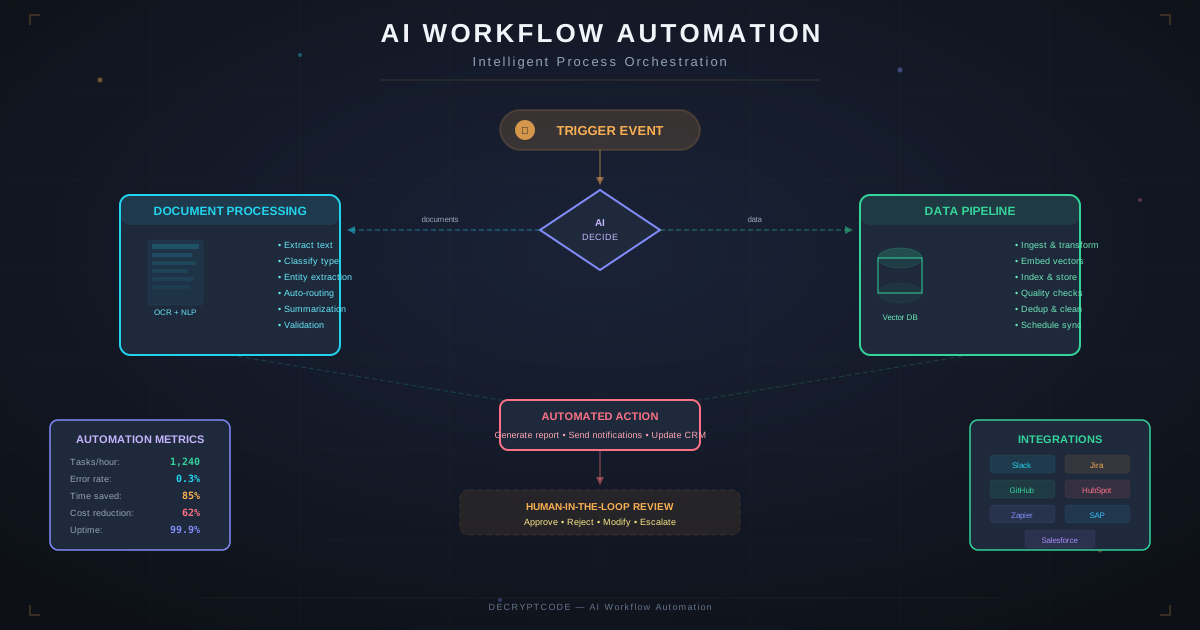
Key Takeaways
- AI automation handles the cognitive work RPA can't — unstructured data, judgment calls, natural language
- Best candidates: high-volume, bottlenecked workflows with clear inputs/outputs and measurable baselines
- Start with a single workflow POC (2-4 weeks), prove ROI, then expand to platform
- Human-in-the-loop design is critical — AI handles 70-90% autonomously, humans handle exceptions
- Change management determines adoption — technical success means nothing if users don't adopt
What Is AI Workflow Automation
AI workflow automation uses machine learning, natural language processing, and AI agents to automate business processes that previously required human judgment. Unlike traditional automation (scripts, RPA) that follows rigid rules, AI automation:
- Processes unstructured data: Reads emails, documents, images, and conversations — not just structured database fields
- Makes decisions under uncertainty: Classifies, prioritizes, and routes work based on patterns, not hard-coded rules
- Adapts to variations: Handles exceptions and edge cases that would break rule-based systems
- Improves over time: Feedback loops refine accuracy and expand the scope of automated tasks
Example: Traditional automation can move a file from folder A to folder B. AI automation can read the file, understand its content, classify it into 50 categories, extract key information, make a routing decision, and take appropriate action — all without human intervention for routine cases.
AI Automation vs. RPA
| Capability | RPA | AI Automation | AI + RPA |
|---|---|---|---|
| Structured data | Excellent | Good | Excellent |
| Unstructured data | Poor | Excellent | Excellent |
| Decision making | Rule-based only | Pattern-based | Both |
| Adaptability | Brittle (breaks on change) | Resilient | Resilient |
| Setup complexity | Low-Medium | Medium-High | High |
| Maintenance | High (UI changes break bots) | Low-Medium | Medium |
| Best for | Repetitive clicks/keystrokes | Cognitive tasks | End-to-end processes |
The most powerful approach combines both: AI makes the decisions, RPA executes the mechanical steps. AI reads and classifies a document → RPA enters the extracted data into legacy systems with no API.
Identifying Automation Candidates
Score workflows against five criteria (1-5 scale):
- Volume: How many times is this workflow executed per day/week/month? High volume = higher ROI.
- Cognitive Simplicity: How much judgment is involved? Workflows with clear decision criteria automate better.
- Data Availability: Is the input data accessible and consistent? Clean data = faster implementation.
- Error Impact: What's the cost of errors? High-impact errors need human-in-the-loop guards.
- Current Bottleneck: Is this workflow currently limiting business throughput? Bottlenecks provide the most immediate ROI.
Top Automation Candidates by Industry
- Healthcare: Claims processing, prior authorization, patient intake forms, clinical documentation
- Financial Services: KYC/AML screening, loan processing, compliance reporting, trade reconciliation
- Insurance: Claims FNOL, underwriting triage, policy comparison, fraud detection
- Legal: Contract review, due diligence, regulatory research, billing review
Architecture Patterns
Pattern 1: Pipeline Automation
Sequential processing: Input → AI Classification → AI Extraction → Validation → Action. Best for document processing, form handling, and data entry workflows. Simple, predictable, easy to debug.
Pattern 2: Event-Driven Automation
Triggers fire based on events (new email, file upload, database change). AI agents process each event independently. Best for monitoring, alerting, and reactive workflows. Scales naturally with event volume.
Pattern 3: Orchestrated Multi-Step
Multi-agent systems coordinate complex workflows with conditional routing, parallel processing, and human approval gates. Best for end-to-end business processes with multiple decision points.
Pattern 4: Human-in-the-Loop
AI handles the bulk (70-90%), routes exceptions to humans with full context. Humans handle edge cases and provide feedback that improves the AI over time. Best for workflows where accuracy requirements exceed AI-only capability.
System Integration
AI automation must connect with existing enterprise systems:
- APIs (REST/GraphQL): Preferred connection. Direct, reliable, version-controlled. Most modern systems expose APIs.
- Database Direct: Read from source databases, write to target databases. Use read replicas to avoid impacting production systems.
- Webhooks: Real-time event notifications from source systems. Enable immediate processing without polling.
- File-Based: Watch folders, SFTP drops, email attachments. Common in legacy environments. Reliable fallback when APIs aren't available.
- RPA Bridge: When legacy systems have no API and no database access, use RPA bots to bridge the gap. AI makes the decision, RPA executes the UI interaction.
Integration Best Practices
- Always prefer APIs over screen scraping or file-based integration
- Implement circuit breakers for external system calls
- Log every integration call with request/response for debugging
- Handle partial failures gracefully — don't let one failed integration block the entire workflow
See also: AI Integration in Production for deployment-specific guidance.
Implementation Roadmap
- Week 1-2: Discovery & Assessment — Map current workflows, measure baselines, score automation candidates, select first workflow
- Week 3-4: POC Development — Build minimal automation for selected workflow. Prove AI accuracy against baseline. Demonstrate to stakeholders.
- Week 5-8: Production Build — Harden POC with error handling, monitoring, security, and integration. Build evaluation suite.
- Week 9-10: Pilot Deployment — Deploy to small user group (5-10%). Collect feedback. Iterate on accuracy and UX.
- Week 11-12: Full Rollout — Expand to all users. Training and change management. Monitor adoption metrics.
- Ongoing: Optimization — Monthly accuracy reviews, expand automation scope, add new workflows.
Change Management
Technical success without user adoption is failure. Key change management practices:
- Early stakeholder involvement: Include end users in design decisions from week 1
- Demonstrate value, not technology: Show time saved, not AI architecture diagrams
- Address fears directly: AI augments humans, it doesn't replace them. Freed-up time goes to higher-value work.
- Training program: Hands-on workshops, not documentation dumps. Show exactly how daily workflow changes.
- Feedback loop: Easy mechanism for users to report issues and suggest improvements. Act on feedback visibly.
- Champion network: Identify 2-3 enthusiastic users per team as peer advocates
Measuring Success
Track these metrics from day 1:
- Automation Rate: % of tasks handled without human intervention. Target: 70-90%.
- Accuracy: % of automated decisions that are correct. Target: >95% for production.
- Time to Complete: Average workflow completion time (before vs. after). Target: 60-85% reduction.
- User Adoption: % of eligible users actively using the automated workflow. Target: >80% by month 3.
- Exception Rate: % of tasks requiring human escalation. Track trend — should decrease over time.
Use the AI ROI calculator framework to translate these metrics into financial impact.
Explore our AI workflow automation services or contact our team.
Frequently Asked Questions
Which workflows should I automate first?
Start with high-volume, rule-based workflows bottlenecked by human capacity. Good first targets: document classification, data extraction, email triage, report generation, and compliance checks.
How is AI automation different from RPA?
RPA automates repetitive, rule-based tasks. AI automation handles unstructured data, judgment-based decisions, and adapts to variations. AI complements RPA — RPA handles mechanical steps, AI handles cognitive steps.
How long does implementation take?
POC: 2-4 weeks. Production single workflow: 6-10 weeks. Enterprise multi-workflow: 12-20 weeks. Start with a focused POC to validate the approach.
Automate Your Business Workflows
From document processing to multi-agent orchestration — we build AI automation that delivers measurable ROI.
Start a Project