
AI Agents & Autonomous Systems: The Complete Enterprise Guide
AI agents are software systems that use LLMs to reason, plan, and execute multi-step tasks using external tools. This guide covers what makes them different from chatbots, the architecture patterns that work in production, and how enterprises are deploying them today.
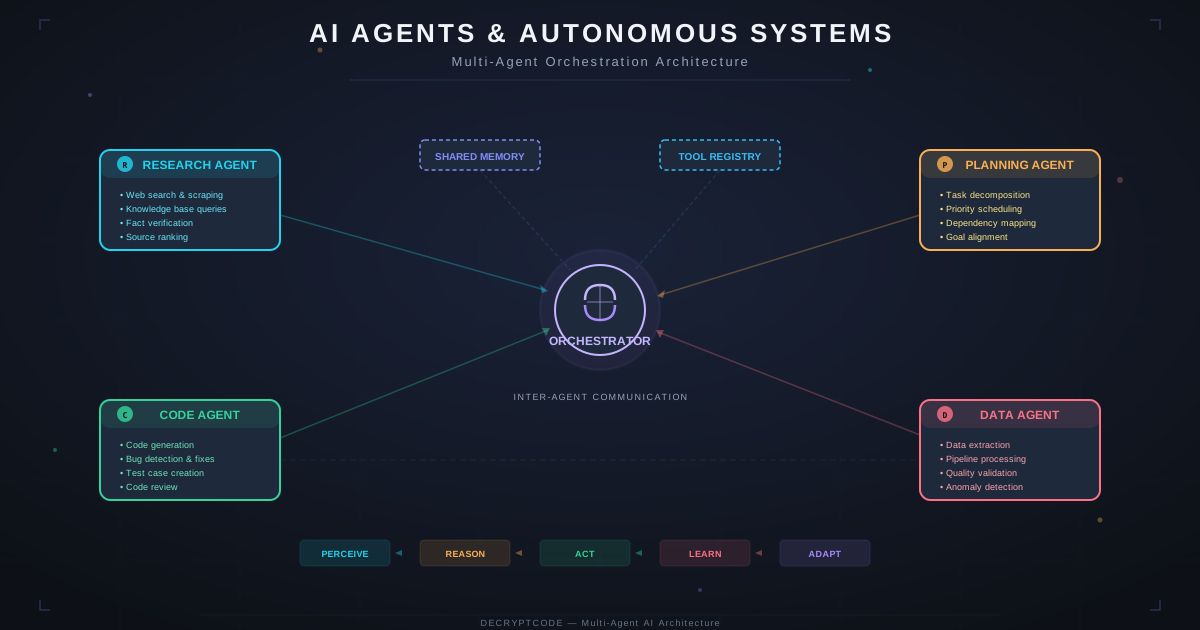
Key Takeaways
- AI agents use LLMs to reason + external tools to act — they don't just generate text
- The ReAct pattern (Reason → Act → Observe) is the foundation of most production agents
- Multi-agent systems outperform single agents for complex workflows by 30-50% on task completion
- Human-in-the-loop approval gates are essential for enterprise — not optional
- Agent reliability comes from engineering discipline (guardrails, testing, monitoring), not just model capability
What Is an AI Agent?
An AI agent is a software system that uses a large language model (LLM) as its reasoning engine to plan tasks, make decisions, and take actions using external tools. Unlike traditional chatbots that simply generate text responses, AI agents can read databases, call APIs, send emails, update CRM records, process documents, and orchestrate complex multi-step workflows.
The core components of an AI agent are:
- Reasoning Engine (LLM): The brain — interprets instructions, breaks down complex tasks into steps, and decides which tools to use. GPT-4, Claude, or open-source models like Llama 3.
- Tools: Functions the agent can call — database queries, API calls, web searches, file operations, calculations. Each tool has a description and schema that the LLM uses to decide when and how to invoke it.
- Memory: Short-term (conversation context) and long-term (vector store, database) memory that gives the agent context about past interactions and domain knowledge.
- Orchestration: The loop that connects reasoning and action — the agent thinks, acts, observes the result, and decides the next step. This is the ReAct (Reason + Act) pattern.
In practice, an enterprise AI agent might receive an instruction like "Prepare this week's sales pipeline report" and autonomously: (1) query the CRM for deal updates, (2) pull revenue data from the data warehouse, (3) calculate pipeline velocity metrics, (4) generate a formatted report, and (5) email it to the VP of Sales — all without human intervention for routine tasks.
Agents vs. Chatbots vs. Copilots
These terms are often used interchangeably, but they describe fundamentally different systems:
| Capability | Chatbot | Copilot | Agent |
|---|---|---|---|
| Generates text | Yes | Yes | Yes |
| Uses external tools | No | Limited | Yes (many tools) |
| Makes decisions | No | Suggests | Decides + acts |
| Multi-step workflows | No | No | Yes |
| Autonomous operation | No | No | Yes (with guardrails) |
| Memory across sessions | Sometimes | Sometimes | Yes |
Chatbots are stateless text generators — great for FAQ and simple Q&A. Copilots assist humans by suggesting actions (like GitHub Copilot suggesting code) — the human makes the final decision. Agents take actions autonomously within defined boundaries — they're the ones doing the work, not just suggesting it.
Agent Architecture Patterns
Pattern 1: ReAct (Reason + Act)
The foundational pattern. The agent loops through: Thought → Action → Observation → Thought → Action → ... until the task is complete. Most production agents are variations of ReAct.
Strengths: Simple, debuggable, works well for most tasks. Weaknesses: Can get stuck in loops, limited planning horizon.
Pattern 2: Plan-and-Execute
The agent first creates a complete plan (ordered list of steps), then executes each step sequentially. Better for complex tasks that benefit from upfront planning.
Strengths: More reliable for multi-step tasks, easier to add human approval. Weaknesses: Rigid — can't adapt plan mid-execution without re-planning.
Pattern 3: Supervisor + Workers
A supervisor agent coordinates multiple worker agents, each specialized for a specific task. The supervisor decides which worker to invoke based on the current state. This is the pattern behind our multi-agent CRM system.
Strengths: Scalable, specialized agents are more reliable than one jack-of-all-trades agent. Weaknesses: More complex to build and debug, supervisor is a single point of failure.
Pattern 4: Hierarchical Agents
Multiple levels of supervisor-worker relationships. A top-level agent delegates to mid-level coordinators, which delegate to specialized workers. Best for enterprise-scale systems with dozens of capabilities.
Tool Use & Function Calling
Tools are what make agents different from chatbots. A tool is a function that the agent can call, defined by:
- Name: What the tool is called (e.g.,
search_customers) - Description: What the tool does in natural language — the LLM uses this to decide when to use it
- Parameters Schema: JSON Schema defining the tool's input parameters
- Implementation: The actual function that executes when called
Modern LLMs (GPT-4, Claude 3.5) support native function calling — the model outputs structured JSON indicating which tool to call with what parameters. This is more reliable than parsing tool calls from free-text output.
Tool Design Best Practices
- Keep tools focused — one tool per capability, not mega-tools with 20 parameters
- Return structured data (JSON), not natural language descriptions
- Include error messages that help the agent self-correct ("Customer not found — try searching by email instead")
- Add rate limiting and timeout handling at the tool level
- Log every tool invocation with inputs, outputs, and latency for observability
Multi-Agent Systems
Multi-agent systems use multiple specialized agents coordinated by an orchestrator. Each agent has its own system prompt, tools, and domain expertise.
When to Use Multi-Agent
- Tasks span multiple domains (sales + marketing + analytics)
- Different tasks require different LLM configurations (temperature, model, tools)
- You need clear accountability — which agent made which decision
- The workflow has parallel branches that can execute simultaneously
Coordination Patterns
Sequential: Agent A → Agent B → Agent C. Simple pipeline. Best when output of one agent is input to the next.
Parallel: Agents A, B, C run simultaneously. Results merged by coordinator. Best for independent research or data gathering tasks.
Conditional: Supervisor routes to Agent A or Agent B based on input analysis. Best for triage and classification workflows.
Iterative: Agent generates output → Reviewer agent evaluates → feedback loop until quality threshold met. Best for content generation and code review.
Memory & State Management
Agent memory determines what context is available for decision-making:
- Working Memory (Context Window): Current conversation + recent tool results. Limited by LLM context window (128K-200K tokens). Managed by selective inclusion — don't dump everything into context.
- Short-Term Memory (Session): Current task state, conversation history, intermediate results. Stored in application state (Redis, PostgreSQL). Persists across tool calls within a session.
- Long-Term Memory (Knowledge): Domain knowledge, past interactions, user preferences. Stored in vector databases or knowledge graphs. Retrieved via RAG pipelines when relevant.
- Episodic Memory: Past task executions and outcomes. Enables the agent to learn from experience — "last time I tried approach X, it failed because Y."
Guardrails & Safety
Enterprise AI agents need multiple layers of safety:
- Input Validation: Sanitize user inputs for prompt injection, SQL injection, and malicious payloads before they reach the LLM.
- Output Filtering: Check agent responses and actions against policy rules before execution. Block PII exposure, harmful content, and out-of-scope actions.
- Permission Boundaries: Each agent has explicit permissions — which tools it can access, which data it can read/write, which systems it can modify. Principle of least privilege.
- Human Approval Gates: High-stakes actions (sending emails, modifying records, financial transactions) require human approval before execution. Configurable by action type and value threshold.
- Rate Limiting: Prevent runaway agents from making excessive API calls or taking too many actions in a short period. Budget controls for LLM API spending.
- Audit Logging: Every decision, tool call, and action is logged with full context for compliance and debugging. Non-negotiable for regulated industries.
Enterprise Use Cases
Where AI agents are delivering measurable ROI today:
- CRM Automation: Lead scoring, personalized outreach, pipeline management. Our CRM multi-agent system generated $1.2M incremental revenue.
- Compliance Review: Document analysis, risk identification, regulatory mapping. Our RAG compliance review achieved 86% faster review cycles.
- Customer Support: Ticket triage, response drafting, escalation routing. Handles 60-80% of routine inquiries without human intervention.
- Data Engineering: Data pipeline monitoring, anomaly detection, automated remediation. Reduces on-call burden by 40-60%.
- Document Processing: Contract analysis, invoice processing, form extraction. Contract analysis system saved $480K annually.
Production Deployment Checklist
- Evaluation Suite: 200+ test cases covering happy paths, edge cases, and adversarial inputs
- Shadow Mode: Run agent in parallel with human workflow for 2-4 weeks before going live
- Gradual Rollout: Start with 5-10% of traffic, monitor metrics, then expand
- Monitoring Dashboard: Token usage, latency, error rate, task completion rate, human escalation rate
- Fallback Mechanism: When agent fails or confidence is low, route to human with full context
- Model Version Pinning: Pin to specific model versions to prevent unexpected behavior changes
- Cost Alerting: Set daily/weekly spend limits with automatic circuit breakers
Ready to build enterprise AI agents? Learn about our AI agent development services or contact our team.
Frequently Asked Questions
What is an AI agent?
An AI agent is a software system that uses an LLM to reason about tasks, make decisions, and take actions using external tools. Unlike chatbots, agents can query databases, call APIs, send emails, and execute multi-step workflows autonomously.
How are AI agents different from chatbots?
Chatbots generate text. Agents take actions — they query databases, update CRMs, send emails, process documents, and orchestrate workflows. Agents have tool access, memory, and planning capability.
Are AI agents reliable enough for enterprise?
Yes, with proper guardrails — human-in-the-loop approval, comprehensive logging, fallback mechanisms, and evaluation suites. Reliability comes from engineering discipline, not model capability alone.
Single-agent vs. multi-agent?
Single-agent: one LLM with multiple tools, good for focused tasks. Multi-agent: multiple specialized agents with a supervisor, better for complex workflows needing different capabilities.
Ready to Build AI Agents?
We've deployed multi-agent systems for CRM automation, compliance review, and healthcare. Let's discuss your use case.
Start a Project